Loading
Form preview
  • US Legal Forms
  • Other Templates
  • Social Forms
  • Texas Social Forms
  • Tx Blue Cross Blue Shield H0500 2016

Get Tx Blue Cross Blue Shield H0500 2016-2026

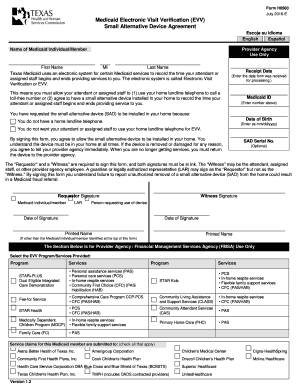
First Name MI Last Name Texas Medicaid uses an electronic system for certain Medicaid services to record the time your attendant or assigned staff begins and ends providing services to you. The electronic system is called Electronic Visit Verification or EVV. Receipt Date (Enter the date form was received for processing.) This means you must allow your attendant or assigned staff to (1) use your home landline telephone to call a toll-free number or (2) agree to have a small alternative device.

How it works

  1. Open form

    Open form follow the instructions

  2. Easily sign form

    Easily sign the form with your finger

  3. Share form

    Send filled & signed form or save

How to fill out the TX Blue Cross Blue Shield H0500 online

The TX Blue Cross Blue Shield H0500 form is essential for individuals utilizing Medicaid services and seeking a small alternative device for electronic visit verification. This guide will provide you with a clear and comprehensive walkthrough to help you fill out the form online with ease.

Follow the steps to accurately complete the TX Blue Cross Blue Shield H0500 form online.

  1. Click ‘Get Form’ button to obtain the form and open it in the editor.
  2. Begin by filling in the name of the Medicaid individual/member at the top of the form. Ensure that the first name, middle initial, and last name are accurately entered.
  3. Next, input the Medicaid ID number as prompted in the designated field. This is essential for identifying the individual in the Medicaid system.
  4. Enter the date of birth of the Medicaid individual/member in the format mm/dd/yyyy. Make sure this date is accurately captured to avoid discrepancies.
  5. Indicate the reason for requesting the small alternative device by selecting one of the provided options. Options include not having a home landline phone or not wanting the attendant to use the home landline for electronic visit verification.
  6. Both the requestor and a witness are required to sign the form. Ensure that the signatures are provided in ink. The witness can be the attendant, assigned staff, or an employee from the provider agency.
  7. Complete the section designated for the provider agency or financial management services agency. This includes selecting the applicable EVV programs and services provided.
  8. Fill out the order history section, indicating the reason for ordering the device and the address where it will be installed.
  9. Finally, review the entire form to ensure all information is accurate and complete. Save your changes, download the completed form, print it for your records, or share it as required.

Start filling out your TX Blue Cross Blue Shield H0500 form online today!

Get form

Experience a faster way to fill out and sign forms on the web. Access the most extensive library of templates available.
Get form

Related content

Designed for Data Acquisition
Designed for Industry-Standard Connectivity. Using LabViEW 4.0, you can acquire data from...
Learn more

Related links form

DIRECTED STUDY REGISTRATION FORM - Usfca Influenza Verification Form - University Of San Francisco - Usfca Employer Life Insurance And University Of San Francisco Form Recreational Sports Department Intramural Team Registration Form - Usfca

Questions & Answers

Get answers to your most pressing questions about US Legal Forms API.

Contact support

To obtain a pump through Blue Cross Blue Shield of Texas, you must first ensure it's covered under your TX Blue Cross Blue Shield H0500 plan. Typically, a prescription from your healthcare provider is necessary. After obtaining the prescription, you can contact your supplier or Blue Cross Blue Shield customer service for the next steps in securing your pump.

To obtain your BCBS Texas member ID, first check your insurance card if you have it. If you don’t, you can log into your account online, where your member ID will be listed. If you still have difficulty locating it, reach out to Blue Cross Blue Shield customer support for assistance with your TX Blue Cross Blue Shield H0500 plan.

Your member number is the unique identification number assigned to you by Blue Cross Blue Shield, located on your insurance card. For those enrolled in the TX Blue Cross Blue Shield H0500 plan, this number is crucial for coordinating treatments and accessing healthcare services. Remember, always keep your card handy for reference when using medical services.

If you haven't received your Blue Cross Blue Shield insurance card, don’t worry. You can check the status of your card by logging into your account or contacting the customer service line for your TX Blue Cross Blue Shield H0500 policy. They can provide assistance and arrange for a new card to be sent to you promptly.

The payout for the Blue Cross Blue Shield lawsuit varies depending on individual circumstances and claims made under the TX Blue Cross Blue Shield H0500 plan. If you feel you qualify for a settlement, you may want to consult with an attorney or legal expert to explore your options. Legal resources like U.S. Legal Forms can guide you through the process.

If you do not have your Blue Cross Blue Shield card, you still have options. You can log into your online account or use the mobile app to access your member ID. Alternatively, you can contact customer service for the TX Blue Cross Blue Shield H0500 plan to retrieve your member information.

You can find your member ID on your Blue Cross Blue Shield insurance card, typically located on the front. If you have the TX Blue Cross Blue Shield H0500 plan, your member ID will be clearly labeled. This number is unique to you and essential for accessing services and managing your benefits.

Yes, BCBSTX, or Blue Cross Blue Shield of Texas, is a part of the broader Blue Cross Blue Shield Association. It operates specifically in Texas, providing various health insurance plans, including the TX Blue Cross Blue Shield H0500. When referring to BCBSTX, you are essentially talking about the Texas branch of the Blue Cross Blue Shield network.

Yes, Blue Cross Blue Shield offers out of network reimbursement, but specific terms depend on your individual plan. If you have a TX Blue Cross Blue Shield H0500 plan, familiarize yourself with your policy's details to understand the reimbursement percentages. For any clarification, consider reaching out to their customer service for tailored support.

To file an out of network claim with BCBSTX, simply complete the claim form that is available on their website. Be sure to include detailed explanations of the services received, along with any necessary receipts. Submitting this promptly will help ensure you receive any applicable benefits under your TX Blue Cross Blue Shield H0500 plan.

Get This Form Now!

Use professional pre-built templates to fill in and sign documents online faster. Get access to thousands of forms.
Get form
If you believe that this page should be taken down, please follow our DMCA take down processhere.
Get TX Blue Cross Blue Shield H0500
Get form
  • Adoption
  • Bankruptcy
  • Contractors
  • Divorce
  • Home Sales
  • Employment
  • Identity Theft
  • Incorporation
  • Landlord Tenant
  • Living Trust
  • Name Change
  • Personal Planning
  • Small Business
  • Wills & Estates
  • Packages A-Z
  • Affidavits
  • Bankruptcy
  • Bill of Sale
  • Corporate - LLC
  • Divorce
  • Employment
  • Identity Theft
  • Internet Technology
  • Landlord Tenant
  • Living Wills
  • Name Change
  • Power of Attorney
  • Real Estate
  • Small Estates
  • Wills
  • All Forms
  • Forms A-Z
  • Other Templates
  • Legal Hub
  • About Us
  • Help Portal
  • Legal Resources
  • Blog
  • Affiliates
  • Contact Us
  • Delete My Account
  • Site Map
  • Industries
  • Forms in Spanish
  • Localized Forms
  • State-specific Forms
  • Forms Kit
  • Real Estate Handbook
  • All Guides
  • Notarize
  • Incorporation services
  • For Consumers
  • For Small Business
  • For Attorneys
  • USLegal
  • FormsPass
  • pdfFiller
  • signNow
  • altaFlow
  • DocHub
  • Instapage
Form Packages
  • Adoption
  • Bankruptcy
  • Contractors
  • Divorce
  • Home Sales
  • Employment
  • Identity Theft
  • Incorporation
  • Landlord Tenant
  • Living Trust
  • Name Change
  • Personal Planning
  • Small Business
  • Wills & Estates
  • Packages A-Z
Form Categories
  • Affidavits
  • Bankruptcy
  • Bill of Sale
  • Corporate - LLC
  • Divorce
  • Employment
  • Identity Theft
  • Internet Technology
  • Landlord Tenant
  • Living Wills
  • Name Change
  • Power of Attorney
  • Real Estate
  • Small Estates
  • Wills
  • All Forms
  • Forms A-Z
  • Other Templates
Customer Service
  • Legal Hub
  • About Us
  • Help Portal
  • Legal Resources
  • Blog
  • Affiliates
  • Contact Us
  • Delete My Account
  • Site Map
  • Industries
  • Forms in Spanish
  • Localized Forms
  • State-specific Forms
  • Forms Kit
Legal Guides
  • Real Estate Handbook
  • All Guides
Prepared for you
  • Notarize
  • Incorporation services
Our Customers
  • For Consumers
  • For Small Business
  • For Attorneys
Our Sites
  • USLegal
  • FormsPass
  • pdfFiller
  • signNow
  • altaFlow
  • DocHub
  • Instapage
Social Media
Call us now toll free:
+1 833 426 79 33
As seen in:
© Copyright 1999-2026 airSlate Legal Forms, Inc. 17 Station Street, Ste. 203, Brookline, MA 02445
  • Your Privacy Choices
  • Terms of Service
  • Privacy Notice
  • Content Takedown Policy
  • Bug Bounty Program