Get Ca Guardian Cef-2005 2013-2026
How it works
-

Open form follow the instructions
-

Easily sign the form with your finger
-

Send filled & signed form or save
How to fill out the CA Guardian CEF-2005 online
Filling out the CA Guardian CEF-2005 form online can be a straightforward process when you follow the appropriate steps. This guide will walk you through each section of the form, ensuring you provide the necessary information correctly and efficiently.
Follow the steps to complete the CA Guardian CEF-2005 form with ease.
- Click ‘Get Form’ button to access the CA Guardian CEF-2005 document and open it in the online editor.
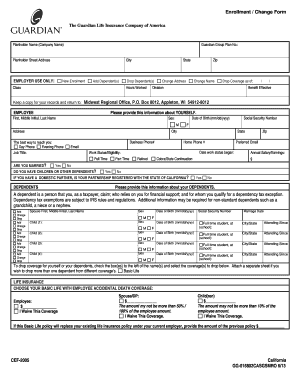
- Begin by entering the planholder name, which is the company name, followed by the Guardian group plan number. Input the street address, city, state, and zip code of the planholder.
- Indicate the type of enrollment using the options provided: new enrollment, add dependent(s), drop dependent(s), change address, change name, or drop coverage. Be sure to fill in any applicable information regarding hours worked and class.
- Provide your personal information, including your first name, middle initial, last name, date of birth, and sex. Additionally, fill in your complete address and social security number. Select the best way to reach you by stating your day, evening, and business phone numbers.
- Indicate your work status/eligibility by confirming if you are full time, part time, retired, or on COBRA/state continuation. Provide your job title and annual salary or earnings.
- Answer the questions regarding marital status and the presence of any children or other dependents. If you have a domestic partner, indicate whether your partnership is registered with the state of California.
- For each dependent, provide the necessary information, including the first name, middle initial, last name, date of birth, and sex. Also, indicate if they are a full-time student, along with the school’s city and state, and the date you began attending.
- Select and specify coverage amounts for basic life insurance, including amounts for yourself, your spouse or domestic partner, and your children. You also have the option to waive coverage if applicable.
- Name your beneficiaries, ensuring the percentages add up to 100%. Include the names of primary beneficiaries and contingent beneficiaries, along with their relationship to you.
- Read and sign the declaration regarding your eligibility and understanding the coverage details. Confirm the information you provided is true and correct, then sign and date the form.
- Once completed, you can save changes, download, print, or share the CA Guardian CEF-2005 form. Make sure to retain a copy for your records before submission.
Complete your CA Guardian CEF-2005 form online today for a seamless enrollment experience.
In California, grounds for guardianship include a parent’s inability to care for themselves or make informed decisions due to incapacity or illness. You will need to demonstrate that a guardian is necessary for their safety and well-being. Filing a petition with the court, such as through the CA Guardian CEF-2005, helps outline these grounds clearly, making it easier for the court to determine the best course of action.