Loading
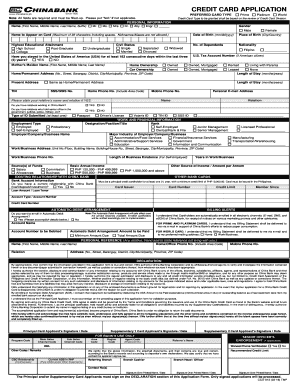
Get Ph Chinabank Ccd-032 (formerly Ccd-013) 2016
How it works
-

Open form follow the instructions
-

Easily sign the form with your finger
-

Send filled & signed form or save
How to fill out the PH ChinaBank CCD-032 (Formerly CCD-013) online
Completing the PH ChinaBank CCD-032 (Formerly CCD-013) application form online is essential for those looking to apply for a China Bank credit card. This guide provides a clear, step-by-step process to help you navigate through each section efficiently.
Follow the steps to complete your credit card application online.
- Click the ‘Get Form’ button to access the application form and open it for editing.
- Begin by filling out the 'Preferred Card Type' section. Note that all fields are required. Choose your desired credit card type, and if not applicable, simply put 'N/A.'
- Proceed to the 'Personal Information' section. Fill in your name, gender, and date of birth in the specified format (mm/dd/yyyy). Include your nationality and the name that is to appear on your card, ensuring it does not exceed 22 characters.
- Complete the 'Home Ownership' and 'Car Ownership' sections by selecting your current status: Owned, Mortgaged, Rented, or Leased. If not applicable, select 'None'.
- In the 'Work and Financial Information' section, add your employment details. Specify your designation, the name of your employer or business, and your annual income. Be sure to indicate the source of funds as well.
- Fill out the 'Existing Relationship with China Bank' section. If you have a current relationship with the bank, indicate it here and provide the necessary card details.
- For the 'Automatic Debit Arrangement', specify whether you wish to enroll by answering 'Yes' or 'No' and providing additional necessary information if applicable.
- Complete the 'Personal Reference' section by providing details about a relative or a friend who does not live with you.
- In the 'Declaration' section, review all the information you have provided. Once satisfied, ensure you sign and date the application. Remember, signatures are required for processing.
- After filling out the form completely and accurately, you can save the changes. You will then have the option to download, print, or share the completed form as per your requirements.
Start your application today by filling out the PH ChinaBank CCD-032 (Formerly CCD-013) online.
Get form
Experience a faster way to fill out and sign forms on the web. Access the most extensive library of templates available.
To connect with Chinabank customer service via Viber, simply add their official Viber number provided on their website. Once added, you can send messages and inquire about services related to the PH ChinaBank CCD-032 (Formerly CCD-013). This platform offers an easy way to communicate directly with customer service representatives at your convenience.
Get This Form Now!
Use professional pre-built templates to fill in and sign documents online faster. Get access to thousands of forms.