Loading
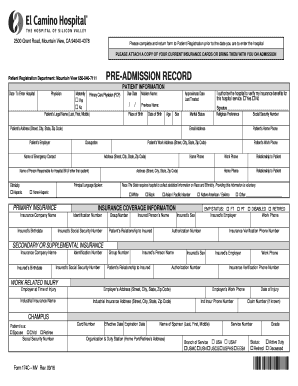
Get El Camino Hospital Form 174c 2016-2026
How it works
-

Open form follow the instructions
-

Easily sign the form with your finger
-

Send filled & signed form or save
How to fill out the El Camino Hospital Form 174C online
This guide provides a clear and supportive approach to completing the El Camino Hospital Form 174C online. By following these instructions, users will be able to effectively fill out the necessary information and ensure a smooth admission process.
Follow the steps to complete the El Camino Hospital Form 174C online.
- Press the ‘Get Form’ button to obtain the form and open it in your editor.
- Begin by entering the patient information. Fill out the date you are scheduled to enter the hospital, the name of your physician, and if applicable, your maternity primary care physician. Indicate if this is your first time to see the physician by selecting ‘Yes’ or ‘No’.
- Input the patient's legal name, maiden name if applicable, and any previous names. Provide the place of birth, date of birth, age, and sex of the patient.
- Complete the address section with the patient's street address, city, state, and zip code. Include the patient’s employer and occupation.
- If the person responsible for the hospital bill is not the patient, enter their name and provide their contact information, including work and home phone numbers.
- Specify the principal language spoken by the patient and provide details regarding their race and ethnicity as this information is collected voluntarily.
- In the primary insurance section, fill out the insured's social security number, relationship to the patient, and their contact numbers. Input the insurance company name, identification number, group number, and insured person’s details.
- If applicable, provide details for any secondary or supplemental insurance, similarly to how you filled out the primary insurance section.
- If the admission is related to a work-related injury, fill in the employer's information at the time of injury, including address, industrial insurance details, and claim number if known.
- Complete the CHAMPUS section if applicable, including the patient's relationship to the sponsor, their social security number, card numbers, and military details.
- Finally, review all completed fields for accuracy, sign where indicated, and provide an email address for future communication.
- Once all information is filled in, you can save changes, download, print, or share the form as needed.
Complete and submit your El Camino Hospital Form 174C online for a smooth admission process.
To complete a medical necessity form, provide details about your condition along with any required documentation from your healthcare provider. Clearly explain the necessity of treatment, using specific medical terminology if possible. Utilizing El Camino Hospital Form 174C can simplify this process and help document your medical needs accurately.