Loading
Form preview
  • US Legal Forms
  • Other Templates
  • Labor Forms
  • Kansas Labor Forms
  • Ks K-ben 987 2018

Get Ks K-ben 987 2018-2026

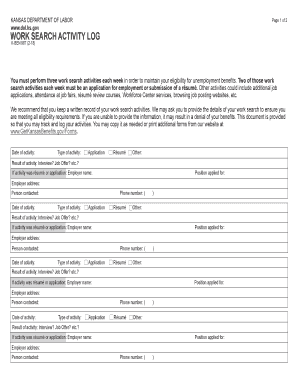
Job Offer? etc.? If activity was résumé or application: Employer name: Position applied for: Employer address: Person contacted: Phone number: ( ) .

How it works

  1. Open form

    Open form follow the instructions

  2. Easily sign form

    Easily sign the form with your finger

  3. Share form

    Send filled & signed form or save

How to fill out the KS K-BEN 987 online

The KS K-BEN 987 form is essential for tracking your work search activities while you receive unemployment benefits in Kansas. This guide will provide you with clear, step-by-step instructions to complete the form efficiently and accurately online.

Follow the steps to fill out the KS K-BEN 987 online

  1. Click ‘Get Form’ button to access the KS K-BEN 987 form and open it in your preferred editor.
  2. Begin by entering the date of your first work search activity in the designated field. Make sure to document this accurately as it is vital for tracking your progress.
  3. Select the type of activity you are reporting. Choose from 'Application,' 'Résumé,' or 'Other.' This will categorize your work search effort appropriately.
  4. In the 'Result of activity' section, indicate whether the outcome was an interview, a job offer, or another result. This provides context for your job search efforts.
  5. If your activity involved applying for a job or submitting a résumé, fill in the employer's name, job position applied for, and the employer's address to provide detailed information about your applications.
  6. Enter the name of the person you contacted regarding the position, if applicable. This information can help clarify your communication efforts during your job search.
  7. Repeat steps 2 through 6 for each additional work search activity being logged, ensuring all required information is provided for up to three activities per week.
  8. Once you have completed all sections, review your entries for accuracy and completeness before proceeding to save your changes. You can then download, print, or share the form as needed.

Start filling out your KS K-BEN 987 form online today to ensure you meet your unemployment benefit requirements.

Get form

Experience a faster way to fill out and sign forms on the web. Access the most extensive library of templates available.
Get form

Related content

Overpayments | State of Kansas Department of...
An overpayment occurs when an individual is paid Unemployment Insurance (UI) benefits that...
Learn more
HIGH SCHOOL
Jul 1, 2019 — Kamehameha Schools Kapńlama High School is located at 210 Konia Circle...
Learn more
Digital Technical Journal
Our cover depicts the dual fiber-optic ring that is the physical medium for high-speed...
Learn more

Related links form

Dv Form Fill Pdf Blank Lcbm Editable Document Proof Of Residency Form 22 Portable Certified Engine Monthly Record Keeping Form

Questions & Answers

Get answers to your most pressing questions about US Legal Forms API.

Contact support

Reporting new hires to the state is mandatory in Kansas and should be done within 20 days of their employment. This holds true for both full-time and part-time employees. Failure to comply can result in penalties, so it is best to be proactive in your reporting. The KS K-BEN 987 platform can assist you with this compliance process, making it simple and straightforward.

Yes, employers must report new hires to the IRS as part of their tax reporting obligations. This helps the IRS track income for tax purposes. Make sure to consolidate your reporting strategies to include both state and federal requirements. Utilizing the KS K-BEN 987 can help ensure that you meet all necessary reporting obligations accurately.

Filing a complaint against an employer in Kansas can be done by contacting the Kansas Department of Labor directly. You can report issues like non-payment of wages or discrimination either online or by phone. Keep records of your employment details to support your claim. The KS K-BEN 987 can provide further information necessary to navigate this complaint process.

Reporting a new hire in Kansas is crucial, and you must do so within 20 days of their start date. Use the Kansas Department of Labor's online portal for efficient reporting, or opt to send the information via fax or postal service. Accurate and timely reporting ensures compliance with state regulations. The KS K-BEN 987 may offer additional resources to help streamline this process.

In Kansas, employers must report new hires to the Kansas Department of Labor within 20 days of their employment start date. This can be done using an online reporting system, fax, or mail. Accurate reporting helps in tracking employee eligibility for benefits, so ensure you provide correct information. For further guidance, the KS K-BEN 987 can assist in navigating this requirement.

To file an initial unemployment claim in Kansas, you must visit the Kansas Department of Labor's website and complete the online application. You will need to provide your Social Security number, employment history, and other personal details. Once submitted, keep track of your application status through the KS K-BEN 987 platform, which can help guide you through the process effectively.

As of my latest knowledge, Kansas offers a maximum weekly unemployment benefit that can vary based on your past earnings. Typically, the amount ranges up to a specific limit determined by the state. The Kansas Department of Labor reviews these limits periodically, so it is essential to stay informed. For accurate details related to your case, utilize the KS K-BEN 987 service.

In Kansas, several factors can disqualify you from receiving unemployment benefits. If you voluntarily quit your job without good cause, are fired for misconduct, or fail to meet the work search requirements, you may not qualify. Additionally, being self-employed or not enough wages earned in the base period can also disqualify you. For assistance in navigating these conditions, the KS K-BEN 987 can be a useful resource.

Disqualifications from unemployment benefits in Kansas include instances of fraudulent claims, inability to work due to health issues not reported, or not complying with the required job search efforts. If you are self-employed or earning income while unemployed, that can also affect your eligibility. Keeping informed about these factors is vital, and resources like KS K-BEN 987 can provide the necessary clarity.

The new hire report in Kansas is a report employers must file that includes the personal information of newly hired employees. This report helps the state improve the efficiency of its child support enforcement and unemployment insurance systems. Employers typically submit this information within a few weeks of hiring. For businesses navigating these regulations, KS K-BEN 987 offers helpful resources.

Get This Form Now!

Use professional pre-built templates to fill in and sign documents online faster. Get access to thousands of forms.
Get form
If you believe that this page should be taken down, please follow our DMCA take down processhere.
Get KS K-BEN 987
Get form
  • Adoption
  • Bankruptcy
  • Contractors
  • Divorce
  • Home Sales
  • Employment
  • Identity Theft
  • Incorporation
  • Landlord Tenant
  • Living Trust
  • Name Change
  • Personal Planning
  • Small Business
  • Wills & Estates
  • Packages A-Z
  • Affidavits
  • Bankruptcy
  • Bill of Sale
  • Corporate - LLC
  • Divorce
  • Employment
  • Identity Theft
  • Internet Technology
  • Landlord Tenant
  • Living Wills
  • Name Change
  • Power of Attorney
  • Real Estate
  • Small Estates
  • Wills
  • All Forms
  • Forms A-Z
  • Other Templates
  • Legal Hub
  • About Us
  • Help Portal
  • Legal Resources
  • Blog
  • Affiliates
  • Contact Us
  • Delete My Account
  • Site Map
  • Industries
  • Forms in Spanish
  • Localized Forms
  • State-specific Forms
  • Forms Kit
  • Real Estate Handbook
  • All Guides
  • Notarize
  • Incorporation services
  • For Consumers
  • For Small Business
  • For Attorneys
  • USLegal
  • FormsPass
  • pdfFiller
  • signNow
  • altaFlow
  • DocHub
  • Instapage
Form Packages
  • Adoption
  • Bankruptcy
  • Contractors
  • Divorce
  • Home Sales
  • Employment
  • Identity Theft
  • Incorporation
  • Landlord Tenant
  • Living Trust
  • Name Change
  • Personal Planning
  • Small Business
  • Wills & Estates
  • Packages A-Z
Form Categories
  • Affidavits
  • Bankruptcy
  • Bill of Sale
  • Corporate - LLC
  • Divorce
  • Employment
  • Identity Theft
  • Internet Technology
  • Landlord Tenant
  • Living Wills
  • Name Change
  • Power of Attorney
  • Real Estate
  • Small Estates
  • Wills
  • All Forms
  • Forms A-Z
  • Other Templates
Customer Service
  • Legal Hub
  • About Us
  • Help Portal
  • Legal Resources
  • Blog
  • Affiliates
  • Contact Us
  • Delete My Account
  • Site Map
  • Industries
  • Forms in Spanish
  • Localized Forms
  • State-specific Forms
  • Forms Kit
Legal Guides
  • Real Estate Handbook
  • All Guides
Prepared for you
  • Notarize
  • Incorporation services
Our Customers
  • For Consumers
  • For Small Business
  • For Attorneys
Our Sites
  • USLegal
  • FormsPass
  • pdfFiller
  • signNow
  • altaFlow
  • DocHub
  • Instapage
Social Media
Call us now toll free:
+1 833 426 79 33
As seen in:
© Copyright 1999-2026 airSlate Legal Forms, Inc. 17 Station Street, Suite 303, Brookline, MA 02445
  • Your Privacy Choices
  • Terms of Service
  • Privacy Notice
  • Content Takedown Policy
  • Bug Bounty Program