Get Proof Of Residency
How it works
-

Open form follow the instructions
-

Easily sign the form with your finger
-

Send filled & signed form or save
How to fill out the Proof of Residency online
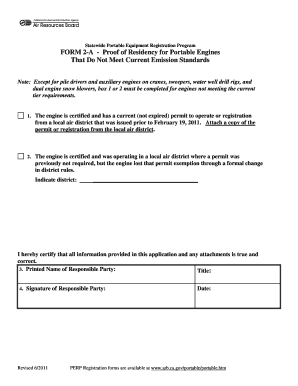
Filling out the Proof of Residency form is an essential step in ensuring compliance with the Statewide Portable Equipment Registration Program. This guide will provide you with clear instructions on how to complete the form accurately and submit it online.
Follow the steps to fill out the Proof of Residency form.
- Press the ‘Get Form’ button to access the Proof of Residency form, ensuring you can fill it out completely and correctly.
- In Box 1 or Box 2, select the appropriate option that applies to your engine's current status. If the engine has a current permit, ensure you attach a clear copy of this document. If the engine has lost its permit exemption, specify the local air district where this change occurred.
- Provide your printed name in the section labeled 'Printed Name of Responsible Party.' Be sure to include your official title to validate your certification.
- Sign in the 'Signature of Responsible Party' field and include the date. Note that your application will not be processed unless this section is complete.
- Once all sections are filled out and reviewed for accuracy, save your changes, download the form for your records, and prepare to submit it along with any other required documents.
Complete your documentation process online to ensure compliance with the Statewide Portable Equipment Registration Program.
Related links form
Documents you can use as proof of address include government-issued identification, recent utility bills, lease agreements, and tax documents. Each of these must display your name and current address to be accepted as valid proof of residency. Keep in mind that different organizations may have specific requirements for documentation. Therefore, check those requirements to ensure compliance and ease of acceptance.