Loading
Form preview
  • US Legal Forms
  • Form Library
  • Other Forms
  • Oklahoma Other Forms
  • Ok Op-050109 2014

Get Ok Op-050109 2014-2026

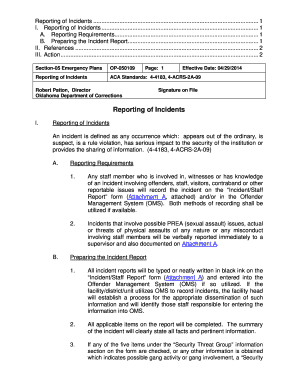
1 A. Reporting Requirements........................................................................................ 1 B. Preparing the Incident Report................................................................................ 1 II. References ................................................................................................................ 2 III. Action ......................................................................................................................... 2 .

How it works

  1. Open form

    Open form follow the instructions

  2. Easily sign form

    Easily sign the form with your finger

  3. Share form

    Send filled & signed form or save

How to fill out the OK OP-050109 online

The OK OP-050109 form is critical for documenting incidents within correctional facilities. This guide provides clear, step-by-step instructions on how to effectively fill out this form online, ensuring compliance with reporting requirements and proper documentation practices.

Follow the steps to complete the OK OP-050109 form successfully.

  1. Click ‘Get Form’ button to obtain the form and open it in the editor.
  2. Carefully read through the requirements for reporting incidents, which include instances involving offenders, staff, visitors, or any contraband. Ensure you understand the context before proceeding.
  3. Fill out the incident report with accurate and clear information. All fields on the form must be completed with relevant facts, as this documentation is essential for further actions.
  4. If the incident relates to any potential security threat group activity, ensure you check the appropriate boxes and be prepared to complete the ‘Security Threat Group Validation Form’ as mandated in the instructions.
  5. Submit the completed incident report to your shift or departmental supervisor before the end of your shift. If extra time is needed, seek prior approval from the facility head.
  6. Obtain the supervisor’s review and signature on the report, confirming it has been properly completed and checking what actions were taken in response to the incident.
  7. Ensure that all necessary distributions of the report are made as outlined in the report instructions, including disseminating it to any additional staff as specified.
  8. Once complete, save the changes, and either download, print, or share the form as necessary to fulfill reporting obligations.

Start filling out the OK OP-050109 form online now to ensure timely and accurate incident reporting.

Get form

Experience a faster way to fill out and sign forms on the web. Access the most extensive library of templates available.
Get form

Related content

Reporting of Incidents - Oklahoma.gov
Jul 2, 2025 — Replaced: OP-050109 entitled “Reporting of Incidents” dated March 29...
Learn more
Community Services Program Outpatient Treatment...
May 18, 2010 — II. OP-021001 “Oklahoma Department of Corrections Internet Standards”...
Learn more

Related links form

NJ-1040NR 2001 - State Of New Jersey - State Nj Form Nj 2450 Nj 2450 Nj 1080e

Questions & Answers

Get answers to your most pressing questions about US Legal Forms API.

Contact support

The five elements of an incident report are the date and time of the incident, the location, a description of what happened, the names of those involved, and the actions taken in response. Each element contributes to a comprehensive understanding of the incident. Using the OK OP-050109 framework can help ensure that you cover all essentials effectively.

The three requirements for writing an incident report include accuracy in presenting facts, clear organization of information, and timeliness in documentation. Additionally, ensure that the report adheres to guidelines like those found in the OK OP-050109 to uphold standards expected by various stakeholders, including management and legal teams.

To properly write an incident report, follow a structured format that includes an introduction, body, and conclusion. Clearly outline the main facts, avoiding personal opinions, to maintain professionalism. You might find the guidelines within the OK OP-050109 helpful in achieving a well-organized and effective report.

When writing an incident report as a security guard, specify your observations clearly and document any actions taken during the incident. Include important details such as time, location, and parties involved. Utilize a structured approach, like the OK OP-050109, to maintain professionalism and ensure that all critical information is recorded accurately.

To write an incident report example, start by providing a brief summary of the incident, including the date and location. Describe the situation step-by-step, focusing on key details such as actions taken and consequences. For a robust report, incorporate the guidelines set forth in the OK OP-050109 framework, ensuring the example serves as an effective template.

The five rules of incident reporting include being accurate, being clear, being concise, maintaining objectivity, and ensuring timeliness. Each report should reflect the true nature of events without unnecessary embellishments. Following these rules will help you create a reliable document, especially when using the OK OP-050109 standard.

To write a professional statement for an incident report, begin by clearly stating the facts of the incident. Use objective language while detailing what happened, who was involved, and any witnesses present. Be sure to include any relevant events that led to the situation. Consistency and clarity are key, especially when referencing the OK OP-050109 format.

Get This Form Now!

Use professional pre-built templates to fill in and sign documents online faster. Get access to thousands of forms.
Get form
If you believe that this page should be taken down, please follow our DMCA take down processhere.

Industry-leading security and compliance

US Legal Forms protects your data by complying with industry-specific security standards.
  • In businnes since 1997
    25+ years providing professional legal documents.
  • Accredited business
    Guarantees that a business meets BBB accreditation standards in the US and Canada.
  • Secured by Braintree
    Validated Level 1 PCI DSS compliant payment gateway that accepts most major credit and debit card brands from across the globe.
Get OK OP-050109
Get form
  • Adoption
  • Bankruptcy
  • Contractors
  • Divorce
  • Home Sales
  • Employment
  • Identity Theft
  • Incorporation
  • Landlord Tenant
  • Living Trust
  • Name Change
  • Personal Planning
  • Small Business
  • Wills & Estates
  • Packages A-Z
  • Affidavits
  • Bankruptcy
  • Bill of Sale
  • Corporate - LLC
  • Divorce
  • Employment
  • Identity Theft
  • Internet Technology
  • Landlord Tenant
  • Living Wills
  • Name Change
  • Power of Attorney
  • Real Estate
  • Small Estates
  • Wills
  • All Forms
  • Forms A-Z
  • Form Library
  • Legal Hub
  • About Us
  • Help Portal
  • Legal Resources
  • Blog
  • Affiliates
  • Contact Us
  • Delete My Account
  • Site Map
  • Industries
  • Forms in Spanish
  • Localized Forms
  • State-specific Forms
  • Forms Kit
  • Real Estate Handbook
  • All Guides
  • Notarize
  • Incorporation services
  • For Consumers
  • For Small Business
  • For Attorneys
  • USLegal
  • FormsPass
  • pdfFiller
  • signNow
  • altaFlow
  • DocHub
  • Instapage
Form Packages
  • Adoption
  • Bankruptcy
  • Contractors
  • Divorce
  • Home Sales
  • Employment
  • Identity Theft
  • Incorporation
  • Landlord Tenant
  • Living Trust
  • Name Change
  • Personal Planning
  • Small Business
  • Wills & Estates
  • Packages A-Z
Form Categories
  • Affidavits
  • Bankruptcy
  • Bill of Sale
  • Corporate - LLC
  • Divorce
  • Employment
  • Identity Theft
  • Internet Technology
  • Landlord Tenant
  • Living Wills
  • Name Change
  • Power of Attorney
  • Real Estate
  • Small Estates
  • Wills
  • All Forms
  • Forms A-Z
  • Form Library
Customer Service
  • Legal Hub
  • About Us
  • Help Portal
  • Legal Resources
  • Blog
  • Affiliates
  • Contact Us
  • Delete My Account
  • Site Map
  • Industries
  • Forms in Spanish
  • Localized Forms
  • State-specific Forms
  • Forms Kit
Legal Guides
  • Real Estate Handbook
  • All Guides
Prepared for you
  • Notarize
  • Incorporation services
Our Customers
  • For Consumers
  • For Small Business
  • For Attorneys
Our Sites
  • USLegal
  • FormsPass
  • pdfFiller
  • signNow
  • altaFlow
  • DocHub
  • Instapage
Social Media
Call us now toll free:
+1 833 426 79 33
As seen in:
© Copyright 1999-2026 airSlate Legal Forms, Inc. 3720 Flowood Dr, Flowood, Mississippi 39232
  • Your Privacy Choices
  • Terms of Service
  • Privacy Notice
  • Content Takedown Policy
  • Bug Bounty Program