Loading
Form preview
  • US Legal Forms
  • Form Library
  • Other Forms
  • California Other Forms
  • Ca Calstrs Es 1161 2018

Get Ca Calstrs Es 1161 2018-2026

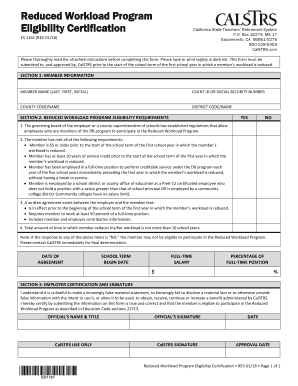
TURE APPROVAL DATE Reduced Workload Program Eligibility Certification • REV 01/18 • Page 1 of 1 Reduced Workload Program Eligibility Certification - Instructions Read these instructions before completing this form. Print or type in dark ink. Initial all corrections. Use this Reduced Workload Program Eligibility Certification form to verify the member’s eligibility for the Reduced Workload Program, per Education Code section 22713. This form must be submitted to, and approved by, CalSTR.

How it works

  1. Open form

    Open form follow the instructions

  2. Easily sign form

    Easily sign the form with your finger

  3. Share form

    Send filled & signed form or save

How to fill out the CA CALSTRS ES 1161 online

Filling out the CA CALSTRS ES 1161 form online is a straightforward process. This guide will help you navigate each section of the form efficiently, ensuring you provide all necessary information for eligibility in the Reduced Workload Program.

Follow the steps to complete the CA CALSTRS ES 1161 form online.

  1. Press the ‘Get Form’ button to retrieve the form and open it for editing.
  2. In Section 1, enter the member's full name, Client ID or Social Security Number, and provide the county and district codes and names.
  3. In Section 2, assess eligibility requirements. For each item listed, mark the corresponding ‘YES’ or ‘NO’ box. Ensure to review every requirement closely, as a 'NO' response may affect eligibility.
  4. Fill in the Date of Agreement, which should be before the school term begin date. Specify the Full-Time Salary, reflecting what the member would earn if employed full-time, and indicate the Percentage of Full-Time Position the member will reduce their workload to.
  5. In Section 3, the official must certify the information. Enter the official's name and title, obtain their signature, and date this section to validate the form before submission.
  6. Finally, save the changes made to the form, then proceed to download, print, or share the form as necessary.

Complete the CA CALSTRS ES 1161 form online to ensure timely submission.

Get form

Experience a faster way to fill out and sign forms on the web. Access the most extensive library of templates available.
Get form

Related content

California Stale Teachers' Retirement System...
Apr 16, 2007 — ... Ca!STRS Creditable Compensation/Service Credit. (0 1-TC-02, 02-TC-19)...
Learn more
Reduced Workload Program Eligibility Certification
Use this Reduced Workload Program Eligibility. Certification form to verify the member's...
Learn more

Related links form

Opnavinst 5218 7c Opnavinst 540044a Form Navso 57241 Form REPORT OF LOST OR STOLEN IDENTIFICATION CARD BO 5512.1 ...

Questions & Answers

Get answers to your most pressing questions about US Legal Forms API.

Contact support

Workload reduction means decreasing the amount of work or hours without losing associated benefits. For educators in California, this could mean engaging with students less frequently while still retaining critical retirement and pension benefits. Understanding workload reduction can aid educators in planning their careers more effectively. Uslegalforms provides resources that can help clarify these concepts further.

The STRS reduced workload program allows eligible educators to work fewer hours while still receiving a portion of their full retirement benefits. This program is designed to help teachers transition into retirement gracefully. It offers a flexible option for those who still want to contribute to education but seek a reduced workload. To learn more, visit uslegalforms or contact CalSTRS directly.

The 180-day rule for CalSTRS states that a retired member must wait 180 days after retirement before returning to work in a CalSTRS-covered position. This rule is in place to prevent abuse of the pension system. For any questions about how this may affect your retirement plans, CA CALSTRS ES 1161 offers helpful insights and resources.

You can withdraw from CalSTRS once you stop working and have accumulated at least five years of service credit. However, early withdrawals may result in reduced benefits. It's wise to explore all options before making a decision, and resources like CA CALSTRS ES 1161 can assist you in understanding the implications of your withdrawal.

Access to CalSTRS benefits is available once you meet specific criteria related to age and service credit. Many educators can begin accessing their benefits at age 50 or older, given they have sufficient service years. Utilizing CA CALSTRS ES 1161 can help you determine when you’ll be eligible and what steps to take next.

You can access your CalSTRS benefits once you meet the minimum service requirements and reach the eligible retirement age. Depending on your circumstances, this could range from age 50 to 62, ensuring you have built enough service credit. Stay informed about your options using resources like CA CALSTRS ES 1161, which can clarify your eligibility and benefits.

Changing your CalSTRS direct deposit is a straightforward process. You will need to complete a form through the CalSTRS website or customer service, providing your new bank details. Remember, ensuring your direct deposit information is up-to-date is crucial for receiving your benefits on time, and exploring options like CA CALSTRS ES 1161 can provide you with additional guidance.

Yes, there is a limit on earnings for CalSTRS retirees who return to work. Exceeding this limit may cause your retirement benefits to be reduced or suspended, impacting your overall financial health. Staying informed about the earning limits as outlined in CA CALSTRS ES 1161 can help you make the most of your retirement years while securing your financial future.

The income limit for CalSTRS retirees varies depending on the circumstances, such as the nature of reemployment. Retirees can continue to earn income, but any earnings beyond the set limit may lead to reductions in their monthly retirement benefits. It's advisable to check the specifics related to the CA CALSTRS ES 1161 to ensure compliance and protect your benefits.

CalSTRS calculates service credit based on the number of years and months you have worked in a qualifying education job. Each year of full-time service typically equates to one year of service credit, while part-time work is pro-rated. Familiarizing yourself with this calculation process is essential, especially when planning for your retirement under the rules of CA CALSTRS ES 1161.

Get This Form Now!

Use professional pre-built templates to fill in and sign documents online faster. Get access to thousands of forms.
Get form
If you believe that this page should be taken down, please follow our DMCA take down processhere.

Industry-leading security and compliance

US Legal Forms protects your data by complying with industry-specific security standards.
  • In businnes since 1997
    25+ years providing professional legal documents.
  • Accredited business
    Guarantees that a business meets BBB accreditation standards in the US and Canada.
  • Secured by Braintree
    Validated Level 1 PCI DSS compliant payment gateway that accepts most major credit and debit card brands from across the globe.
Get CA CALSTRS ES 1161
Get form
  • Adoption
  • Bankruptcy
  • Contractors
  • Divorce
  • Home Sales
  • Employment
  • Identity Theft
  • Incorporation
  • Landlord Tenant
  • Living Trust
  • Name Change
  • Personal Planning
  • Small Business
  • Wills & Estates
  • Packages A-Z
  • Affidavits
  • Bankruptcy
  • Bill of Sale
  • Corporate - LLC
  • Divorce
  • Employment
  • Identity Theft
  • Internet Technology
  • Landlord Tenant
  • Living Wills
  • Name Change
  • Power of Attorney
  • Real Estate
  • Small Estates
  • Wills
  • All Forms
  • Forms A-Z
  • Form Library
  • Legal Hub
  • About Us
  • Help Portal
  • Legal Resources
  • Blog
  • Affiliates
  • Contact Us
  • Delete My Account
  • Site Map
  • Industries
  • Forms in Spanish
  • Localized Forms
  • State-specific Forms
  • Forms Kit
  • Real Estate Handbook
  • All Guides
  • Notarize
  • Incorporation services
  • For Consumers
  • For Small Business
  • For Attorneys
  • USLegal
  • FormsPass
  • pdfFiller
  • signNow
  • altaFlow
  • DocHub
  • Instapage
Form Packages
  • Adoption
  • Bankruptcy
  • Contractors
  • Divorce
  • Home Sales
  • Employment
  • Identity Theft
  • Incorporation
  • Landlord Tenant
  • Living Trust
  • Name Change
  • Personal Planning
  • Small Business
  • Wills & Estates
  • Packages A-Z
Form Categories
  • Affidavits
  • Bankruptcy
  • Bill of Sale
  • Corporate - LLC
  • Divorce
  • Employment
  • Identity Theft
  • Internet Technology
  • Landlord Tenant
  • Living Wills
  • Name Change
  • Power of Attorney
  • Real Estate
  • Small Estates
  • Wills
  • All Forms
  • Forms A-Z
  • Form Library
Customer Service
  • Legal Hub
  • About Us
  • Help Portal
  • Legal Resources
  • Blog
  • Affiliates
  • Contact Us
  • Delete My Account
  • Site Map
  • Industries
  • Forms in Spanish
  • Localized Forms
  • State-specific Forms
  • Forms Kit
Legal Guides
  • Real Estate Handbook
  • All Guides
Prepared for you
  • Notarize
  • Incorporation services
Our Customers
  • For Consumers
  • For Small Business
  • For Attorneys
Our Sites
  • USLegal
  • FormsPass
  • pdfFiller
  • signNow
  • altaFlow
  • DocHub
  • Instapage
Social Media
Call us now toll free:
+1 833 426 79 33
As seen in:
© Copyright 1999-2026 airSlate Legal Forms, Inc. 3720 Flowood Dr, Flowood, Mississippi 39232
  • Your Privacy Choices
  • Terms of Service
  • Privacy Notice
  • Content Takedown Policy
  • Bug Bounty Program