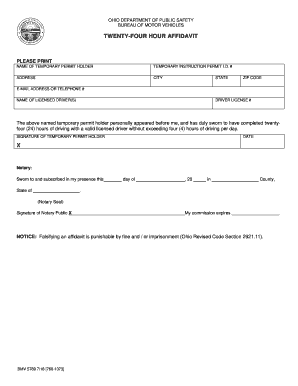
Ed Code Section 2921.11). BMV 5789 7/18 [760-1073] .
Open form follow the instructions
Easily sign the form with your finger
Send filled & signed form or save
How to fill out the OH BMV 5789 online
The Ohio BMV 5789 form is essential for documenting the completion of a driving requirement for users with a temporary permit. This guide provides a clear and user-friendly approach to filling out the form online, ensuring you understand each part of the document.
Follow the steps to accurately complete your form.
- Click the ‘Get Form’ button to access and open the OH BMV 5789 in your preferred editor.
- In the first section, enter the name of the temporary permit holder clearly as it appears on their permit.
- Next, include the temporary instruction permit I.D. number exactly as provided.
- Fill in the address details, making sure to include the street address, city, state, and zip code accurately.
- Provide either an email address or telephone number where the permit holder can be reached.
- List the name(s) of the licensed driver(s) who will accompany the permit holder during their driving practice.
- Next, input the driver’s license number(s) of the licensed driver(s) listed.
- The temporary permit holder must sign and date the form, confirming they have completed twenty-four hours of driving under supervision.
- The notary section will need to be completed; a notary public will verify and sign the affidavit, along with the date and their commission expiration.
- Once you have filled out all required fields, you can save changes, download, print, or share the completed form as needed.
Complete your OH BMV 5789 online now to ensure all necessary information is accurately documented.
Experience a faster way to fill out and sign forms on the web. Access the most extensive library of templates available.
Related content
NOTICE: Falsifying an affidavit is punishable by fine and / or imprisonment (Ohio Revised...
If applicable, provide a completed, notarized Twenty-Four Hour Affidavit (form BMV 5789)...
Get answers to your most pressing questions about US Legal Forms API.
Do both parties have to be present to get a title notarized in Ohio?
In Ohio, both parties typically need to be present for notarization of the title. This rule ensures that everyone involved consents to the transaction. If you have questions about this process, resources like US Legal Forms can help clarify the requirements.
How do I file for POA in Ohio?
Filing for power of attorney in Ohio involves completing the necessary forms and submitting them to the appropriate parties. Make sure to include all vital information, sign, and date the document. For additional clarity and templates, US Legal Forms offers comprehensive tools for filing POA documents.
Does the Ohio 50 hour affidavit have to be notarized?
Yes, the Ohio 50-hour affidavit generally needs to be notarized to be valid. Notarization ensures that the document is authenticated and meets state requirements. If you are unsure about the process, US Legal Forms has resources to assist you with notarization needs.
How do I show proof of insurance online?
You can show proof of insurance online by accessing the Ohio BMV’s online service. Log in to your account and upload a digital version of your insurance card or policy details. This secure method aligns with the requirements of the OH BMV 5789.
How to give power of attorney for a car?
To give power of attorney for a car, you need to fill out the appropriate form, specifying the vehicle and the person you authorize. Both your signature and the date must be present, and the document may need to be notarized depending on local regulations. For convenience, consider using US Legal Forms to handle the paperwork.
How do I provide proof of insurance to Ohio BMV?
You can provide proof of insurance to the Ohio BMV during your visit or online by submitting a scanned copy via their portal. Ensure that the document is current and contains all necessary information such as policy number and effective dates. Using the US Legal Forms helps you streamline this process.
How to fill out a power of attorney for Ohio vehicle registration?
To complete a power of attorney for Ohio vehicle registration, start with the correct form, listing the vehicle and the authorized person clearly. Make sure to include your signature and the date at the end of the document. For additional assistance, check out US Legal Forms, which offers user-friendly templates.
How to fill out power of attorney for Ohio vehicle registration?
Filling out the power of attorney for Ohio vehicle registration requires you to provide specific information, including the vehicle details and the name of the individual receiving authority. Use a clear format and ensure you sign the document in the appropriate sections. If you encounter difficulties, US Legal Forms has templates to simplify the process.
Does Ohio accept electronic proof of insurance?
Yes, Ohio accepts electronic proof of insurance. This option allows you to display your insurance information on your smartphone or another electronic device when requested. Remember, it should contain all necessary details as specified by the OH BMV 5789 regulations.
How do I submit proof of insurance to Ohio BMV?
To submit proof of insurance to the Ohio BMV, you can either bring a physical copy of your insurance card to your local BMV office or upload it online through the Ohio BMV website. Ensure that the information matches your vehicle registration details to avoid any issues. If you need help with the process, you might consider using the US Legal Forms platform for guidance.
Use professional pre-built templates to fill in and sign documents online faster. Get access to thousands of forms.
If you believe that this page should be taken down, please follow our DMCA take down process here.