Loading
Get Uk Mb 086-1z-6pl
How it works
-

Open form follow the instructions
-

Easily sign the form with your finger
-

Send filled & signed form or save
How to fill out the UK MB 086-1Z-6PL online
Filling out the UK MB 086-1Z-6PL form is a straightforward process that allows users to authorize automatic payments for vehicle tax. This guide provides a step-by-step approach to help users complete the form accurately and efficiently.
Follow the steps to fill out the UK MB 086-1Z-6PL form online.
- Click ‘Get Form’ button to obtain the form and open it in the editor.
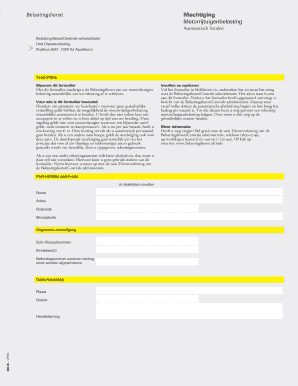
- Enter your personal information in block letters. You will need to provide your full name, address, postcode, and city of residence.
- In the authorization section, fill in your SOFI/fiscal number and the registration number(s) of the vehicle for which you are setting up automatic payments.
- Provide the bank account number from which the vehicle tax will be deducted monthly.
- Review all fields for accuracy. Ensure that all information is clearly legible to avoid processing delays.
- Sign and date the form in the appropriate section. Make sure to include the place of signing.
- Once all sections are completed, save your changes, download, print, or share the form as needed.
Complete your UK MB 086-1Z-6PL form online today for a hassle-free vehicle tax payment experience.
When preparing for self-assessment in the UK, provide your accountant with details of your income, expenses, and any relevant tax documents. Specifically, information related to the UK MB 086-1Z-6PL form will help them assess your returns accurately. Additionally, include bank statements and records of any taxable benefits. A well-organized set of documents can streamline the entire self-assessment process.