Loading
Get Sg Scciob Sc09csm07 2009-2026
How it works
-

Open form follow the instructions
-

Easily sign the form with your finger
-

Send filled & signed form or save
How to fill out the SG SCCIOB SC09CSM07 online
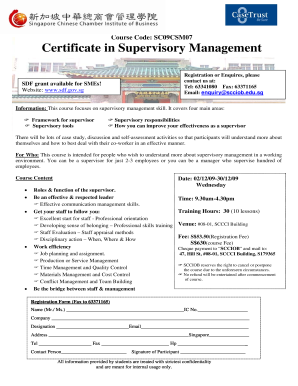
Filling out the SG SCCIOB SC09CSM07 form is an essential step for those interested in the Certificate in Supervisory Management course. This guide provides a clear, step-by-step approach to completing the form online efficiently.
Follow the steps to successfully complete the SG SCCIOB SC09CSM07 form.
- Click the ‘Get Form’ button to initiate the process and access the form in an online editor.
- Begin filling out the form by providing your name. Indicate whether you are a Mr. or Ms., followed by your full name.
- Enter your Identification Number (IC No.) in the designated field to identify yourself.
- Fill in your company name to indicate your employer.
- Specify your designation within the company.
- Provide your email address to ensure that you can receive important information and updates.
- Enter your address, making sure to include your postal code to facilitate communication.
- Fill in your telephone number, fax number, and mobile number for further contact.
- Indicate the name of the contact person, if applicable.
- Confirm your submission by signing as the participant, which verifies your intent to enroll in the course.
- After completing the form, you can save your changes, download a copy, print the form, or share it as needed.
Ready to enhance your supervisory skills? Start filling out the SG SCCIOB SC09CSM07 form online today!
The place of issue on a China visa application refers to where your passport was issued, which is typically the country of your citizenship. It is crucial to provide this information accurately because authorities might cross-reference it with your passport details. Using our resources, such as those offered by uslegalforms, can clarify any uncertainties you might have regarding the SG SCCIOB SC09CSM07 form.