Loading
Get Ph Pra-rrsc-2013-01 2011
How it works
-

Open form follow the instructions
-

Easily sign the form with your finger
-

Send filled & signed form or save
How to fill out the PH PRA-RRSC-2013-01 online
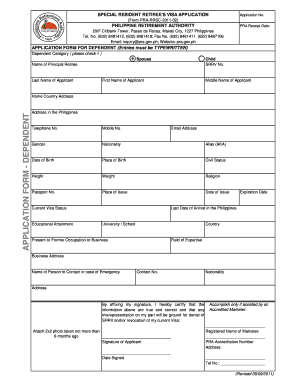
Filling out the PH PRA-RRSC-2013-01 form is an essential step for applying for a special resident retiree's visa. This guide provides clear instructions to help users navigate and complete the online application efficiently.
Follow the steps to accurately complete your application.
- Click ‘Get Form’ button to obtain the form and open it in the editor.
- Start by entering the application number in the designated field at the top of the form. Ensure that you provide the correct number as indicated.
- Next, fill in the Philippine retirement authority (PRA) receipt date. This date is crucial as it serves as a reference for tracking your application.
- Indicate whether you are applying for a dependent by checking the appropriate box. Specify the dependent category as 'Spouse' or 'Child'.
- Provide the full name of the principal retiree, including their last name, first name, and middle name.
- Input personal details of the applicant. Include their home country address, address in the Philippines, telephone number, mobile number, and email address.
- Fill out personal identification details such as gender, nationality, alias (if applicable), date of birth, place of birth, and civil status.
- Next, enter physical characteristics including height and weight, as well as religion, passport number, place of issue, and date of issue.
- Provide the current visa status, expiration date, and last date of arrival in the Philippines.
- Input your educational background, including the university or school attended, the country of the institution, as well as present or former occupation or business, along with your field of expertise.
- Specify your business address, and provide the name and contact information of a person to reach in case of emergency, including their nationality and address.
- Affix your signature to certify that the information is accurate. Include the date signed beneath your signature.
- If you require assistance from an accredited marketer, complete the additional section including their registered name, PRA accreditation number, address, and contact number.
- Finally, save your changes, and download or print the completed form for your records.
Complete your documents online now for a smooth application process.
Get form
Experience a faster way to fill out and sign forms on the web. Access the most extensive library of templates available.
Get This Form Now!
Use professional pre-built templates to fill in and sign documents online faster. Get access to thousands of forms.