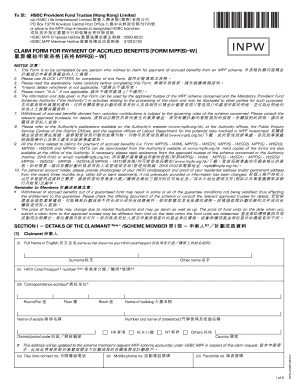
To *INPW* : HSBC Provident Fund Trustee (Hong Kong) Limited c/o HSBC Life (International) Limited PO Box 73770 Kowloon Central Post Office 73770 or place to the MPF dropin boxes at designated HSBC.

How it works
  • Open form

    Open form follow the instructions

  • Easily sign form

    Easily sign the form with your finger

  • Share form

    Send filled & signed form or save

How to fill out the HK HSBC INPW online

Filling out the HK HSBC INPW form is a critical step for those seeking to claim accrued benefits from an MPF scheme. This guide provides you with a clear, step-by-step approach to ensure your submission is accurate and complete.

Follow the steps to successfully complete the HK HSBC INPW form.

  1. Use the ‘Get Form’ button to access the HK HSBC INPW form online and open it in the designated editor.
  2. Begin by providing your personal details under the claimant section, ensuring that your full name matches the one on your HKID card or passport. Input your correspondence address clearly, using block letters as specified.
  3. Complete the section regarding the scheme member details, if different from the claimant. Make sure to include the full name and HKID card or passport number.
  4. In the details of the claim section, indicate the name of the MPF scheme and provide your account number(s). Choose the appropriate method of payment by marking the checkbox next to your choice.
  5. Select and check the reason for claiming the accrued benefits. Ensure to provide any necessary supporting documents according to your chosen ground for the claim.
  6. If applicable, authorize the termination of your MPF account with no residual balance by marking the authorization box.
  7. Complete the declaration section. Ensure that all information is accurate and sign the form, indicating the date.
  8. Once all sections are filled out, validate your form to ensure accuracy. After validation, you can save changes, print the form, or download it for sharing.

Submit your completed HK HSBC INPW form online to ensure your claim is processed efficiently.

Get form

Experience a faster way to fill out and sign forms on the web. Access the most extensive library of templates available.

Related content

0001144204-15-053370.txt

... HSBC USA Inc. (“HSBC”), will not pay interest, do not guarantee any return of...

Learn more
The Nature, Origin and Preservation of Amide...

INTRODUCTION. 1. 1.1 WHY STUDY N ORGANIC MATTER? 1. 1.2 DISSERTATION OBJECTIVES. 5. 1.3...

Learn more
Questions & Answers

Get answers to your most pressing questions about US Legal Forms API.

Contact support

How do I close my HSBC Hong Kong account?

Closing your HSBC Hong Kong account involves a few simple steps. First, ensure you clear any outstanding transactions and withdraw any remaining balance. Then, visit a local branch or contact customer service for proper account closure procedures to ensure your request is processed smoothly.

To check your MPF contributions, you can log into the MPF provider's online portal. Most providers, including HSBC, provide comprehensive statements detailing all contributions. If you're uncertain about your contributions, tools available on platforms like US Legal forms can assist you in obtaining the necessary documentation.

Your three-digit branch code can usually be found on the bottom of your checks or your account details in online banking. For HK HSBC INPW inquiries, this code can aid in international transactions. If you're having difficulty locating it, consider using US Legal forms for related contractual needs.

Finding your HSBC branch sort code is quite straightforward. You can find it on your bank statement, within your online banking profile, or by using the HSBC mobile app. If you prefer, reach out to HSBC for help to ensure accuracy.

To check your bank branch code, log into your HSBC online banking. Navigate to your account settings where branch details are listed. Alternatively, if you have documents from your bank, like statements or checks, they often display your branch code.

Finding your HSBC branch code is simple. You can locate it on your checks, bank statements, or within your online banking portal under account details. Another option is to contact HSBC customer service for personalized support.

To find your HSBC branch code, you can visit the official HSBC website for HK HSBC INPW services. Additionally, your branch code is typically printed on your bank statements, or you can check it within your online banking account. If you need further assistance, consider using US Legal forms to access templates that help with banking inquiries.

Your HSBC HK swift code is fundamental for international transactions. You can find it in your bank account documents or by visiting the HSBC website. For those utilizing the HK HSBC INPW, this swift code may also be available in your account details section for easy reference.

To set up the HSBC HK App on your new phone, first download it from your device’s app store. After installation, log in with your existing credentials, and follow the on-screen prompts. For a smooth experience, refer to the instructions on the HK HSBC INPW for any app-specific requirements.

An account number for HSBC in Hong Kong typically consists of 10 to 12 digits. This format varies depending on the type of account you hold. For detailed guidance, visiting the HK HSBC INPW can help clarify account number formats specific to your needs.

Get This Form Now!

Use professional pre-built templates to fill in and sign documents online faster. Get access to thousands of forms.

If you believe that this page should be taken down, please follow our DMCA take down process here.

Get HK HSBC INPW