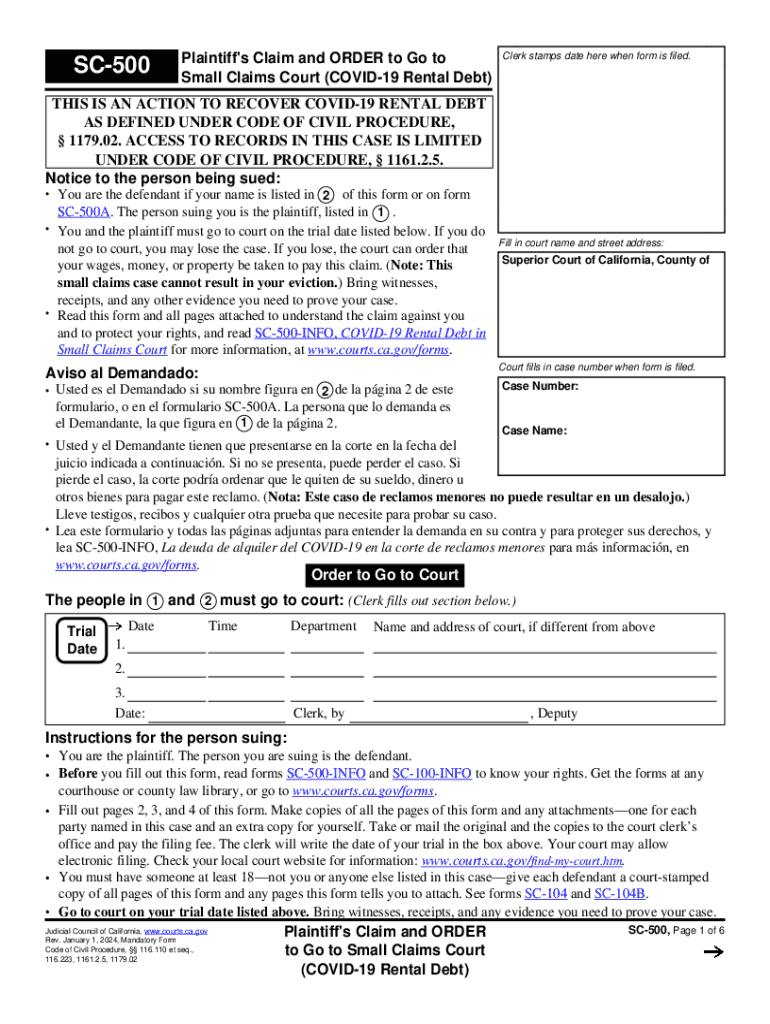
CODE OF CIVIL PROCEDURE, 1179.02. ACCESS TO RECORDS IN THIS CASE IS LIMITED UNDER CODE OF CIVIL PROCEDURE, 1161.2.5. Notice to the person being sued: You are the defendant if your name is listed in 2 of this form or on form SC-500A. The person suing you is the plaintiff, listed in 1 . You and the plaintiff must go to court on the trial date listed below. If you do not go to court, you may lose the case. If you lose, the court can order that your wages, money, or property be taken to p.
Loading

Open form follow the instructions

Easily sign the form with your finger

Send filled & signed form or save
How to fill out and sign CA SC-500 online?
Get your online template and fill it in using progressive features. Enjoy smart fillable fields and interactivity.Follow the simple instructions below:
The days of frightening complicated legal and tax forms have ended. With US Legal Forms the procedure of submitting official documents is anxiety-free. The best editor is directly close at hand offering you a wide range of useful tools for filling out a CA SC-500. These guidelines, combined with the editor will help you through the whole procedure.
- Click the orange Get Form option to start editing.
- Switch on the Wizard mode in the top toolbar to have extra pieces of advice.
- Complete every fillable area.
- Ensure the info you fill in CA SC-500 is up-to-date and correct.
- Include the date to the form using the Date tool.
- Click on the Sign icon and create an e-signature. You can use 3 available choices; typing, drawing, or capturing one.
- Check every area has been filled in correctly.
- Click Done in the top right corne to save the sample. There are various alternatives for getting the doc. As an instant download, an attachment in an email or through the mail as a hard copy.
We make completing any CA SC-500 more convenient. Get started now!
Tips on how to fill out, edit and sign CA SC-500 online
How to fill and sign CA SC-500
Get your online template and fill it in using progressive features. Enjoy smart fillable fields and interactivity.Follow the simple instructions below:
The days of frightening complicated legal and tax forms have ended. With US Legal Forms the procedure of submitting official documents is anxiety-free. The best editor is directly close at hand offering you a wide range of useful tools for filling out a CA SC-500. These guidelines, combined with the editor will help you through the whole procedure.
- Click the orange Get Form option to start editing.
- Switch on the Wizard mode in the top toolbar to have extra pieces of advice.
- Complete every fillable area.
- Ensure the info you fill in CA SC-500 is up-to-date and correct.
- Include the date to the form using the Date tool.
- Click on the Sign icon and create an e-signature. You can use 3 available choices; typing, drawing, or capturing one.
- Check every area has been filled in correctly.
- Click Done in the top right corne to save the sample. There are various alternatives for getting the doc. As an instant download, an attachment in an email or through the mail as a hard copy.
We make completing any CA SC-500 more convenient. Get started now!
How to edit CA SC-500
Completing papers is easy with smart online instruments. Get rid of paperwork with easily downloadable CA SC-500 templates you can modify online and print out.
Preparing papers and paperwork needs to be more accessible, whether it is a daily element of one’s profession or occasional work. When a person must file a CA SC-500, studying regulations and guides on how to complete a form properly and what it should include might take a lot of time and effort. However, if you find the proper CA SC-500 template, completing a document will stop being a challenge with a smart editor at hand.
Discover a broader range of features you can add to your document flow routine. No need to print out, fill out, and annotate forms manually. With a smart editing platform, all of the essential document processing features will always be at hand. If you want to make your work process with CA SC-500 forms more efficient, find the template in the catalog, click on it, and see a less complicated method to fill it in.
- If you need to add text in a random part of the form or insert a text field, use the Text and Text field instruments and expand the text in the form as much as you require.
- Use the Highlight instrument to stress the main aspects of the form. If you need to hide or remove some text parts, utilize the Blackout or Erase instruments.
- Customize the form by adding default graphic elements to it. Use the Circle, Check, and Cross instruments to add these components to the forms, if needed.
- If you need additional annotations, make use of the Sticky note tool and place as many notes on the forms page as required.
- If the form requires your initials or date, the editor has instruments for that too. Minimize the possibility of errors using the Initials and Date instruments.
- It is also easy to add custom graphic elements to the form. Use the Arrow, Line, and Draw instruments to change the document.
The more instruments you are familiar with, the better it is to work with CA SC-500. Try the solution that offers everything necessary to find and modify forms in a single tab of your browser and forget about manual paperwork.
How to fill and sign CA SC-500
Get your online template and fill it in using progressive features. Enjoy smart fillable fields and interactivity.Follow the simple instructions below:
The days of frightening complicated legal and tax forms have ended. With US Legal Forms the procedure of submitting official documents is anxiety-free. The best editor is directly close at hand offering you a wide range of useful tools for filling out a CA SC-500. These guidelines, combined with the editor will help you through the whole procedure.
- Click the orange Get Form option to start editing.
- Switch on the Wizard mode in the top toolbar to have extra pieces of advice.
- Complete every fillable area.
- Ensure the info you fill in CA SC-500 is up-to-date and correct.
- Include the date to the form using the Date tool.
- Click on the Sign icon and create an e-signature. You can use 3 available choices; typing, drawing, or capturing one.
- Check every area has been filled in correctly.
- Click Done in the top right corne to save the sample. There are various alternatives for getting the doc. As an instant download, an attachment in an email or through the mail as a hard copy.
We make completing any CA SC-500 more convenient. Get started now!
Experience a faster way to fill out and sign forms on the web. Access the most extensive library of templates available.
Related content
Read form SC-500-INFO,. COVID-19 Rental Debt in Small Claims Court. You don't have to file...
This two-credit course for first-year students is more than the study of leadership; it is...
Control Unit. The SC System includes a LCD video Monitor, control console, and necessary...
Get answers to your most pressing questions about US Legal Forms API.
How to file a personal injury claim in California?
To file a personal injury claim in California, start by gathering evidence to support your case, such as medical records and photographs of the incident. Next, ensure you comply with the CA SC-500 regulations that dictate the filing process and necessary documents. You may want to consult resources like uslegalforms to navigate these procedures effectively and maximize your chances of a successful claim.
Is small claims court worth the hassle?
While small claims court may seem like a hassle, it often provides a practical solution for resolving disputes without extensive legal battles. The CA SC-500 offers a streamlined method for addressing claims, and many users find the process straightforward. Weighing the benefits against the frustrations can lead you to a decision that favors getting your issues resolved effectively.
Is it worth suing someone for $500?
Suing someone for $500 can be worth considering, especially if the amount owed is valid and you believe you can win your case. The CA SC-500 process simplifies the litigation experience, allowing you to handle smaller claims efficiently. Think about the potential recovery against your legal expenses and time, and weigh your options carefully before proceeding.
What is the minimum amount to take someone to small claims court?
In California, the minimum amount you can claim in small claims court is $SmallClaimLimit, which currently is $SmallClaimLimit. The CA SC-500 allows you to resolve disputes without the complexities of higher courts, making it accessible for addressing various grievances. Consider your costs and time involved, but always remember small claims court is designed for straightforward cases without exorbitant financial stakes.
How to personally serve someone in California?
To personally serve someone in California, you need to deliver the necessary legal documents directly to the individual. You can do this yourself, or hire a professional process server to ensure compliance with California law. It's essential to follow the CA SC-500 requirements closely, as proper service is crucial for your case to proceed. Additionally, you must file a proof of service with the court after serving the documents.
Is it worth going to small claims court for $500 in California?
If you're considering filing a claim for $500, it's worth weighing your options. The CA SC-500 allows you to file a claim efficiently without the high costs of hiring a lawyer. Moreover, for many individuals, recovering $500 can be a significant remedy, making it a viable option. You should evaluate your specific situation and potential outcomes.
How long do I have to file a small claim in California?
In California, you typically have two years to file a small claim for most cases, such as contract disputes. If your complaint involves a specific type of claim, such as a personal injury, you may have a different deadline. This is where understanding the CA SC-500 form and its timelines is crucial. For personalized assistance, consider using US Legal Forms to help guide you through the filing process.
Can I sue for $1?
Yes, you can sue for $1 in small claims court in California. However, you should consider whether the effort and resources involved in filing a CA SC-500 claim for such a small amount are worth it. Often, pursuing larger claims tends to be more productive in resolving disputes. Always weigh your options and seek advice when necessary.
How do I serve someone in small claims court in California?
Serving someone in small claims court in California requires you to deliver the necessary documents, including the CA SC-500 form, to the defendant. You can do this through a process server or by having someone who is not involved in the case personally deliver the papers. The court mandates that you follow specific guidelines for serving, so make sure you understand these requirements. Consulting resources like US Legal Forms can help ensure you complete this step correctly.
How to start a small claims case in California?
To start a small claims case in California, begin by filing the necessary documents, such as the CA SC-500 form, at your local small claims court. You will need to provide details about the nature of the claim and the amount you seek to recover. Once submitted, the court will schedule a hearing to resolve the matter. Utilizing US Legal Forms can simplify this process by providing you with the right forms and guidance.
Use professional pre-built templates to fill in and sign documents online faster. Get access to thousands of forms.
If you believe that this page should be taken down, please follow our DMCA take down process here.