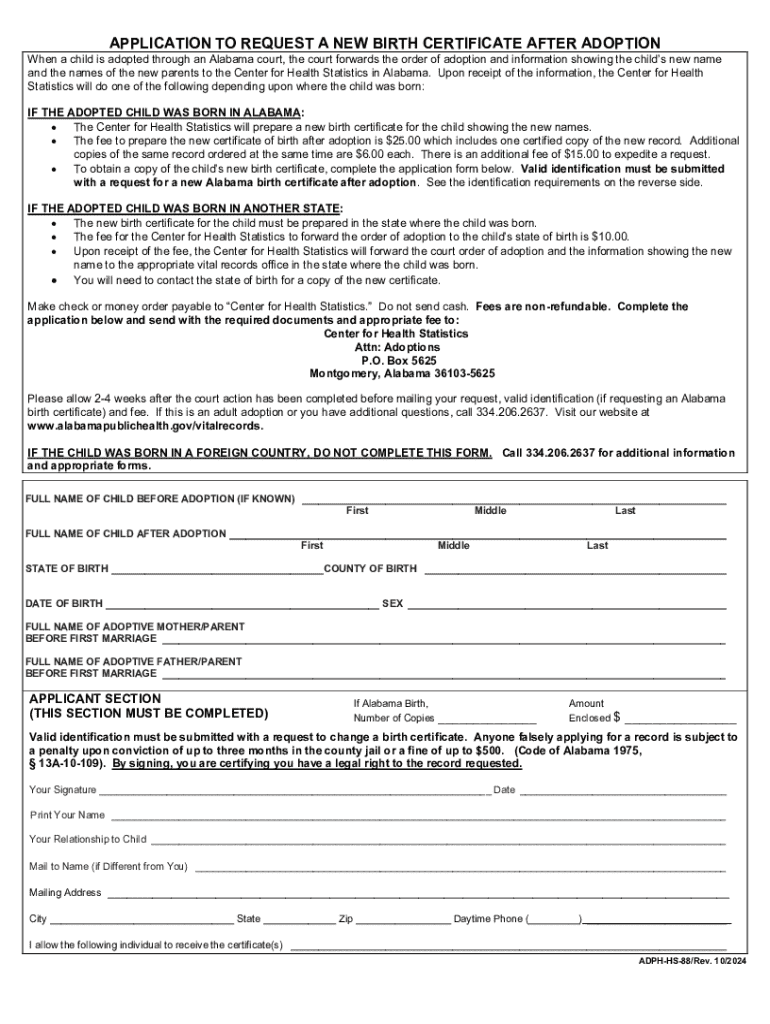
E and the names of the new parents to the Center for Health Statistics in Alabama. Upon receipt of the information, the Center for Health Statistics will do one of the following depending upon where the child was born: IF THE ADOPTED CHILD WAS BORN IN ALABAMA: The Center for Health Statistics will prepare a new birth certificate for the child showing the new names. The fee to prepare the new certificate of birth after adoption is $25.00 which includes one certified copy of the new record.
Loading

Open form follow the instructions

Easily sign the form with your finger

Send filled & signed form or save
How to fill out and sign AL ADPH-HS 88 online?
Get your online template and fill it in using progressive features. Enjoy smart fillable fields and interactivity.Follow the simple instructions below:
Legal, tax, business along with other electronic documents need a high level of compliance with the legislation and protection. Our templates are updated on a regular basis according to the latest amendments in legislation. In addition, with our service, all of the information you include in the AL ADPH-HS 88 is well-protected against leakage or damage by means of top-notch encryption.
The tips below will help you complete AL ADPH-HS 88 quickly and easily:
- Open the form in our full-fledged online editing tool by clicking Get form.
- Complete the required fields that are colored in yellow.
- Click the green arrow with the inscription Next to move on from box to box.
- Use the e-autograph solution to add an electronic signature to the template.
- Add the date.
- Read through the whole template to ensure that you haven?t skipped anything.
- Press Done and save the new form.
Our solution enables you to take the entire procedure of submitting legal documents online. Due to this, you save hours (if not days or weeks) and eliminate unnecessary expenses. From now on, submit AL ADPH-HS 88 from your home, workplace, and even on the go.
Tips on how to fill out, edit and sign AL ADPH-HS 88 online
How to fill and sign AL ADPH-HS 88
Get your online template and fill it in using progressive features. Enjoy smart fillable fields and interactivity.Follow the simple instructions below:
Legal, tax, business along with other electronic documents need a high level of compliance with the legislation and protection. Our templates are updated on a regular basis according to the latest amendments in legislation. In addition, with our service, all of the information you include in the AL ADPH-HS 88 is well-protected against leakage or damage by means of top-notch encryption.
The tips below will help you complete AL ADPH-HS 88 quickly and easily:
- Open the form in our full-fledged online editing tool by clicking Get form.
- Complete the required fields that are colored in yellow.
- Click the green arrow with the inscription Next to move on from box to box.
- Use the e-autograph solution to add an electronic signature to the template.
- Add the date.
- Read through the whole template to ensure that you haven?t skipped anything.
- Press Done and save the new form.
Our solution enables you to take the entire procedure of submitting legal documents online. Due to this, you save hours (if not days or weeks) and eliminate unnecessary expenses. From now on, submit AL ADPH-HS 88 from your home, workplace, and even on the go.
How to edit AL ADPH-HS 88
Sign and share AL ADPH-HS 88 along with any other business and personal documentation online without wasting time and resources on printing and postal delivery. Get the most out of our online document editor using a built-in compliant electronic signature option.
Approving and submitting AL ADPH-HS 88 templates electronically is faster and more effective than managing them on paper. However, it requires employing online solutions that guarantee a high level of data security and provide you with a certified tool for creating eSignatures. Our powerful online editor is just the one you need to prepare your AL ADPH-HS 88 and other personal and business or tax forms in an accurate and appropriate manner in line with all the requirements. It offers all the essential tools to quickly and easily complete, modify, and sign paperwork online and add Signature fields for other parties, specifying who and where should sign.
It takes just a few simple steps to fill out and sign AL ADPH-HS 88 online:
- Open the chosen file for further managing.
- Use the upper panel to add Text, Initials, Image, Check, and Cross marks to your sample.
- Underline the most significant details and blackout or erase the sensitive ones if necessary.
- Click on the Sign option above and choose how you prefer to eSign your document.
- Draw your signature, type it, upload its image, or use another option that suits you.
- Switch to the Edit Fillable Fileds panel and place Signature areas for other people.
- Click on Add Signer and provide your recipient’s email to assign this field to them.
- Check that all information provided is complete and correct before you click Done.
- Share your document with others using one of the available options.
When signing AL ADPH-HS 88 with our robust online solution, you can always be certain you get it legally binding and court-admissible. Prepare and submit documents in the most efficient way possible!
How to fill and sign AL ADPH-HS 88
Get your online template and fill it in using progressive features. Enjoy smart fillable fields and interactivity.Follow the simple instructions below:
Legal, tax, business along with other electronic documents need a high level of compliance with the legislation and protection. Our templates are updated on a regular basis according to the latest amendments in legislation. In addition, with our service, all of the information you include in the AL ADPH-HS 88 is well-protected against leakage or damage by means of top-notch encryption.
The tips below will help you complete AL ADPH-HS 88 quickly and easily:
- Open the form in our full-fledged online editing tool by clicking Get form.
- Complete the required fields that are colored in yellow.
- Click the green arrow with the inscription Next to move on from box to box.
- Use the e-autograph solution to add an electronic signature to the template.
- Add the date.
- Read through the whole template to ensure that you haven?t skipped anything.
- Press Done and save the new form.
Our solution enables you to take the entire procedure of submitting legal documents online. Due to this, you save hours (if not days or weeks) and eliminate unnecessary expenses. From now on, submit AL ADPH-HS 88 from your home, workplace, and even on the go.
Experience a faster way to fill out and sign forms on the web. Access the most extensive library of templates available.
Related content
ADPH-HS-88/Rev. 10/2024. Page 2. IDENTIFICATION REQUIREMENTS FOR RESTRICTED ALABAMA VITAL...
1-88 (exception AIDS). (k) "Dentist" - A person currently licensed to practice dentistry...
May 1, 2019 — THE SHIPPERS LISTED HAVE BEEN CERTIFIED BY REGULATORY AUTHORITIES IN THE...
Get answers to your most pressing questions about US Legal Forms API.
How do I add a father to a birth certificate in Alabama?
Adding a father to a birth certificate in Alabama involves completing a Delayed Registration of Birth form, according to AL ADPH-HS 88 guidelines. You will need to provide several documents, including proof of paternity. It’s best to consult with legal experts or use platforms like USLegalForms to guide you through this process efficiently.
What do you have to have to get a birth certificate in Alabama?
To obtain a birth certificate in Alabama, you need to provide specific information and documents as outlined by the AL ADPH-HS 88. Generally, you'll need an application form, proof of identity, and information relating to the birth, such as the date and place. Ensure you have all required documents ready to streamline the process.
Is it a must to have a birth certificate?
While not legally required for every single situation, having a birth certificate is highly recommended in the US. The AL ADPH-HS 88 states that this document serves many key functions, including verifying identity and facilitating access to essential services. Without it, individuals may face challenges in various legal and social aspects.
Is a birth certificate mandatory in the US?
While a birth certificate is not mandatory for all aspects of living in the United States, it plays a critical role in many legal situations. The AL ADPH-HS 88 emphasizes the importance of having this document for things like enrolling in school, obtaining identification, and applying for benefits. Having a birth certificate helps ensure individuals have access to necessary rights and services.
Are Alabama birth certificates public records?
Yes, Alabama birth certificates are considered public records, though access may be restricted to certain individuals. The AL ADPH-HS 88 guidelines determine who can obtain copies, typically including parents, guardians, or individuals with legal reasons. Access to these documents helps maintain transparency in public health records.
What is the law on birth certificates in Alabama?
In Alabama, the law on birth certificates is governed by the Alabama Department of Public Health. According to AL ADPH-HS 88, parents must apply for a birth certificate shortly after the birth of their child to ensure proper registration. This document serves as an essential record for various legal purposes, including identification and citizenship.
Which states have unsealed adoption records?
Several states have reformed their adoption laws to allow for unsealed adoption records, including Alaska and Oregon, among others. However, laws vary significantly across the U.S., so it's crucial to check the specific regulations in each state. Many individuals find it helpful to consult legal resources or adoption agencies to understand these differences. UsLegalForms can assist with finding specific information and forms needed to navigate adoption records under AL ADPH-HS 88.
How do you unseal your adoption records?
To unseal adoption records in Alabama, you should file a motion with the probate court where your adoption was finalized. The court will review your request, and you may need to provide valid reasons for wanting access to the sealed records. It's advisable to consult with a legal expert to guide you through this procedure. Platforms like UsLegalForms can also facilitate this process under AL ADPH-HS 88 by providing essential forms and resources.
Are Alabama adoption records sealed?
Yes, Alabama law mandates that adoption records remain sealed to ensure the confidentiality of all parties. This legal measure is designed to respect the privacy of both adoptees and birth parents. To access these records, individuals may need to petition the court, outlining the reasons for their request. Utilizing UsLegalForms can streamline this process and provide necessary forms related to AL ADPH-HS 88.
Are adoption records sealed in Alabama?
Yes, adoption records are sealed in Alabama, which means they are not accessible to the public. This sealing is intended to protect the privacy of adoptees and birth parents. However, adopted individuals may have the option to access their records under specific circumstances through a court order. For more information on navigating this process, check UsLegalForms for support related to AL ADPH-HS 88.
Use professional pre-built templates to fill in and sign documents online faster. Get access to thousands of forms.
If you believe that this page should be taken down, please follow our DMCA take down process here.