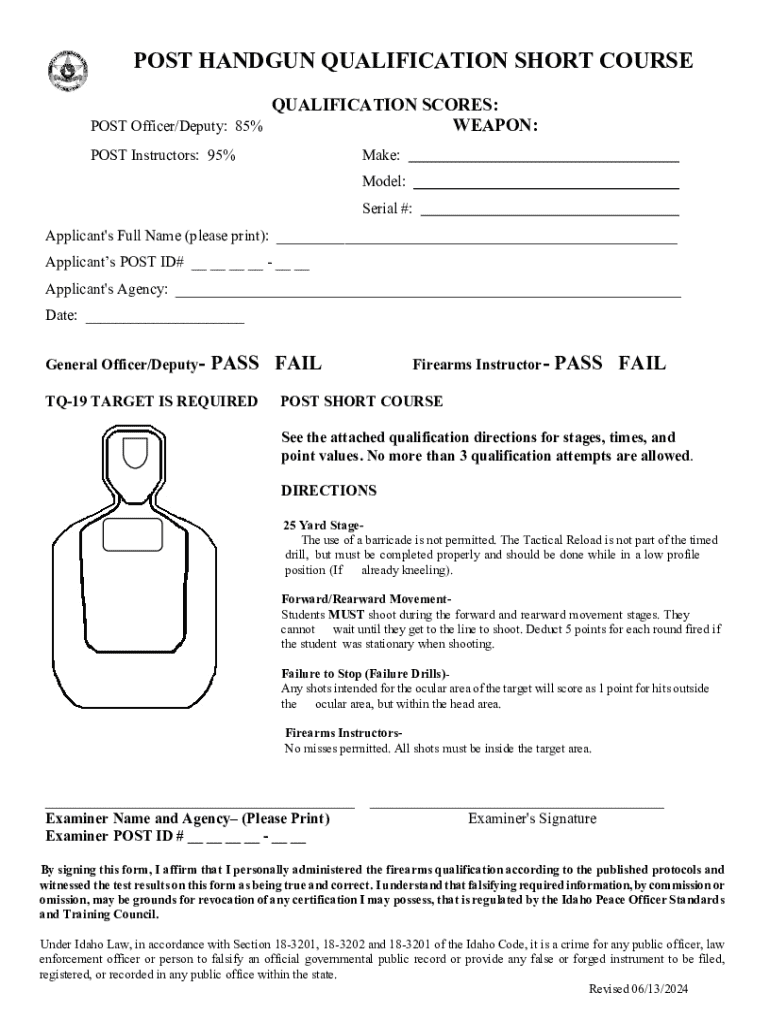
Applicant s POST ID# - Applicant's Agency: Date: General Officer/Deputy- PASS FAIL TQ-19 TARGET IS REQUIRED Firearms Instructor- PASS FAIL POST SHORT COURSE See the attached qualification directions for stages, times, and point values. No more than 3 qualification attempts are allowed. DIRECTIONS 25 Yard StageThe use of a barricade is not permit.
Loading

Open form follow the instructions

Easily sign the form with your finger

Send filled & signed form or save
How to fill out and sign ID Post Handgun Qualification Short Course online?
Get your online template and fill it in using progressive features. Enjoy smart fillable fields and interactivity.Follow the simple instructions below:
Getting a legal professional, making a scheduled appointment and coming to the workplace for a private conference makes doing a ID Post Handgun Qualification Short Course from beginning to end tiring. US Legal Forms helps you to quickly make legally binding papers based on pre-constructed browser-based samples.
Execute your docs in minutes using our simple step-by-step instructions:
- Get the ID Post Handgun Qualification Short Course you need.
- Open it using the cloud-based editor and begin adjusting.
- Fill in the blank areas; involved parties names, places of residence and numbers etc.
- Change the blanks with exclusive fillable fields.
- Add the day/time and place your e-signature.
- Click on Done after double-examining everything.
- Save the ready-made document to your gadget or print it out like a hard copy.
Swiftly create a ID Post Handgun Qualification Short Course without needing to involve specialists. We already have over 3 million people making the most of our rich collection of legal documents. Join us today and gain access to the #1 catalogue of web samples. Test it yourself!
Tips on how to fill out, edit and sign ID Post Handgun Qualification Short Course online
How to fill and sign ID Post Handgun Qualification Short Course
Get your online template and fill it in using progressive features. Enjoy smart fillable fields and interactivity.Follow the simple instructions below:
Getting a legal professional, making a scheduled appointment and coming to the workplace for a private conference makes doing a ID Post Handgun Qualification Short Course from beginning to end tiring. US Legal Forms helps you to quickly make legally binding papers based on pre-constructed browser-based samples.
Execute your docs in minutes using our simple step-by-step instructions:
- Get the ID Post Handgun Qualification Short Course you need.
- Open it using the cloud-based editor and begin adjusting.
- Fill in the blank areas; involved parties names, places of residence and numbers etc.
- Change the blanks with exclusive fillable fields.
- Add the day/time and place your e-signature.
- Click on Done after double-examining everything.
- Save the ready-made document to your gadget or print it out like a hard copy.
Swiftly create a ID Post Handgun Qualification Short Course without needing to involve specialists. We already have over 3 million people making the most of our rich collection of legal documents. Join us today and gain access to the #1 catalogue of web samples. Test it yourself!
How to edit ID Post Handgun Qualification Short Course
Use our comprehensive editor to transform a simple online template into a completed document. Read on to learn how to edit ID Post Handgun Qualification Short Course online easily.
Once you discover a perfect ID Post Handgun Qualification Short Course, all you have to do is adjust the template to your needs or legal requirements. In addition to completing the fillable form with accurate data, you may want to delete some provisions in the document that are irrelevant to your circumstance. On the other hand, you may want to add some missing conditions in the original template. Our advanced document editing tools are the best way to fix and adjust the document.
The editor enables you to change the content of any form, even if the file is in PDF format. It is possible to add and remove text, insert fillable fields, and make further changes while keeping the initial formatting of the document. Also you can rearrange the structure of the document by changing page order.
You don’t need to print the ID Post Handgun Qualification Short Course to sign it. The editor comes along with electronic signature capabilities. The majority of the forms already have signature fields. So, you only need to add your signature and request one from the other signing party with a few clicks.
Follow this step-by-step guide to create your ID Post Handgun Qualification Short Course:
- Open the preferred template.
- Use the toolbar to adjust the form to your preferences.
- Fill out the form providing accurate information.
- Click on the signature field and add your electronic signature.
- Send the document for signature to other signers if necessary.
Once all parties complete the document, you will receive a signed copy which you can download, print, and share with others.
Our services enable you to save tons of your time and reduce the risk of an error in your documents. Enhance your document workflows with effective editing tools and a powerful eSignature solution.
How to fill and sign ID Post Handgun Qualification Short Course
Get your online template and fill it in using progressive features. Enjoy smart fillable fields and interactivity.Follow the simple instructions below:
Getting a legal professional, making a scheduled appointment and coming to the workplace for a private conference makes doing a ID Post Handgun Qualification Short Course from beginning to end tiring. US Legal Forms helps you to quickly make legally binding papers based on pre-constructed browser-based samples.
Execute your docs in minutes using our simple step-by-step instructions:
- Get the ID Post Handgun Qualification Short Course you need.
- Open it using the cloud-based editor and begin adjusting.
- Fill in the blank areas; involved parties names, places of residence and numbers etc.
- Change the blanks with exclusive fillable fields.
- Add the day/time and place your e-signature.
- Click on Done after double-examining everything.
- Save the ready-made document to your gadget or print it out like a hard copy.
Swiftly create a ID Post Handgun Qualification Short Course without needing to involve specialists. We already have over 3 million people making the most of our rich collection of legal documents. Join us today and gain access to the #1 catalogue of web samples. Test it yourself!
Experience a faster way to fill out and sign forms on the web. Access the most extensive library of templates available.
Related content
The course includes stages at 25, 15, 7, 3-7 yards, with 40 total rounds...
This 15-week program follows the curriculum of Idaho POST, in Meridian. All of our...
These schedules are based on the desirable number of training hours for a pistol or...
Get answers to your most pressing questions about US Legal Forms API.
What are the qualifications for the Army pistol?
The qualifications for the Army pistol include specific performance standards that soldiers must achieve during shooting qualifications. This includes accuracy, safety, and proper handling of the firearm. Completing the ID Post Handgun Qualification Short Course can better prepare individuals for these Army standards, enhancing their shooting skills. Ensuring that you meet these qualifications is vital for maintaining readiness and safety.
What is the FBI pistol qualification course?
The FBI pistol qualification course is a comprehensive training program designed to test and ensure proficiency in firearm handling. Participants must demonstrate the ability to accurately shoot a pistol under various conditions. This program aligns with the ID Post Handgun Qualification Short Course standards, making it an essential step for many law enforcement personnel. Engaging in this qualification helps boost confidence and skill in safe gun handling.
Use professional pre-built templates to fill in and sign documents online faster. Get access to thousands of forms.
If you believe that this page should be taken down, please follow our DMCA take down process here.