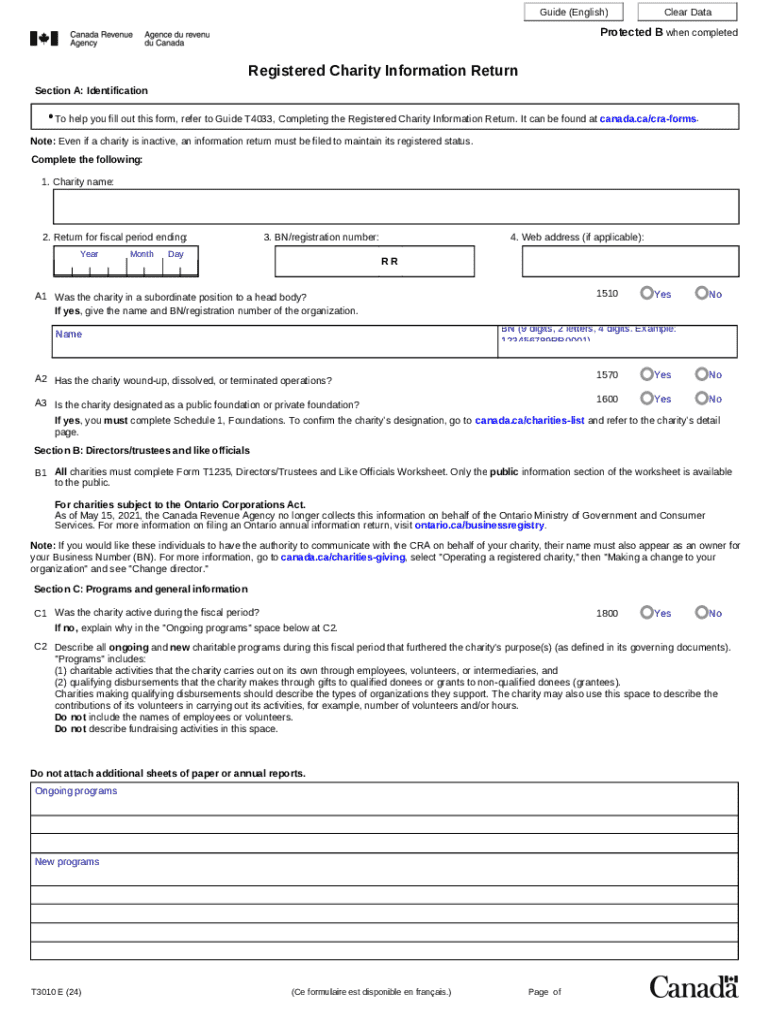
Guide (English) Clear Data Protected B when completed Registered Charity Information Return Section A: Identification To help you fill out this form, refer to Guide T4033, Completing the Registered.
Loading

Open form follow the instructions

Easily sign the form with your finger

Send filled & signed form or save
How to fill out the Canada T3010 E online
Filling out the Canada T3010 E form is an essential task for registered charities in Canada to maintain their status. This guide provides clear, step-by-step instructions to assist users in accurately completing the form online.
Follow the steps to complete your Canada T3010 E form online
- Click 'Get Form' button to obtain the form and open it in the editor.
- In Section A: Identification, provide your charity's name, the return for the fiscal period ending, and the BN/registration number. Ensure these details are accurate to avoid issues with your submission.
- Answer the questions A1 through A3 pertaining to your charity's status, including whether it is in a subordinate position, if it has wound up operations, or its designation as a public or private foundation.
- Moving to Section B: Directors/trustees and like officials, complete Form T1235, providing details of all charity officials. This information is crucial for the transparency of the organization.
- In Section C: Programs and general information, indicate if the charity was active during the fiscal period, and detail all ongoing and new charitable programs that furthered the charity's purpose.
- Continue through Section C by answering questions regarding gifts to qualified donees, activities outside Canada, fundraising methods used, and any external fundraisers utilized during the fiscal period.
- In Section D: Financial information, choose to complete either Section D or Schedule 6 depending on the charity's financial size. Ensure that all financial values are reported accurately as per your financial statements.
- Finally, in Section E: Certification, ensure the return is signed by an authorized person. Review all information for completeness and accuracy before submission.
- Once you have completed the form, you can save your changes, download a copy for your records, print it if necessary, or share it with relevant parties.
Start completing your Canada T3010 E form online today for a smooth registration process.
Experience a faster way to fill out and sign forms on the web. Access the most extensive library of templates available.
Related content
From the findings of over 40 interviews conducted between 2014 and 2017 and document...
The Canadian Satellite Account of Nonprofit Institutions and Volunteering is a research...
Total revenue received from all sources outside Canada by Canadian ... of the T3010...
Get answers to your most pressing questions about US Legal Forms API.
Do registered charities have to file a t2?
All resident corporations (except tax-exempt Crown corporations, Hutterite colonies and registered charities) have to file a T2 return for every tax year, even if there is no tax payable. This includes: non-profit organizations. tax-exempt corporations.
What is the t3010?
Canadian registered charities are required to file their T3010 Registered Charity. Information Return (commonly referred to as the T3010 ) within 6 months after their. charity s fiscal year-end.
Use professional pre-built templates to fill in and sign documents online faster. Get access to thousands of forms.
If you believe that this page should be taken down, please follow our DMCA take down process here.