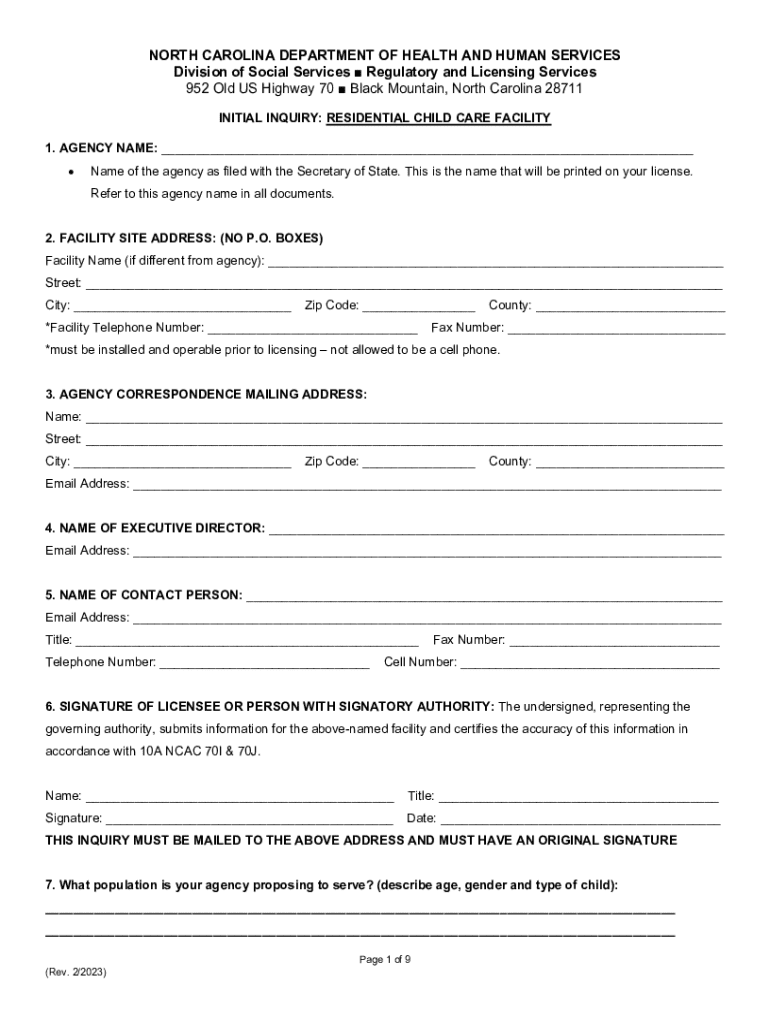
IDENTIAL CHILD CARE FACILITY 1. AGENCY NAME: Name of the agency as filed with the Secretary of State. This is the name that will be printed on your license. Refer to this agency name in all documents. 2. FACILITY SITE ADDRESS: (NO P.O. BOXES) Facility Name (if different from agency): Street:.
Loading

Open form follow the instructions

Easily sign the form with your finger

Send filled & signed form or save
How to fill out and sign NC Initial Inquiry: Residential Child Care Facility online?
Get your online template and fill it in using progressive features. Enjoy smart fillable fields and interactivity.Follow the simple instructions below:
Getting a authorized professional, creating a scheduled appointment and going to the office for a private meeting makes doing a NC Initial Inquiry: Residential Child Care Facility from start to finish stressful. US Legal Forms helps you to rapidly make legally-compliant papers based on pre-created online templates.
Prepare your docs within a few minutes using our easy step-by-step guideline:
- Get the NC Initial Inquiry: Residential Child Care Facility you want.
- Open it with cloud-based editor and start adjusting.
- Fill out the blank fields; concerned parties names, addresses and phone numbers etc.
- Change the template with smart fillable areas.
- Put the particular date and place your e-signature.
- Click Done following double-examining everything.
- Download the ready-produced record to your system or print it like a hard copy.
Quickly generate a NC Initial Inquiry: Residential Child Care Facility without having to involve professionals. We already have more than 3 million customers making the most of our unique catalogue of legal documents. Join us right now and get access to the #1 collection of browser-based samples. Test it yourself!
Tips on how to fill out, edit and sign NC Initial Inquiry: Residential Child Care Facility online
How to fill and sign NC Initial Inquiry: Residential Child Care Facility
Get your online template and fill it in using progressive features. Enjoy smart fillable fields and interactivity.Follow the simple instructions below:
Getting a authorized professional, creating a scheduled appointment and going to the office for a private meeting makes doing a NC Initial Inquiry: Residential Child Care Facility from start to finish stressful. US Legal Forms helps you to rapidly make legally-compliant papers based on pre-created online templates.
Prepare your docs within a few minutes using our easy step-by-step guideline:
- Get the NC Initial Inquiry: Residential Child Care Facility you want.
- Open it with cloud-based editor and start adjusting.
- Fill out the blank fields; concerned parties names, addresses and phone numbers etc.
- Change the template with smart fillable areas.
- Put the particular date and place your e-signature.
- Click Done following double-examining everything.
- Download the ready-produced record to your system or print it like a hard copy.
Quickly generate a NC Initial Inquiry: Residential Child Care Facility without having to involve professionals. We already have more than 3 million customers making the most of our unique catalogue of legal documents. Join us right now and get access to the #1 collection of browser-based samples. Test it yourself!
How to edit NC Initial Inquiry: Residential Child Care Facility
Completing documents is more comfortable with smart online tools. Get rid of paperwork with easily downloadable NC Initial Inquiry: Residential Child Care Facility templates you can edit online and print.
Preparing papers and paperwork must be more accessible, whether it is an everyday component of one’s occupation or occasional work. When a person must file a NC Initial Inquiry: Residential Child Care Facility, studying regulations and tutorials on how to complete a form correctly and what it should include might take a lot of time and effort. Nonetheless, if you find the right NC Initial Inquiry: Residential Child Care Facility template, completing a document will stop being a struggle with a smart editor at hand.
Discover a wider selection of functions you can add to your document flow routine. No need to print, fill in, and annotate forms manually. With a smart editing platform, all the essential document processing functions are always at hand. If you want to make your work process with NC Initial Inquiry: Residential Child Care Facility forms more efficient, find the template in the catalog, select it, and see a simpler method to fill it in.
- If you want to add text in a random part of the form or insert a text field, use the Text and Text field instruments and expand the text in the form as much as you need.
- Use the Highlight tool to stress the main parts of the form. If you want to cover or remove some text pieces, utilize the Blackout or Erase tools.
- Customize the form by adding default graphic components to it. Use the Circle, Check, and Cross tools to add these components to the forms, if needed.
- If you need additional annotations, make use of the Sticky note tool and put as many notes on the forms page as required.
- If the form needs your initials or date, the editor has tools for that too. Minimize the risk of errors by using the Initials and Date instruments.
- It is also possible to add custom graphic components to the form. Use the Arrow, Line, and Draw tools to customize the document.
The more tools you are familiar with, the easier it is to work with NC Initial Inquiry: Residential Child Care Facility. Try the solution that offers everything necessary to find and edit forms in one tab of your browser and forget about manual paperwork.
How to fill and sign NC Initial Inquiry: Residential Child Care Facility
Get your online template and fill it in using progressive features. Enjoy smart fillable fields and interactivity.Follow the simple instructions below:
Getting a authorized professional, creating a scheduled appointment and going to the office for a private meeting makes doing a NC Initial Inquiry: Residential Child Care Facility from start to finish stressful. US Legal Forms helps you to rapidly make legally-compliant papers based on pre-created online templates.
Prepare your docs within a few minutes using our easy step-by-step guideline:
- Get the NC Initial Inquiry: Residential Child Care Facility you want.
- Open it with cloud-based editor and start adjusting.
- Fill out the blank fields; concerned parties names, addresses and phone numbers etc.
- Change the template with smart fillable areas.
- Put the particular date and place your e-signature.
- Click Done following double-examining everything.
- Download the ready-produced record to your system or print it like a hard copy.
Quickly generate a NC Initial Inquiry: Residential Child Care Facility without having to involve professionals. We already have more than 3 million customers making the most of our unique catalogue of legal documents. Join us right now and get access to the #1 collection of browser-based samples. Test it yourself!
Experience a faster way to fill out and sign forms on the web. Access the most extensive library of templates available.
Related content
LEGAL IDENTITY OF LICENSEE: Full legal name of individual, partnership, corporation, or...
child care facility are part of the child care licensing system of the NC DHHS Division...
Interested parties should do their own research, and a list of references may be provided...
Get answers to your most pressing questions about US Legal Forms API.
How to open a home daycare in NC?
To open a home daycare in North Carolina, start by researching and completing the necessary requirements for licensing residential child care facilities. You will need to submit an application, undergo background checks, and comply with safety regulations. Creating a solid business plan and ensuring your home is equipped for childcare will support your success. US Legal Forms offers resources that can guide you through each step of the application process.
How many kids can I babysit in my home in NC?
In North Carolina, the number of children you can care for in your home daycare depends on the age of the children and the space available. Generally, you can care for up to two children unless you are licensed, which allows for a larger group. Understanding these limits ensures that you provide safe care tailored to each child's needs. US Legal Forms can help you navigate the licensing process, making it easier to care for more children legally.
Who is responsible for regulating child care in NC?
The North Carolina Division of Child Development and Early Education oversees the regulation of child care facilities, including home daycares. They establish the standards that licensed providers must meet for safety and quality. By adhering to these regulations, you ensure that your facility operates within the law while providing the best care for children. For more information, check official resources or platforms that specialize in legal forms and guidance.
How to start a home daycare in North Carolina?
To begin a home daycare in North Carolina, you should first understand the state's regulations on residential child care facilities. Start by reviewing the requirements for licensure, which include background checks and training. It's essential to create a safe and welcoming environment for children, while also developing a structured plan for your daycare activities. Consider using platforms like US Legal Forms for resources and guidance throughout this process.
How much do group home owners make in North Carolina?
The income of group home owners in North Carolina can vary widely based on factors such as location, size of the facility, and funding sources. Many owners earn a comfortable living while also reinvesting in their homes to enhance care quality. Understanding potential income can help you navigate the NC Initial Inquiry: Residential Child Care Facility marketplace effectively.
What are the requirements for childcare staff in NC?
Childcare staff in North Carolina must meet specific qualifications, including background checks, relevant training, and experience working with children. Staff must also complete ongoing educational requirements to maintain their licenses. Following these guidelines is essential for any facility seeking to align with the NC Initial Inquiry: Residential Child Care Facility standards.
When according to NC child care rules must every facility have a policy addressing shaken baby syndrome?
According to North Carolina child care regulations, all facilities must establish a policy addressing shaken baby syndrome upon licensure. This requirement ensures that staff are trained to recognize and respond to this serious issue. Complying with these rules is crucial for maintaining the safety of children within the NC Initial Inquiry: Residential Child Care Facility framework.
What is a group home vs. nursing home?
A group home primarily caters to children who require residential care, whereas a nursing home is designed for older adults needing medical supervision. Group homes focus on emotional and social development, while nursing homes provide healthcare support. Knowing the differences can guide your decisions when exploring the NC Initial Inquiry: Residential Child Care Facility options.
What is the difference between a community home and a group home?
A community home serves as a supportive environment for individuals with disabilities or special needs, while a group home specifically focuses on children in need of care. Both types of homes provide stability and structure, but they differ in their target residents. Understanding these distinctions can help you navigate the NC Initial Inquiry: Residential Child Care Facility process effectively.
What is a group home in NC?
A group home in North Carolina is a residential setting designed to provide care for children who cannot live with their biological families. These facilities offer a supportive environment, where trained staff help nurture the child's emotional and social development. The NC Initial Inquiry: Residential Child Care Facility framework ensures that these homes comply with state regulations, fostering a safe and nurturing atmosphere for all residents.
Use professional pre-built templates to fill in and sign documents online faster. Get access to thousands of forms.
If you believe that this page should be taken down, please follow our DMCA take down process here.