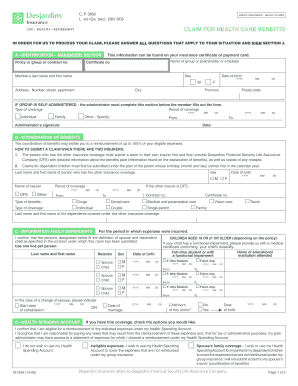
Get Canada Desjardins 19132a 2014
How it works
-

Open form follow the instructions
-

Easily sign the form with your finger
-

Send filled & signed form or save
How to fill out the Canada Desjardins 19132A online
Filling out the Canada Desjardins 19132A form online can ensure that you efficiently submit your health claims for processing. This guide will walk you through each section of the form, providing clear instructions to help you complete it accurately.
Follow the steps to successfully complete the Canada Desjardins 19132A form.
- Click 'Get Form' button to access the form and open it in your editor.
- Begin with section A - Identification, which is mandatory. Fill in your policy or group number found on your insurance certificate. Provide your name, sex, date of birth, address, and postal code. If applicable, have the group administrator complete this section before you proceed.
- In section B - Coordination of Benefits, provide details about any other insurance coverage you may have. List the name and date of birth of the person with the other insurance, and check the necessary benefits that need to be coordinated between insurers.
- Complete section C - Information About Dependents. List the names and relationships of your dependents, along with their dates of birth. Confirm their relationship with you according to the definition provided in the policy.
- In section D - Health Spending Account, indicate your eligibility for a reimbursement and whether you want to use your health spending account for any ineligible expenses.
- Section E - Direct Deposit Service requires you to attach a specimen cheque marked 'VOID' if you wish to enroll. Provide your banking information for automatic deposits.
- In section F - Electronic Notice Service, enter your email address to receive updates about your claim once processed, if you enrolled in direct deposit.
- Fill out section G - Information About the Claim, marking whether the claim is a result of a work injury or an accident. Provide details relevant to the nature of your claim.
- If applicable, fill in section H - Out-of-Province Expenses with information regarding the trip, including dates and amount claimed.
- Review section I - Personal Information Management for details on how your information will be used and stored.
- Finally, sign in section J - Declaration and Authorization. Confirm that all information is accurate and complete, and then submit your claim to the address provided.
- You can now save changes, download, print, or share your completed form as needed.
Complete your forms online today for a smooth claims submission process.
Get form
To find out your Desjardins username, start by checking previous emails or documentation from Desjardins that may include your login credentials. If you cannot locate such information, you can utilize the 'Forgot Username' feature on the website. This feature will guide you through the necessary steps to recover your account information securely. Your username is essential for accessing your Canada Desjardins 19132A benefits and services.