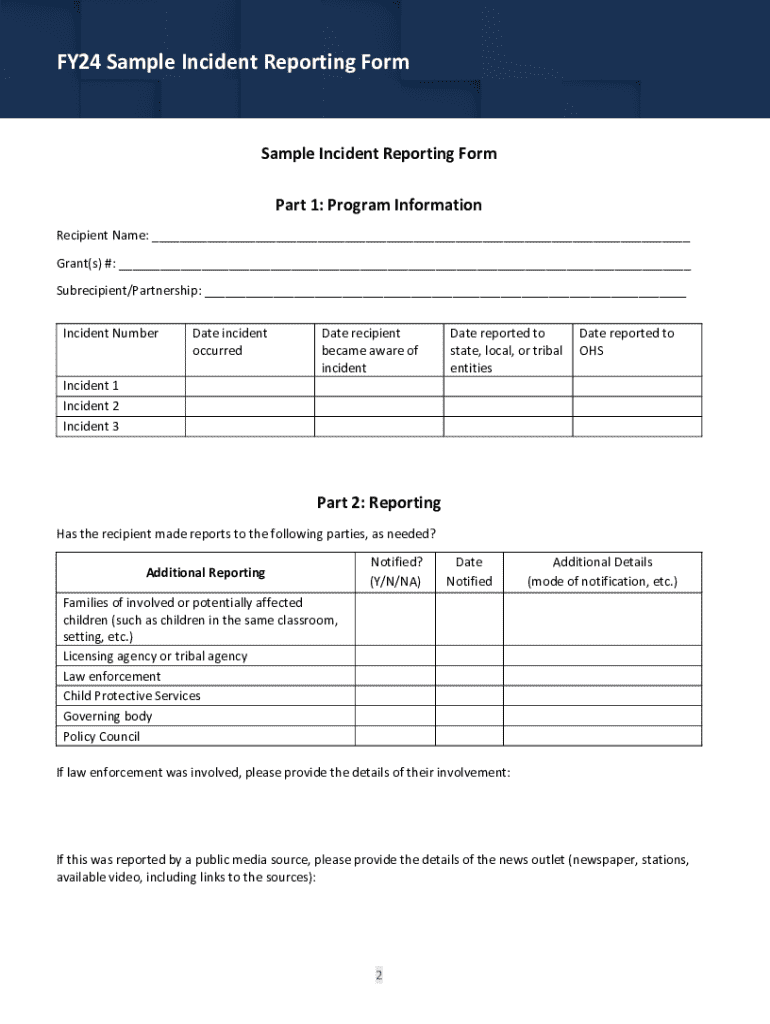
Immediately or as soon as practicable, and not later than seven calendar days following the incident. Head Start recipients should not wait for the completion of state or other investigations but should report immediately or as soon as practicable. Recipients are responsible for reporting the following incidents, precipitated by staff, consultants, contractors, or volunteers, of: Potential child abuse, neglect, and inappropriate conduct by program staff, consultants, contractor.
Loading

Open form follow the instructions

Easily sign the form with your finger

Send filled & signed form or save
How to fill out and sign Office Of Head Start Sample Incident Reporting Form online?
Get your online template and fill it in using progressive features. Enjoy smart fillable fields and interactivity.Follow the simple instructions below:
The preparing of legal paperwork can be expensive and time-ingesting. However, with our predesigned online templates, things get simpler. Now, creating a Office Of Head Start Sample Incident Reporting Form requires a maximum of 5 minutes. Our state-specific online samples and clear guidelines eliminate human-prone mistakes.
Follow our simple actions to get your Office Of Head Start Sample Incident Reporting Form well prepared rapidly:
- Pick the web sample from the catalogue.
- Type all required information in the required fillable areas. The intuitive drag&drop interface makes it easy to add or relocate fields.
- Make sure everything is completed correctly, without any typos or absent blocks.
- Place your e-signature to the page.
- Click Done to confirm the changes.
- Save the record or print out your PDF version.
- Submit immediately towards the recipient.
Make use of the quick search and innovative cloud editor to produce a correct Office Of Head Start Sample Incident Reporting Form. Clear away the routine and produce paperwork on the web!
Tips on how to fill out, edit and sign Office Of Head Start Sample Incident Reporting Form online
How to fill and sign Office Of Head Start Sample Incident Reporting Form
Get your online template and fill it in using progressive features. Enjoy smart fillable fields and interactivity.Follow the simple instructions below:
The preparing of legal paperwork can be expensive and time-ingesting. However, with our predesigned online templates, things get simpler. Now, creating a Office Of Head Start Sample Incident Reporting Form requires a maximum of 5 minutes. Our state-specific online samples and clear guidelines eliminate human-prone mistakes.
Follow our simple actions to get your Office Of Head Start Sample Incident Reporting Form well prepared rapidly:
- Pick the web sample from the catalogue.
- Type all required information in the required fillable areas. The intuitive drag&drop interface makes it easy to add or relocate fields.
- Make sure everything is completed correctly, without any typos or absent blocks.
- Place your e-signature to the page.
- Click Done to confirm the changes.
- Save the record or print out your PDF version.
- Submit immediately towards the recipient.
Make use of the quick search and innovative cloud editor to produce a correct Office Of Head Start Sample Incident Reporting Form. Clear away the routine and produce paperwork on the web!
How to edit Office Of Head Start Sample Incident Reporting Form
Pick a reliable document editing solution you can rely on. Edit, complete, and certify Office Of Head Start Sample Incident Reporting Form securely online.
Very often, modifying forms, like Office Of Head Start Sample Incident Reporting Form, can be a challenge, especially if you received them in a digital format but don’t have access to specialized software. Of course, you can use some workarounds to get around it, but you risk getting a form that won't meet the submission requirements. Using a printer and scanner isn’t a way out either because it's time- and resource-consuming.
We provide a smoother and more efficient way of modifying forms. An extensive catalog of document templates that are easy to edit and certify, making fillable for other individuals. Our solution extends way beyond a set of templates. One of the best parts of using our services is that you can edit Office Of Head Start Sample Incident Reporting Form directly on our website.
Since it's a web-based service, it saves you from having to get any computer software. Additionally, not all company rules allow you to install it on your corporate laptop. Here's how you can effortlessly and securely complete your paperwork with our platform.
- Click the Get Form > you’ll be instantly taken to our editor.
- As soon as opened, you can start the editing process.
- Choose checkmark or circle, line, arrow and cross and other choices to annotate your document.
- Pick the date option to add a particular date to your document.
- Add text boxes, photos and notes and more to enrich the content.
- Utilize the fillable fields option on the right to create fillable {fields.
- Choose Sign from the top toolbar to generate and create your legally-binding signature.
- Click DONE and save, print, and share or get the document.
Say goodbye to paper and other inefficient ways of executing your Office Of Head Start Sample Incident Reporting Form or other files. Use our solution instead that combines one of the richest libraries of ready-to-customize templates and a powerful document editing services. It's easy and secure, and can save you lots of time! Don’t take our word for it, give it a try yourself!
How to fill and sign Office Of Head Start Sample Incident Reporting Form
Get your online template and fill it in using progressive features. Enjoy smart fillable fields and interactivity.Follow the simple instructions below:
The preparing of legal paperwork can be expensive and time-ingesting. However, with our predesigned online templates, things get simpler. Now, creating a Office Of Head Start Sample Incident Reporting Form requires a maximum of 5 minutes. Our state-specific online samples and clear guidelines eliminate human-prone mistakes.
Follow our simple actions to get your Office Of Head Start Sample Incident Reporting Form well prepared rapidly:
- Pick the web sample from the catalogue.
- Type all required information in the required fillable areas. The intuitive drag&drop interface makes it easy to add or relocate fields.
- Make sure everything is completed correctly, without any typos or absent blocks.
- Place your e-signature to the page.
- Click Done to confirm the changes.
- Save the record or print out your PDF version.
- Submit immediately towards the recipient.
Make use of the quick search and innovative cloud editor to produce a correct Office Of Head Start Sample Incident Reporting Form. Clear away the routine and produce paperwork on the web!
Experience a faster way to fill out and sign forms on the web. Access the most extensive library of templates available.
Related content
Lower Columbia College Head Start/EHS/ECEAP. Incident Summary Report. 1. Identification...
This is a Field Reference Guide for the Automated Crash Reporting System, covering an...
Get answers to your most pressing questions about US Legal Forms API.
How to fill out an incident report form?
Filling out an incident report form starts by gathering all necessary information before you begin. Use the Office Of Head Start Sample Incident Reporting Form to guide you through the process, ensuring you note relevant details such as involved parties, actions taken, and follow-up measures required. Be specific and straightforward in your writing, as clarity is key. Once completed, review the form for accuracy and completeness to ensure it serves its purpose effectively.
How to write an incident report for kids?
When writing an incident report for kids using the Office Of Head Start Sample Incident Reporting Form, use simple language that is easy for them to understand. Focus on capturing the facts without embellishment, such as what led to the incident and its aftermath. Encourage kids to express how they felt during the incident, as their perspective can provide valuable context. This approach not only aids in accuracy but also supports their emotional understanding.
What is the best way to fill out an incident report example?
The best way to fill out an Office Of Head Start Sample Incident Reporting Form is to start with clear and concise information. Begin by providing details about the incident, including the date, time, and location. It is important to describe what happened, who was involved, and any witnesses present. By following this structured approach, you ensure the incident report is informative and useful for future reference.
How to fill an incident form?
To fill an incident form, start by reviewing the form’s sections carefully. Input the necessary data in each segment, making sure to provide detailed descriptions where required. Familiarizing yourself with the Office Of Head Start Sample Incident Reporting Form can simplify this process and enhance the form’s effectiveness.
How to make an incident report sample for work?
To create an incident report sample for work, consider the specific incidents you need to document. Outline key details such as what happened, when it occurred, and who was involved. Using the Office Of Head Start Sample Incident Reporting Form can provide a solid template to help you produce a well-organized and professional report.
What are the 5 rules of incident reporting?
The five rules of incident reporting include being factual, timely, detailed, objective, and clear. Adhering to these guidelines helps ensure that your reports provide accurate and relevant information. The Office Of Head Start Sample Incident Reporting Form exemplifies these principles, which can guide you in creating thorough and effective reports.
How to make an incident report letter format?
To make an incident report letter format, structure your letter clearly and concisely. Start with your contact information, followed by the date and recipient’s information. Use the Office Of Head Start Sample Incident Reporting Form to ensure you cover all necessary elements and present your case effectively.
How to create an incident report in Excel?
To create an incident report in Excel, start by launching a new spreadsheet. Designate columns for essential details like date, involved individuals, and a description of the incident. You can refer to the Office Of Head Start Sample Incident Reporting Form for a comprehensive structure that addresses all important components.
How to create an incident report form?
Creating an incident report form involves planning its layout and content. Begin by pinpointing the incidents you want to report and the information required for each case. Consider using the Office Of Head Start Sample Incident Reporting Form as a template, which helps streamline the process and ensures compliance with standards.
How do I create an incident report form?
To create an incident report form, start by identifying the key information you need to capture, such as dates, times, and involved parties. Next, outline the structure of the form, making it easy to fill out. You can utilize the Office Of Head Start Sample Incident Reporting Form to guide your design, ensuring all necessary details are included for clarity and compliance.
Use professional pre-built templates to fill in and sign documents online faster. Get access to thousands of forms.
If you believe that this page should be taken down, please follow our DMCA take down process here.