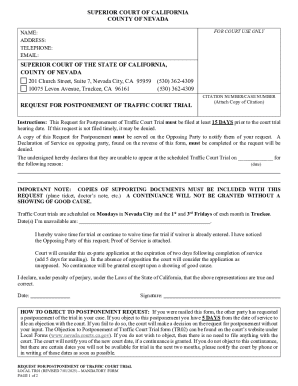
Get Ca Local Tr01 - County Of Nevada 2025-2026
How it works
-

Open form follow the instructions
-

Easily sign the form with your finger
-

Send filled & signed form or save
How to fill out and sign CA Local TR01 - County Of Nevada online?
Get your online template and fill it in using progressive features. Enjoy smart fillable fields and interactivity.Follow the simple instructions below:Feel all the benefits of completing and submitting legal documents online. Using our platform filling in CA Local TR01 - County Of Nevada only takes a matter of minutes. We make that achievable by giving you access to our full-fledged editor capable of changing/fixing a document?s initial textual content, adding special fields, and putting your signature on.
Execute CA Local TR01 - County Of Nevada in several moments following the guidelines listed below:
- Select the template you need from the library of legal form samples.
- Click the Get form button to open it and start editing.
- Submit the necessary boxes (they will be marked in yellow).
- The Signature Wizard will help you add your electronic autograph after you have finished imputing details.
- Add the relevant date.
- Look through the whole document to make certain you?ve completed all the information and no corrections are needed.
- Click Done and download the ecompleted form to the computer.
Send the new CA Local TR01 - County Of Nevada in a digital form when you finish filling it out. Your data is securely protected, because we keep to the latest security requirements. Join numerous satisfied customers who are already filling in legal templates straight from their apartments.
Tips on how to fill out, edit and sign CA Local TR01 - County Of Nevada online
How to fill out and sign CA Local TR01 - County Of Nevada online?
Get your online template and fill it in using progressive features. Enjoy smart fillable fields and interactivity.Follow the simple instructions below:
Feel all the benefits of completing and submitting legal documents online. Using our platform filling in CA Local TR01 - County Of Nevada only takes a matter of minutes. We make that achievable by giving you access to our full-fledged editor capable of changing/fixing a document?s initial textual content, adding special fields, and putting your signature on.
Execute CA Local TR01 - County Of Nevada in several moments following the guidelines listed below:
- Select the template you need from the library of legal form samples.
- Click the Get form button to open it and start editing.
- Submit the necessary boxes (they will be marked in yellow).
- The Signature Wizard will help you add your electronic autograph after you have finished imputing details.
- Add the relevant date.
- Look through the whole document to make certain you?ve completed all the information and no corrections are needed.
- Click Done and download the ecompleted form to the computer.
Send the new CA Local TR01 - County Of Nevada in a digital form when you finish filling it out. Your data is securely protected, because we keep to the latest security requirements. Join numerous satisfied customers who are already filling in legal templates straight from their apartments.
How to edit CA Local TR01 - County Of Nevada: customize forms online
Find the right CA Local TR01 - County Of Nevada template and edit it on the spot. Streamline your paperwork with a smart document editing solution for online forms.
Your day-to-day workflow with documents and forms can be more effective when you have all you need in one place. For instance, you can find, get, and edit CA Local TR01 - County Of Nevada in one browser tab. If you need a specific CA Local TR01 - County Of Nevada, you can easily find it with the help of the smart search engine and access it immediately. You do not have to download it or search for a third-party editor to edit it and add your data. All of the tools for effective work go in one packaged solution.
This editing solution enables you to customize, fill, and sign your CA Local TR01 - County Of Nevada form right on the spot. Once you see an appropriate template, click on it to open the editing mode. Once you open the form in the editor, you have all the needed instruments at your fingertips. You can easily fill in the dedicated fields and remove them if needed with the help of a simple yet multifunctional toolbar. Apply all the changes immediately, and sign the form without leaving the tab by merely clicking the signature field. After that, you can send or print your document if required.
Make more custom edits with available instruments.
- Annotate your document using the Sticky note tool by placing a note at any spot within the document.
- Add required visual elements, if needed, with the Circle, Check, or Cross instruments.
- Modify or add text anywhere in the document using Texts and Text box instruments. Add content with the Initials or Date tool.
- Modify the template text using the Highlight and Blackout, or Erase instruments.
- Add custom visual elements using the Arrow and Line, or Draw tools.
Discover new options in efficient and effortless paperwork. Find the CA Local TR01 - County Of Nevada you need in minutes and fill it in in the same tab. Clear the mess in your paperwork for good with the help of online forms.
Converting a California corporation to a Nevada corporation involves first filing a plan of conversion in both states. This plan must meet the requirements of CA Local TR01 - County Of Nevada, ensuring smooth operation in the new state. Consider using US Legal Forms to access the necessary documents and ensure compliance throughout your conversion process.