Loading
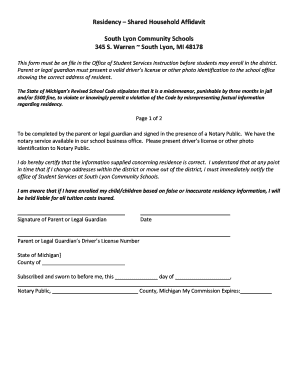
Get Mi South Lyon Community Schools Residency - Shared Household Affidavit 2016-2026
How it works
-

Open form follow the instructions
-

Easily sign the form with your finger
-

Send filled & signed form or save
How to fill out the MI South Lyon Community Schools Residency - Shared Household Affidavit online
Completing the MI South Lyon Community Schools Residency - Shared Household Affidavit is an essential step for families wishing to enroll their children in the district. This guide provides a clear, step-by-step approach to assist users in filling out the form accurately and efficiently online.
Follow the steps to fill out the affidavit for residency verification.
- Click ‘Get Form’ button to access the document and launch it in your editing application.
- Begin by identifying the section designated for the parent or legal guardian's information. Fill in your full name, address, and contact details. Ensure that the details provided are complete and accurate as these will be used for residency verification.
- Next, indicate the driver's license number of the parent or legal guardian, along with the state of issuance. This step is critical to establish identity and validate residency.
- Proceed to fill out the section that requires the resident's information. Include the name, address, and two proofs of residency. Attach the necessary documentation to ensure compliance with local requirements.
- List all individuals residing with you, including their names, grades, and dates of birth. This information must align with the children's information provided by the parent or legal guardian.
- After completing all required fields, sign the document in the presence of a Notary Public. Ensure you have a valid photo identification ready for verification.
- Finally, save your changes, and choose to download, print, or share the completed Affidavit for submission as needed.
Complete your residency affidavit online today to ensure timely enrollment in South Lyon Community Schools.