Loading
Get Canada Imm 5741 E 2016
How it works
-

Open form follow the instructions
-

Easily sign the form with your finger
-

Send filled & signed form or save
How to fill out the Canada IMM 5741 E online
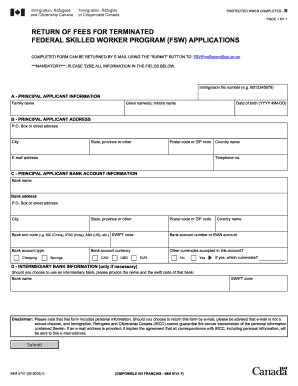
The Canada IMM 5741 E form is used for the return of fees for terminated federal skilled worker program applications. This guide aims to assist users in accurately completing the form online by providing a step-by-step approach.
Follow the steps to complete the Canada IMM 5741 E form.
- Click the ‘Get Form’ button to access the form and open it in the editing interface.
- Enter your immigration file number in the designated field. This number usually starts with the letter 'B' followed by eight digits.
- In section A, provide the principal applicant's information. Fill in the family name, given name(s), and middle name as required.
- Next, enter the date of birth in the format YYYY-MM-DD in section A.
- Move to section B and fill in the principal applicant's address details: P.O. Box or street address, city, state/province, postal/ZIP code, email address, country name, and telephone number.
- Proceed to section C to provide bank account information. This includes the bank name, address (P.O. Box or street address, city, state/province, postal/ZIP code), and sort code or SWIFT code if applicable.
- Indicate the type of bank account (chequing or savings) and enter the bank account number or IBAN. Additionally, choose the currency of the bank account, specifying if it accepts other currencies.
- If necessary, complete section D with the intermediary bank information, including the bank name and SWIFT code.
- Review all entered information for accuracy. After completing the form, you can save changes, download, print, or share the completed document.
Don't hesitate to complete your Canada IMM 5741 E online using the guidance provided.
Get form
Experience a faster way to fill out and sign forms on the web. Access the most extensive library of templates available.
If you cannot open IRCC forms, it may be due to a few common issues. First, ensure that you have a compatible PDF reader installed. Additionally, if you are accessing the Canada IMM 5741 E from an outdated browser, it might hinder file accessibility. Consider updating your browser or using a different one to resolve the issue.
Get This Form Now!
Use professional pre-built templates to fill in and sign documents online faster. Get access to thousands of forms.