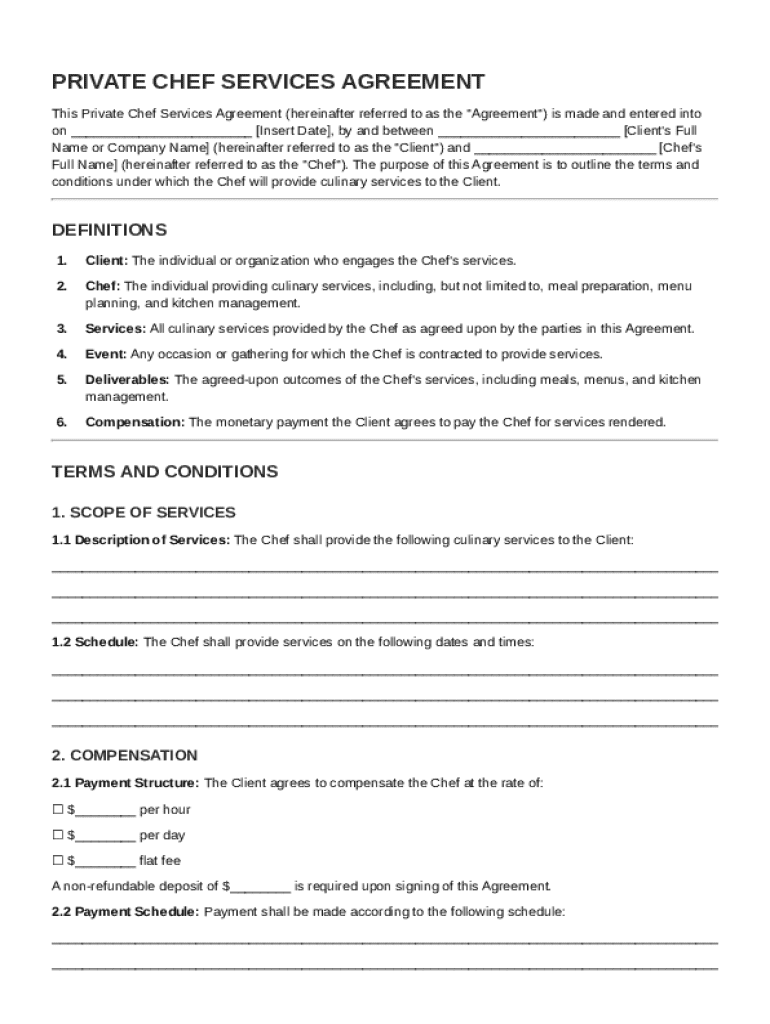
N Client's Full Name or Company Name (hereinafter referred to as the "Client") and Chef's Full Name (hereinafter referred to as the "Chef"). The purpose of this Agreement is to outline the terms and conditions under which the Chef will provide culinary services to the Client. DEFINITIONS 1. Client: The individual or organization who engages the Chef's services. 2. Chef: The individual providing culinary services, including, but not limite.

Open form follow the instructions

Easily sign the form with your finger

Send filled & signed form or save
How to fill out and sign Private Chef Contract Template online?
Get your online template and fill it in using progressive features. Enjoy smart fillable fields and interactivity.Follow the simple instructions below:
The times of terrifying complicated legal and tax forms are over. With US Legal Forms the process of completing official documents is anxiety-free. The best editor is directly close at hand supplying you with a wide range of beneficial tools for completing a Private Chef Contract Template. These tips, combined with the editor will guide you with the whole procedure.
- Click the Get Form button to start editing.
- Activate the Wizard mode on the top toolbar to obtain extra tips.
- Fill in every fillable area.
- Ensure the info you add to the Private Chef Contract Template is updated and correct.
- Include the date to the document using the Date function.
- Select the Sign tool and make a signature. Feel free to use 3 available options; typing, drawing, or uploading one.
- Check each and every area has been filled in correctly.
- Select Done in the top right corne to export the document. There are many ways for getting the doc. An attachment in an email or through the mail as a hard copy, as an instant download.
We make completing any Private Chef Contract Template less difficult. Get started now!
Tips on how to fill out, edit and sign Private Chef Contract Template online
How to fill and sign Private Chef Contract Template
Get your online template and fill it in using progressive features. Enjoy smart fillable fields and interactivity.Follow the simple instructions below:
The times of terrifying complicated legal and tax forms are over. With US Legal Forms the process of completing official documents is anxiety-free. The best editor is directly close at hand supplying you with a wide range of beneficial tools for completing a Private Chef Contract Template. These tips, combined with the editor will guide you with the whole procedure.
- Click the Get Form button to start editing.
- Activate the Wizard mode on the top toolbar to obtain extra tips.
- Fill in every fillable area.
- Ensure the info you add to the Private Chef Contract Template is updated and correct.
- Include the date to the document using the Date function.
- Select the Sign tool and make a signature. Feel free to use 3 available options; typing, drawing, or uploading one.
- Check each and every area has been filled in correctly.
- Select Done in the top right corne to export the document. There are many ways for getting the doc. An attachment in an email or through the mail as a hard copy, as an instant download.
We make completing any Private Chef Contract Template less difficult. Get started now!
How to edit Private Chef Contract Template
Fill out and sign your Private Chef Contract Template quickly and error-free. Get and edit, and sign customizable form templates in a comfort of a single tab.
Your document workflow can be far more efficient if everything you need for modifying and handling the flow is arranged in one place. If you are looking for a Private Chef Contract Template form sample, this is a place to get it and fill it out without looking for third-party solutions. With this intelligent search engine and editing tool, you won’t need to look any further.
Simply type the name of the Private Chef Contract Template or any other form and find the right template. If the sample seems relevant, you can start modifying it right on the spot by clicking Get form. No need to print or even download it. Hover and click on the interactive fillable fields to place your details and sign the form in a single editor.
Use more modifying tools to customize your template:
- Check interactive checkboxes in forms by clicking on them. Check other areas of the Private Chef Contract Template form text by using the Cross, Check, and Circle tools
- If you need to insert more textual content into the document, use the Text tool or add fillable fields with the respective button. You can even specify the content of each fillable field.
- Add pictures to forms with the Image button. Add pictures from your device or capture them with your computer camera.
- Add custom graphic components to the document. Use Draw, Line, and Arrow tools to draw on the form.
- Draw over the text in the document if you want to conceal it or stress it. Cover text fragments using theErase and Highlight, or Blackout tool.
- Add custom components such as Initials or Date using the respective tools. They will be generated automatically.
- Save the form on your computer or convert its format to the one you need.
When equipped with a smart forms catalog and a powerful document modifying solution, working with documentation is easier. Find the form look for, fill it out instantly, and sign it on the spot without downloading it. Get your paperwork routine simplified with a solution tailored for modifying forms.
How to fill and sign Private Chef Contract Template
Get your online template and fill it in using progressive features. Enjoy smart fillable fields and interactivity.Follow the simple instructions below:
The times of terrifying complicated legal and tax forms are over. With US Legal Forms the process of completing official documents is anxiety-free. The best editor is directly close at hand supplying you with a wide range of beneficial tools for completing a Private Chef Contract Template. These tips, combined with the editor will guide you with the whole procedure.
- Click the Get Form button to start editing.
- Activate the Wizard mode on the top toolbar to obtain extra tips.
- Fill in every fillable area.
- Ensure the info you add to the Private Chef Contract Template is updated and correct.
- Include the date to the document using the Date function.
- Select the Sign tool and make a signature. Feel free to use 3 available options; typing, drawing, or uploading one.
- Check each and every area has been filled in correctly.
- Select Done in the top right corne to export the document. There are many ways for getting the doc. An attachment in an email or through the mail as a hard copy, as an instant download.
We make completing any Private Chef Contract Template less difficult. Get started now!
Experience a faster way to fill out and sign forms on the web. Access the most extensive library of templates available.
Related content
This ChEF PURCHASE AGREEMENT is made and entered into as of August 31, 2022 (together with...
# Chef. # Attendants. # Party Maids. RENTALS $ 00.00. Tent (examples). Dance floor. Sound...
Sep 25, 2019 — ... contract and (2) certain costs to fulfill a contract as an asset...
Get answers to your most pressing questions about US Legal Forms API.
How to write a simple contract agreement?
Writing a simple contract agreement involves stating the key terms and conditions clearly. Start with the names of the parties involved, followed by a description of the services provided. Make sure to include details such as payment terms, duration of service, and any cancellation policies. Using a Private Chef Contract Template can streamline this process and ensure you cover all necessary aspects of the agreement.
How do I write my private chef CV?
To write an effective private chef CV, begin by clearly outlining your culinary skills and experiences. Include relevant details such as your education, work history, and any specialized training. Make sure to highlight your ability to create customized meal plans and your knowledge of various cuisines. A well-organized CV paired with a Private Chef Contract Template can showcase your professionalism to potential clients.
How to make a contract for a private service?
To make a contract for a private service, begin by specifying who is providing the service and the nature of that service. Clearly define the responsibilities, terms of payment, and any deadlines involved. A Private Chef Contract Template is an excellent resource that ensures you cover all important aspects, making your contract solid and enforceable.
How do I write a simple contract agreement?
Writing a simple contract agreement starts with outlining the basic terms of the arrangement. Use clear language to define the services, payment structure, and duration. Choosing a Private Chef Contract Template can make this task easier by providing a ready-made structure that you can customize to fit your specific needs.
How to fill a contract?
Filling a contract involves completing all sections with accurate and precise information. This includes details such as service descriptions, payment terms, and any contingencies. A Private Chef Contract Template streamlines this process, providing guidelines to help you adequately fill in critical details and avoid misunderstandings.
What are the 5 requirements of a valid contract?
A valid contract requires offer, acceptance, consideration, mutual consent, and legal capacity. An offer outlines the terms to be accepted by the other party, while consideration refers to the value exchanged. Using a Private Chef Contract Template can help you ensure that all these requirements are met clearly and effectively, providing protection for both parties.
How to write a private contract?
Writing a private contract involves outlining the agreement between parties in a clear and concise manner. Begin with an introduction that identifies the parties and the intent of the contract. Utilizing a Private Chef Contract Template ensures you include key elements such as services offered, timelines, and fees, which can make your contract both effective and legally sound.
How to fill out a contract agreement?
To fill out a contract agreement, start by clearly stating the names of all parties involved and the purpose of the contract. Next, include specific terms and conditions, such as payment details and service expectations. A Private Chef Contract Template can help simplify this process by providing a structured format that covers all essential elements.
How do I make a private contract with myself?
Making a private contract with yourself requires you to clearly outline the terms of the agreement. A Private Chef Contract Template can help structure this effectively, detailing your commitments and expectations. This internal contract can be useful for accountability and organization. To simplify this process, consider using available templates from uslegalforms designed for personal agreements.
Can you write your own service contract?
Yes, writing your own service contract is entirely possible. Focus on creating a detailed Private Chef Contract Template that outlines the services provided, payment terms, and duration of the service. Ensure that the contract is clear and understandable for both parties. You may find it helpful to use tools from uslegalforms to create a professional-looking document.
Use professional pre-built templates to fill in and sign documents online faster. Get access to thousands of forms.
If you believe that this page should be taken down, please follow our DMCA take down process here.