Loading
Form preview
  • US Legal Forms
  • Other Templates
  • More Forms
  • More Multi-State Forms
  • Real Estate Termination Contract Template

Get Real Estate Termination Contract Template

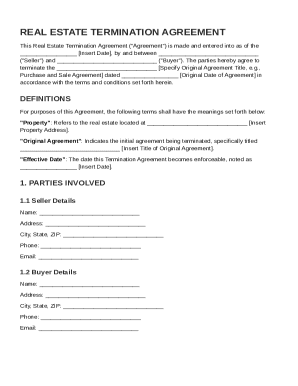
The Insert Date , by and between ("Seller") and ("Buyer"). The parties hereby agree to terminate the Specify Original Agreement Title, e.g., Purchase and Sale Agreement dated Original Date of Agreement in accordance with the terms and conditions set forth herein. DEFINITIONS For purposes of this Agreement, the following terms shall have the meanings set forth be.

How it works

  1. Open form

    Open form follow the instructions

  2. Easily sign form

    Easily sign the form with your finger

  3. Share form

    Send filled & signed form or save

How to fill out and sign Real Estate Termination Contract Template online?

Get your online template and fill it in using progressive features. Enjoy smart fillable fields and interactivity.Follow the simple instructions below:

The days of distressing complicated tax and legal documents have ended. With US Legal Forms the entire process of submitting official documents is anxiety-free. The leading editor is already close at hand supplying you with various useful instruments for submitting a Real Estate Termination Contract Template. These guidelines, with the editor will help you with the complete procedure.

  1. Click the Get Form button to begin filling out.
  2. Activate the Wizard mode in the top toolbar to have more suggestions.
  3. Fill each fillable area.
  4. Ensure that the information you fill in Real Estate Termination Contract Template is up-to-date and accurate.
  5. Add the date to the document using the Date tool.
  6. Click on the Sign tool and make an electronic signature. You will find three available options; typing, drawing, or capturing one.
  7. Check once more every field has been filled in properly.
  8. Click Done in the top right corne to save or send the record. There are many options for getting the doc. As an instant download, an attachment in an email or through the mail as a hard copy.

We make completing any Real Estate Termination Contract Template much faster. Get started now!

Tips on how to fill out, edit and sign Real Estate Termination Contract Template online

How to fill out and sign Real Estate Termination Contract Template online?

Get your online template and fill it in using progressive features. Enjoy smart fillable fields and interactivity.Follow the simple instructions below:

The days of distressing complicated tax and legal documents have ended. With US Legal Forms the entire process of submitting official documents is anxiety-free. The leading editor is already close at hand supplying you with various useful instruments for submitting a Real Estate Termination Contract Template. These guidelines, with the editor will help you with the complete procedure.

  1. Click the Get Form button to begin filling out.
  2. Activate the Wizard mode in the top toolbar to have more suggestions.
  3. Fill each fillable area.
  4. Ensure that the information you fill in Real Estate Termination Contract Template is up-to-date and accurate.
  5. Add the date to the document using the Date tool.
  6. Click on the Sign tool and make an electronic signature. You will find three available options; typing, drawing, or capturing one.
  7. Check once more every field has been filled in properly.
  8. Click Done in the top right corne to save or send the record. There are many options for getting the doc. As an instant download, an attachment in an email or through the mail as a hard copy.

We make completing any Real Estate Termination Contract Template much faster. Get started now!

How to edit Real Estate Termination Contract Template: customize forms online

Fill out and sign your Real Estate Termination Contract Template quickly and error-free. Get and edit, and sign customizable form templates in a comfort of a single tab.

Your document workflow can be a lot more efficient if everything required for modifying and managing the flow is organized in one place. If you are searching for a Real Estate Termination Contract Template form sample, this is a place to get it and fill it out without looking for third-party solutions. With this intelligent search engine and editing tool, you won’t need to look any further.

Simply type the name of the Real Estate Termination Contract Template or any other form and find the right template. If the sample seems relevant, you can start modifying it right on the spot by clicking Get form. No need to print or even download it. Hover and click on the interactive fillable fields to insert your information and sign the form in a single editor.

Use more modifying tools to customize your form:

  • Check interactive checkboxes in forms by clicking on them. Check other areas of the Real Estate Termination Contract Template form text by using the Cross, Check, and Circle tools
  • If you need to insert more text into the file, utilize the Text tool or add fillable fields with the respective button. You can even specify the content of each fillable field.
  • Add images to forms with the Image button. Add images from your device or capture them with your computer camera.
  • Add custom visual elements to the document. Use Draw, Line, and Arrow tools to draw on the document.
  • Draw over the text in the document if you wish to conceal it or stress it. Cover text fragments with theErase and Highlight, or Blackout instrument.
  • Add custom elements like Initials or Date with the respective tools. They will be generated automatically.
  • Save the form on your computer or convert its format to the one you require.

When equipped with a smart forms catalog and a powerful document modifying solution, working with documentation is easier. Find the form you require, fill it out right away, and sign it on the spot without downloading it. Get your paperwork routine simplified with a solution designed for modifying forms.

Get form

Experience a faster way to fill out and sign forms on the web. Access the most extensive library of templates available.
Get form

Related content

Notice of Buyer's Termination of Contract | TREC...
This form is used when a buyer wants to notify a seller that the buyer is terminating an...
Learn more
TERMINATION OF AGENCY AGREEMENT AND RELEASE
(This form is designed for use by a buyer and seller who agree to terminate the Offer To...
Learn more
Remedies for Real Property Disputes in Florida
In that regard, the following is a sample arbitration clause tailored for a real estate...
Learn more

Related links form

Incoming Wire Memorandum - CSULB Foundation - California State ... Application For University Affairs Vice Chair 2012-13 - Asi Fullerton One Week In Advance Of Interview - California State University, Long ... High School Science And Math Teachers Paid Summer - Howard ... - Hhmi Fullerton

Questions & Answers

Get answers to your most pressing questions about US Legal Forms API.

Contact support

To terminate a real estate contract, it’s important to follow the guidelines set within the contract document. Generally, you must provide written notice to the other party, citing the reasons for termination. A Real Estate Termination Contract Template can help you draft this notice effectively to ensure that it meets legal standards. It offers a clear framework to navigate the termination process smoothly.

Filling out a termination agreement involves clearly stating the reason for termination and including all relevant details about the parties involved. Start by identifying the contract being terminated, then include the date and signatures of all parties. Using a Real Estate Termination Contract Template can streamline this process, as it provides prompts for the essential information you need. This template ensures that you don’t miss any critical elements.

To terminate a real estate agent contract, you should refer to the terms outlined in the agreement itself. Most contracts include a clause that explains how to proceed with termination, including any notice periods required. Utilizing a Real Estate Termination Contract Template will help you draft a formal termination notice that is clear and legally sound. This approach protects both you and the agent by ensuring all necessary steps are taken.

The most common way for real estate contracts to terminate is through mutual agreement between the parties involved. This often happens when both the buyer and seller decide to cancel the deal amicably. By using a Real Estate Termination Contract Template, you can clearly outline the terms and conditions for ending the contract. This template provides a structured way to ensure all parties understand their rights and responsibilities.

To end a relationship with a realtor, first check your listing agreement for termination clauses. Typically, you will need to provide written notice to your realtor and confirm the termination in a formal document like a Real Estate Termination Contract Template. Communication is key; discuss your reasons and ensure all obligations are settled. This will help maintain a professional relationship even after your contract ends.

Yes, you can get out of a contract with an estate agent by following the specified termination procedures outlined in your agreement. Commonly, this requires providing written notice and possibly using a Real Estate Termination Contract Template for documentation. It is important to understand any penalties or conditions associated with early termination. Take the time to review your agreement to ensure a smooth exit.

To write a contract termination agreement, start by clearly stating the intent to terminate the existing contract. Include relevant information such as the date, names of the parties, and the reason for termination. Using a Real Estate Termination Contract Template can guide you through the necessary components and ensure that your document is comprehensive and professional. Finally, have both parties sign to validate the termination.

A termination agreement in real estate is a document that officially ends a contractual relationship between parties. This agreement outlines the terms of the termination and is vital for protecting all parties involved. Utilizing a Real Estate Termination Contract Template simplifies the process, providing a clear framework for both parties. It eliminates confusion and ensures legality in the termination.

To terminate an agency agreement, you should review the specific terms outlined in your contract. Usually, this requires giving written notice to your agent and using a Real Estate Termination Contract Template to formalize the cancellation. Make sure the notice period is respected to avoid any disputes. This approach ensures a smooth exit from the agreement.

A real estate contract can be terminated through several methods, including mutual consent, breach of contract, or the passage of a specified deadline. Always consult the terms outlined in your specific contract. Using a Real Estate Termination Contract Template can simplify the process and clarify each party's responsibilities during the termination.

Get This Form Now!

Use professional pre-built templates to fill in and sign documents online faster. Get access to thousands of forms.
Get form
If you believe that this page should be taken down, please follow our DMCA take down processhere.
Get Real Estate Termination Contract Template
Get form
  • Adoption
  • Bankruptcy
  • Contractors
  • Divorce
  • Home Sales
  • Employment
  • Identity Theft
  • Incorporation
  • Landlord Tenant
  • Living Trust
  • Name Change
  • Personal Planning
  • Small Business
  • Wills & Estates
  • Packages A-Z
  • Affidavits
  • Bankruptcy
  • Bill of Sale
  • Corporate - LLC
  • Divorce
  • Employment
  • Identity Theft
  • Internet Technology
  • Landlord Tenant
  • Living Wills
  • Name Change
  • Power of Attorney
  • Real Estate
  • Small Estates
  • Wills
  • All Forms
  • Forms A-Z
  • Other Templates
  • Legal Hub
  • About Us
  • Help Portal
  • Legal Resources
  • Blog
  • Affiliates
  • Contact Us
  • Delete My Account
  • Site Map
  • Industries
  • Forms in Spanish
  • Localized Forms
  • State-specific Forms
  • Forms Kit
  • Real Estate Handbook
  • All Guides
  • Notarize
  • Incorporation services
  • For Consumers
  • For Small Business
  • For Attorneys
  • USLegal
  • FormsPass
  • pdfFiller
  • signNow
  • altaFlow
  • DocHub
  • Instapage
Form Packages
  • Adoption
  • Bankruptcy
  • Contractors
  • Divorce
  • Home Sales
  • Employment
  • Identity Theft
  • Incorporation
  • Landlord Tenant
  • Living Trust
  • Name Change
  • Personal Planning
  • Small Business
  • Wills & Estates
  • Packages A-Z
Form Categories
  • Affidavits
  • Bankruptcy
  • Bill of Sale
  • Corporate - LLC
  • Divorce
  • Employment
  • Identity Theft
  • Internet Technology
  • Landlord Tenant
  • Living Wills
  • Name Change
  • Power of Attorney
  • Real Estate
  • Small Estates
  • Wills
  • All Forms
  • Forms A-Z
  • Other Templates
Customer Service
  • Legal Hub
  • About Us
  • Help Portal
  • Legal Resources
  • Blog
  • Affiliates
  • Contact Us
  • Delete My Account
  • Site Map
  • Industries
  • Forms in Spanish
  • Localized Forms
  • State-specific Forms
  • Forms Kit
Legal Guides
  • Real Estate Handbook
  • All Guides
Prepared for you
  • Notarize
  • Incorporation services
Our Customers
  • For Consumers
  • For Small Business
  • For Attorneys
Our Sites
  • USLegal
  • FormsPass
  • pdfFiller
  • signNow
  • altaFlow
  • DocHub
  • Instapage
Social Media
Call us now toll free:
+1 833 426 79 33
As seen in:
© Copyright 1999-2026 airSlate Legal Forms, Inc. 17 Station Street, Ste. 203, Brookline, MA 02445
  • Your Privacy Choices
  • Terms of Service
  • Privacy Notice
  • Content Takedown Policy
  • Bug Bounty Program