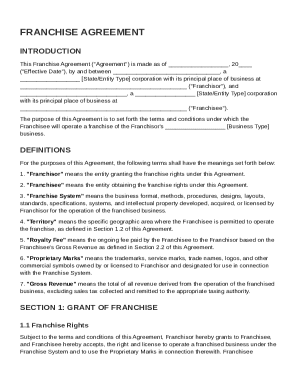
Get Franchise Franchise Contract Template
How it works
-

Open form follow the instructions
-

Easily sign the form with your finger
-

Send filled & signed form or save
How to fill out and sign Franchise Franchise Contract Template online?
Get your online template and fill it in using progressive features. Enjoy smart fillable fields and interactivity.Follow the simple instructions below:The days of frightening complex legal and tax forms are over. With US Legal Forms the process of submitting official documents is anxiety-free. The best editor is directly close at hand supplying you with a wide range of beneficial instruments for completing a Franchise Franchise Contract Template. These tips, in addition to the editor will assist you with the whole procedure.
- Hit the Get Form button to begin filling out.
- Switch on the Wizard mode on the top toolbar to get more suggestions.
- Complete each fillable area.
- Ensure that the information you fill in Franchise Franchise Contract Template is up-to-date and accurate.
- Include the date to the template using the Date function.
- Select the Sign icon and make an e-signature. You can use 3 available alternatives; typing, drawing, or uploading one.
- Make certain each area has been filled in correctly.
- Click Done in the top right corne to export the form. There are several options for receiving the doc. As an instant download, an attachment in an email or through the mail as a hard copy.
We make completing any Franchise Franchise Contract Template easier. Get started now!
Tips on how to fill out, edit and sign Franchise Franchise Contract Template online
How to fill out and sign Franchise Franchise Contract Template online?
Get your online template and fill it in using progressive features. Enjoy smart fillable fields and interactivity.Follow the simple instructions below:
The days of frightening complex legal and tax forms are over. With US Legal Forms the process of submitting official documents is anxiety-free. The best editor is directly close at hand supplying you with a wide range of beneficial instruments for completing a Franchise Franchise Contract Template. These tips, in addition to the editor will assist you with the whole procedure.
- Hit the Get Form button to begin filling out.
- Switch on the Wizard mode on the top toolbar to get more suggestions.
- Complete each fillable area.
- Ensure that the information you fill in Franchise Franchise Contract Template is up-to-date and accurate.
- Include the date to the template using the Date function.
- Select the Sign icon and make an e-signature. You can use 3 available alternatives; typing, drawing, or uploading one.
- Make certain each area has been filled in correctly.
- Click Done in the top right corne to export the form. There are several options for receiving the doc. As an instant download, an attachment in an email or through the mail as a hard copy.
We make completing any Franchise Franchise Contract Template easier. Get started now!
How to edit Franchise Franchise Contract Template: customize forms online
Enjoy the functionality of the multi-featured online editor while filling out your Franchise Franchise Contract Template. Use the variety of tools to quickly complete the blanks and provide the required data right away.
Preparing documentation is time-taking and expensive unless you have ready-to-use fillable templates and complete them electronically. The easiest way to deal with the Franchise Franchise Contract Template is to use our professional and multi-featured online editing tools. We provide you with all the necessary tools for quick document fill-out and enable you to make any adjustments to your templates, adapting them to any demands. Apart from that, you can comment on the changes and leave notes for other people involved.
Here’s what you can do with your Franchise Franchise Contract Template in our editor:
- Complete the blanks using Text, Cross, Check, Initials, Date, and Sign options.
- Highlight significant details with a desired color or underline them.
- Hide confidential details using the Blackout tool or simply remove them.
- Add pictures to visualize your Franchise Franchise Contract Template.
- Substitute the original text using the one corresponding with your needs.
- Leave comments or sticky notes to inform others on the updates.
- Place extra fillable fields and assign them to specific recipients.
- Protect the sample with watermarks, add dates, and bates numbers.
- Share the document in various ways and save it on your device or the cloud in different formats as soon as you finish editing.
Working with Franchise Franchise Contract Template in our powerful online editor is the quickest and most efficient way to manage, submit, and share your paperwork the way you need it from anywhere. The tool works from the cloud so that you can utilize it from any location on any internet-connected device. All templates you generate or fill out are safely kept in the cloud, so you can always access them whenever needed and be assured of not losing them. Stop wasting time on manual document completion and get rid of papers; make it all on the web with minimum effort.
The 7 day rule refers to the requirement that a franchisor must provide a prospective franchisee with a Franchise Disclosure Document (FDD) at least seven days before they sign any agreements or make any payments. This rule helps ensure that the franchisee has adequate time to review the terms and make informed decisions. Incorporating a Franchise Franchise Contract Template that complies with this requirement fortifies transparency and builds trust in the franchise relationship.