Loading
Form preview
  • US Legal Forms
  • Other Templates
  • More Forms
  • More Multi-State Forms
  • Monitor Contract Template

Get Monitor Contract Template

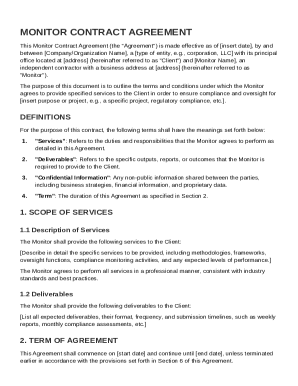
Name , a type of entity, e.g., corporation, LLC with its principal office located at address (hereinafter referred to as "Client") and Monitor Name , an independent contractor with a business address at address (hereinafter referred to as "Monitor"). The purpose of this document is to outline the terms and conditions under which the Monitor agrees to provide specified services to the Client in order to ensure compliance and oversight for insert purpose or project, e.g., a specific proje.

How it works

  1. Open form

    Open form follow the instructions

  2. Easily sign form

    Easily sign the form with your finger

  3. Share form

    Send filled & signed form or save

How to fill out and sign Monitor Contract Template online?

Get your online template and fill it in using progressive features. Enjoy smart fillable fields and interactivity.Follow the simple instructions below:

The days of terrifying complicated tax and legal documents are over. With US Legal Forms the entire process of creating official documents is anxiety-free. The leading editor is right at your fingertips offering you a range of useful instruments for completing a Monitor Contract Template. These tips, together with the editor will help you through the entire procedure.

  1. Click the Get Form option to start enhancing.
  2. Turn on the Wizard mode on the top toolbar to obtain more pieces of advice.
  3. Fill out every fillable field.
  4. Ensure the info you fill in Monitor Contract Template is up-to-date and correct.
  5. Include the date to the form using the Date option.
  6. Click the Sign button and create a digital signature. There are 3 options; typing, drawing, or uploading one.
  7. Check each and every field has been filled in properly.
  8. Click Done in the top right corne to save the form. There are several choices for getting the doc. As an instant download, an attachment in an email or through the mail as a hard copy.

We make completing any Monitor Contract Template simpler. Use it now!

Tips on how to fill out, edit and sign Monitor Contract Template online

How to fill out and sign Monitor Contract Template online?

Get your online template and fill it in using progressive features. Enjoy smart fillable fields and interactivity.Follow the simple instructions below:

The days of terrifying complicated tax and legal documents are over. With US Legal Forms the entire process of creating official documents is anxiety-free. The leading editor is right at your fingertips offering you a range of useful instruments for completing a Monitor Contract Template. These tips, together with the editor will help you through the entire procedure.

  1. Click the Get Form option to start enhancing.
  2. Turn on the Wizard mode on the top toolbar to obtain more pieces of advice.
  3. Fill out every fillable field.
  4. Ensure the info you fill in Monitor Contract Template is up-to-date and correct.
  5. Include the date to the form using the Date option.
  6. Click the Sign button and create a digital signature. There are 3 options; typing, drawing, or uploading one.
  7. Check each and every field has been filled in properly.
  8. Click Done in the top right corne to save the form. There are several choices for getting the doc. As an instant download, an attachment in an email or through the mail as a hard copy.

We make completing any Monitor Contract Template simpler. Use it now!

How to edit Monitor Contract Template: customize forms online

Take away the mess from your paperwork routine. Discover the simplest way to find and edit, and file a Monitor Contract Template

The process of preparing Monitor Contract Template demands accuracy and focus, especially from people who are not well familiar with this kind of job. It is important to get a suitable template and fill it in with the correct information. With the right solution for handling documents, you can get all the tools at hand. It is easy to simplify your editing process without learning additional skills. Locate the right sample of Monitor Contract Template and fill it out immediately without switching between your browser tabs. Discover more instruments to customize your Monitor Contract Template form in the modifying mode.

While on the Monitor Contract Template page, simply click the Get form button to start modifying it. Add your information to the form on the spot, as all the essential tools are at hand right here. The sample is pre-designed, so the effort needed from the user is minimal. Simply use the interactive fillable fields in the editor to easily complete your paperwork. Simply click on the form and proceed to the editor mode right away. Fill in the interactive field, and your file is good to go.

Try out more instruments to customize your form:

  • Place more text around the document if needed. Use the Text and Text Box instruments to insert text in a separate box.
  • Add pre-designed graphic elements like Circle, Cross, and Check with respective instruments.
  • If needed, capture or upload images to the document with the Image tool.
  • If you need to draw something in the document, use Line, Arrow, and Draw instruments.
  • Try the Highlight, Erase, and Blackout tools to customize the text in the document.
  • If you need to add comments to specific document sections, click the Sticky tool and place a note where you want.

Sometimes, a small error can ruin the whole form when someone completes it manually. Forget about inaccuracies in your paperwork. Find the samples you need in moments and complete them electronically using a smart modifying solution.

Get form

Experience a faster way to fill out and sign forms on the web. Access the most extensive library of templates available.
Get form

Related content

Affordable Housing New York - 421-a(16) Marketing...
Upon the Agency's approval of the New Marketing Monitor, Applicant must submit a copy of a...
Learn more
Contract Management Plan Template
A Contract Management Plan makes contracts clear, condensed, and accessible, enabling...
Learn more
Endpoint security monitoring service per license...
Dell EMC Services is pleased to provide Endpoint security monitoring service per license...
Learn more

Related links form

Printable Registration Form - University Of Virginia School Of Law - Law Virginia Urban Www Procedures To Identify And Manage Environmental Issues - Uwf 2011 - MEMBERSHIP APPLICATION - Rev 6-24-10 - University Of ...

Questions & Answers

Get answers to your most pressing questions about US Legal Forms API.

Contact support

Yes, you can create your own contract template tailored to your specific needs. However, ensuring that it covers all necessary legal aspects is crucial for its effectiveness. Using a Monitor Contract Template provides a solid foundation, allowing you to customize it based on your requirements while ensuring compliance with legal standards.

Monitoring contracts involves tracking deadlines, ensuring compliance, and evaluating performance metrics. Regular communication with involved parties also plays a significant role in this process. Using a Monitor Contract Template makes this task easier, allowing you to focus on key aspects rather than getting lost in paperwork.

The 5 C's of a contract are capacity, consideration, consent, legality, and certainty. Understanding these elements is crucial for creating enforceable agreements. A Monitor Contract Template can help you incorporate these elements effectively, ensuring that all necessary components are included.

Contract monitoring refers to the ongoing process of ensuring that all parties fulfill their obligations under the agreement. This process often includes reviewing timelines, deliverables, and compliance with terms. By utilizing a Monitor Contract Template, you streamline your efforts and ensure that critical aspects are not overlooked.

To monitor a contract effectively, you should establish clear benchmarks and milestones. Regularly reviewing key performance indicators will help you track progress. Additionally, utilizing a Monitor Contract Template can simplify this process by providing a structured framework to check compliance and deadlines.

To make a contract file, gather all relevant documents and information that pertain to the agreement. Include the signed contract, copies of any amendments, correspondence, and documentation of compliance with contract terms. Using a monitor contract template can help you systematically structure your file, ensuring all important materials are readily accessible for future reference.

Contract monitoring refers to the ongoing process of tracking the performance and compliance of contracts over time. This ensures that all parties adhere to the agreed terms and helps mitigate any risks associated with contract execution. A monitor contract template can simplify this process, enabling you to set clear performance metrics and timelines that are easy to follow.

Writing a simple contract template involves understanding the key elements needed in any agreement, such as the parties involved, scope of work, payment terms, and termination conditions. Begin by outlining these sections clearly, and ensure the language is straightforward and unambiguous. Using a monitor contract template can guide you in maintaining a professional tone and structure within your documents.

To organize contract files effectively, start by categorizing them based on their type or purpose. Use a consistent naming convention for easy retrieval, and consider using subfolders to separate different categories. Implement a digital contract management system to streamline your process, particularly one that allows you to easily monitor contract templates and access important documents when needed.

To fill up a contract, begin by providing accurate details about all parties involved. Follow with the specifics of the agreement, such as services or products involved and payment terms. Utilizing the Monitor Contract Template simplifies this process, ensuring that you accurately represent the agreement and reduce misunderstandings.

Get This Form Now!

Use professional pre-built templates to fill in and sign documents online faster. Get access to thousands of forms.
Get form
If you believe that this page should be taken down, please follow our DMCA take down processhere.
Get Monitor Contract Template
Get form
  • Adoption
  • Bankruptcy
  • Contractors
  • Divorce
  • Home Sales
  • Employment
  • Identity Theft
  • Incorporation
  • Landlord Tenant
  • Living Trust
  • Name Change
  • Personal Planning
  • Small Business
  • Wills & Estates
  • Packages A-Z
  • Affidavits
  • Bankruptcy
  • Bill of Sale
  • Corporate - LLC
  • Divorce
  • Employment
  • Identity Theft
  • Internet Technology
  • Landlord Tenant
  • Living Wills
  • Name Change
  • Power of Attorney
  • Real Estate
  • Small Estates
  • Wills
  • All Forms
  • Forms A-Z
  • Other Templates
  • Legal Hub
  • About Us
  • Help Portal
  • Legal Resources
  • Blog
  • Affiliates
  • Contact Us
  • Delete My Account
  • Site Map
  • Industries
  • Forms in Spanish
  • Localized Forms
  • State-specific Forms
  • Forms Kit
  • Real Estate Handbook
  • All Guides
  • Notarize
  • Incorporation services
  • For Consumers
  • For Small Business
  • For Attorneys
  • USLegal
  • FormsPass
  • pdfFiller
  • signNow
  • altaFlow
  • DocHub
  • Instapage
Form Packages
  • Adoption
  • Bankruptcy
  • Contractors
  • Divorce
  • Home Sales
  • Employment
  • Identity Theft
  • Incorporation
  • Landlord Tenant
  • Living Trust
  • Name Change
  • Personal Planning
  • Small Business
  • Wills & Estates
  • Packages A-Z
Form Categories
  • Affidavits
  • Bankruptcy
  • Bill of Sale
  • Corporate - LLC
  • Divorce
  • Employment
  • Identity Theft
  • Internet Technology
  • Landlord Tenant
  • Living Wills
  • Name Change
  • Power of Attorney
  • Real Estate
  • Small Estates
  • Wills
  • All Forms
  • Forms A-Z
  • Other Templates
Customer Service
  • Legal Hub
  • About Us
  • Help Portal
  • Legal Resources
  • Blog
  • Affiliates
  • Contact Us
  • Delete My Account
  • Site Map
  • Industries
  • Forms in Spanish
  • Localized Forms
  • State-specific Forms
  • Forms Kit
Legal Guides
  • Real Estate Handbook
  • All Guides
Prepared for you
  • Notarize
  • Incorporation services
Our Customers
  • For Consumers
  • For Small Business
  • For Attorneys
Our Sites
  • USLegal
  • FormsPass
  • pdfFiller
  • signNow
  • altaFlow
  • DocHub
  • Instapage
Social Media
Call us now toll free:
+1 833 426 79 33
As seen in:
© Copyright 1999-2026 airSlate Legal Forms, Inc. 17 Station Street, Ste. 203, Brookline, MA 02445
  • Your Privacy Choices
  • Terms of Service
  • Privacy Notice
  • Content Takedown Policy
  • Bug Bounty Program