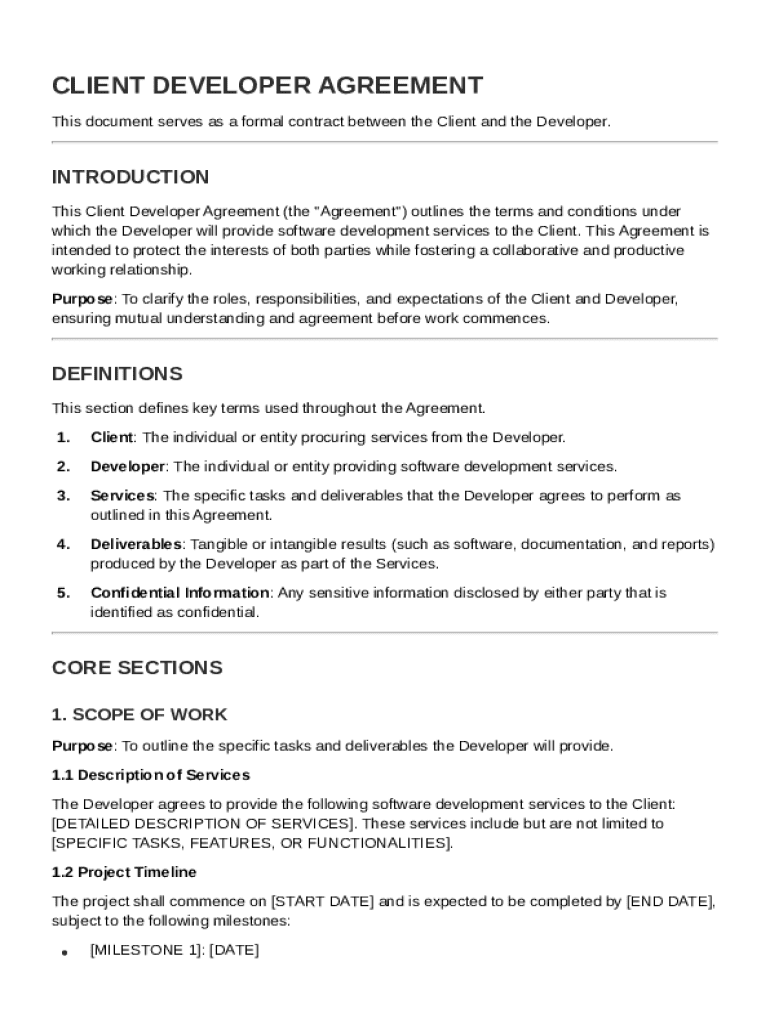
Under which the Developer will provide software development services to the Client. This Agreement is intended to protect the interests of both parties while fostering a collaborative and productive working relationship. Purpose: To clarify the roles, responsibilities, and expectations of the Client and Developer, ensuring mutual understanding and agreement before work commences. DEFINITIONS This section defines key terms used throughout the Agreement. 1. Client: The individual or entity procu.
Loading

Open form follow the instructions

Easily sign the form with your finger

Send filled & signed form or save
How to fill out and sign Client Developer Contract Template online?
Get your online template and fill it in using progressive features. Enjoy smart fillable fields and interactivity.Follow the simple instructions below:
The preparation of lawful documents can be high-priced and time-consuming. However, with our predesigned online templates, things get simpler. Now, using a Client Developer Contract Template requires a maximum of 5 minutes. Our state web-based blanks and simple guidelines remove human-prone mistakes.
Follow our easy steps to have your Client Developer Contract Template ready rapidly:
- Pick the template from the library.
- Type all necessary information in the necessary fillable fields. The intuitive drag&drop user interface allows you to add or relocate areas.
- Check if everything is completed appropriately, without typos or missing blocks.
- Use your e-signature to the page.
- Click Done to confirm the alterations.
- Save the document or print your copy.
- Distribute immediately towards the recipient.
Make use of the quick search and powerful cloud editor to produce a precise Client Developer Contract Template. Clear away the routine and produce paperwork online!
Tips on how to fill out, edit and sign Client Developer Contract Template online
How to fill and sign Client Developer Contract Template
Get your online template and fill it in using progressive features. Enjoy smart fillable fields and interactivity.Follow the simple instructions below:
The preparation of lawful documents can be high-priced and time-consuming. However, with our predesigned online templates, things get simpler. Now, using a Client Developer Contract Template requires a maximum of 5 minutes. Our state web-based blanks and simple guidelines remove human-prone mistakes.
Follow our easy steps to have your Client Developer Contract Template ready rapidly:
- Pick the template from the library.
- Type all necessary information in the necessary fillable fields. The intuitive drag&drop user interface allows you to add or relocate areas.
- Check if everything is completed appropriately, without typos or missing blocks.
- Use your e-signature to the page.
- Click Done to confirm the alterations.
- Save the document or print your copy.
- Distribute immediately towards the recipient.
Make use of the quick search and powerful cloud editor to produce a precise Client Developer Contract Template. Clear away the routine and produce paperwork online!
How to edit Client Developer Contract Template
Sign and share Client Developer Contract Template along with any other business and personal paperwork online without wasting time and resources on printing and postal delivery. Get the most out of our online form editor with a built-in compliant eSignature tool.
Approving and submitting Client Developer Contract Template documents electronically is quicker and more efficient than managing them on paper. However, it requires using online solutions that guarantee a high level of data protection and provide you with a certified tool for generating eSignatures. Our powerful online editor is just the one you need to prepare your Client Developer Contract Template and other individual and business or tax forms in a precise and proper manner in line with all the requirements. It offers all the necessary tools to easily and quickly fill out, edit, and sign paperwork online and add Signature fields for other parties, specifying who and where should sign.
It takes just a few simple actions to fill out and sign Client Developer Contract Template online:
- Open the selected file for further managing.
- Utilize the top toolbar to add Text, Initials, Image, Check, and Cross marks to your sample.
- Underline the key details and blackout or erase the sensitive ones if required.
- Click on the Sign tool above and select how you prefer to eSign your document.
- Draw your signature, type it, upload its picture, or use an alternative option that suits you.
- Move to the Edit Fillable Fileds panel and place Signature areas for other people.
- Click on Add Signer and enter your recipient’s email to assign this field to them.
- Check that all data provided is complete and accurate before you click Done.
- Share your document with others utilizing one of the available options.
When approving Client Developer Contract Template with our powerful online solution, you can always be sure to get it legally binding and court-admissible. Prepare and submit documents in the most beneficial way possible!
How to fill and sign Client Developer Contract Template
Get your online template and fill it in using progressive features. Enjoy smart fillable fields and interactivity.Follow the simple instructions below:
The preparation of lawful documents can be high-priced and time-consuming. However, with our predesigned online templates, things get simpler. Now, using a Client Developer Contract Template requires a maximum of 5 minutes. Our state web-based blanks and simple guidelines remove human-prone mistakes.
Follow our easy steps to have your Client Developer Contract Template ready rapidly:
- Pick the template from the library.
- Type all necessary information in the necessary fillable fields. The intuitive drag&drop user interface allows you to add or relocate areas.
- Check if everything is completed appropriately, without typos or missing blocks.
- Use your e-signature to the page.
- Click Done to confirm the alterations.
- Save the document or print your copy.
- Distribute immediately towards the recipient.
Make use of the quick search and powerful cloud editor to produce a precise Client Developer Contract Template. Clear away the routine and produce paperwork online!
Experience a faster way to fill out and sign forms on the web. Access the most extensive library of templates available.
Related content
The Client hereby appoints and engages the Developer, and the Developer hereby accepts...
DEVELOPER represents and warrants that it is under no obligation or restriction that would...
Preamble. This End User License Agreement (hereinafter referred to as “EULA”) applies...
Get answers to your most pressing questions about US Legal Forms API.
How to make a contract for your client?
To make a contract for your client, define what services you will provide and stipulate payment and timelines. Include any additional clauses that protect you and your client. Using a Client Developer Contract Template can help you create a professional document that meets both parties' needs.
How to make a development agreement?
Making a development agreement involves defining the project’s scope, deliverables, and compensation. Ensure that you include terms regarding intellectual property and confidentiality as well. A specialized Client Developer Contract Template can streamline the development of this agreement.
How do I make my own contract?
To make your own contract, outline the key elements like the parties involved, the scope of work, payment terms, and timelines. Then, organize this information in a clear structure. For efficiency, consider starting with a Client Developer Contract Template, which can provide a comprehensive framework.
Is there a contract template in Google Docs?
Yes, Google Docs offers various templates, including some for contracts. You can find templates by searching within Google Docs or Google Drive. However, using a specific Client Developer Contract Template ensures that you have all relevant terms tailored to your development services.
What are the 3 C's of a contract?
The 3 C's of a contract are clear, concise, and complete. A contract should clearly state the terms to avoid confusion, be concise to ensure understanding, and be complete to cover all necessary details. A well-structured Client Developer Contract Template can help achieve these objectives.
Can I draft a contract without a lawyer?
Yes, you can draft a contract without a lawyer, especially for straightforward agreements. However, it’s important to understand the basic legal requirements for your contract to avoid future disputes. A Client Developer Contract Template can guide you through the essential components, making the process easier.
How to make a contract for clients?
To make a contract for clients, start by outlining the project's scope and the services you will provide. Include payment terms, deadlines, and any other important details. Utilizing a Client Developer Contract Template can help ensure that you cover all essential elements and create a solid agreement.
Use professional pre-built templates to fill in and sign documents online faster. Get access to thousands of forms.
If you believe that this page should be taken down, please follow our DMCA take down process here.