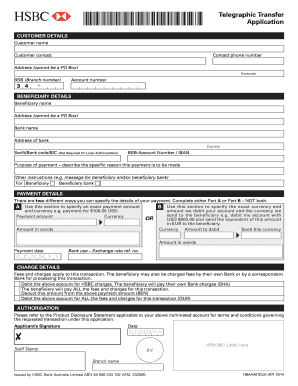
Instructions Print Clear Telegraphic Transfer Application CUSTOMER DETAILS Customer name Customer contact Contact phone number Address (cannot be a PO Box) Postcode BSB (Branch number) 3 4 Account.
Open form follow the instructions
Easily sign the form with your finger
Send filled & signed form or save
How to fill out the AU HSBC HBAA401CUA online
Filling out the AU HSBC HBAA401CUA form is a straightforward process that enables users to facilitate telegraphic transfers. This guide will provide clear step-by-step instructions to assist you in completing the online form accurately and efficiently.
Follow the steps to complete the AU HSBC HBAA401CUA form.
- Click the ‘Get Form’ button to access the AU HSBC HBAA401CUA and open it in the editor.
- Begin by entering your personal details in the 'Customer Details' section. Provide your full name, contact details, phone number, complete address (ensure it is not a PO Box), and postcode.
- Next, input your BSB (Branch number) and account number in the designated fields.
- In the 'Beneficiary Details' section, enter the name and address of the beneficiary. Ensure the address is complete and in a standard format. Provide the bank name and address, and specify the country.
- If applicable, enter the Swift/Bank code/BIC, although this is not required for local AUD transfers, and include the BSB-Account Number or IBAN.
- Clearly describe the purpose of the payment in the corresponding field. You may also include any additional instructions you wish to convey to the beneficiary or their bank.
- Specify who the beneficiary bank is by entering the relevant information.
- Proceed to fill out the 'Payment Details' section. Choose either Part A or Part B to denote how you would like to specify your payment.
- Be sure to also write the payment amount in words.
- Next, fill out the 'Charge Details' section. Choose whether to debit your account for HSBC charges. Indicate the charging preference that suits your situation best.
- Make sure you understand the implications of fees that may arise from this transaction before finalizing your selection.
- In the 'Authorisation' section, review the terms and conditions applicable to your account in the Product Disclosure Statement.
- Date the form, sign by hand, and if required, affix the B61 label to the designated area.
- Once the form is fully completed, you may save changes, download a copy, print, or share the form as needed.
Complete your AU HSBC HBAA401CUA form online today to ensure a smooth telegraphic transfer process.
Experience a faster way to fill out and sign forms on the web. Access the most extensive library of templates available.
Related content
At maturity, HSBC will either pay you the Principal Amount per Note or, if the Closing...
Get answers to your most pressing questions about US Legal Forms API.
Can I sell my shares through HSBC?
Yes, you can sell your shares through HSBC, as they offer various investment and brokerage services. Simply reach out to your local HSBC branch or use their online platform for shares transactions. The AU HSBC HBAA401CUA feature can assist you in navigating this process smoothly.
How do I find my HSBC branch sort code?
You can find your HSBC branch sort code by checking your bank statements or using the HSBC online banking platform. By logging in, you can navigate to your account information where it is usually displayed clearly. Alternatively, you can contact HSBC customer service for immediate assistance.
Can I sell my shares through my bank online?
Yes, many banks allow you to sell shares online, including HSBC. Simply log into your online banking account, locate the investment section, and follow the steps to sell your shares. If you're looking for more guidance, check out the AU HSBC HBAA401CUA features.
How can I sell my shares quickly?
To sell your shares quickly, use an online broker that specializes in fast transactions. Ensure that you have all necessary account information handy for a seamless process. It’s often advantageous to check live market trends, as timing your sale can significantly impact your returns.
How do I sell my Computershare shares?
Selling Computershare shares typically involves logging into your Computershare account or contacting their customer service. You can enter the number of shares you wish to sell, review the transaction details, and confirm the sale. For guidance, you may explore resources provided by the AU HSBC HBAA401CUA site.
How to get annual bank statement HSBC?
To obtain your annual bank statement from HSBC, log into your online banking account. Navigate to the statements section, where you can select and download your annual bank statements in PDF format. If you prefer a physical copy, you may request it directly from your local branch.
What is the full form of Hbap in HSBC?
Hbap stands for HSBC Business Account Program. This program offers tailored services for businesses, including flexible banking solutions and efficient tools to manage finances. If you’re interested in opening an Hbap account, visit the AU HSBC HBAA401CUA page for more information.
How can I sell my HSBC shares?
To sell your HSBC shares, you can use a stockbroker or an online trading platform. If you’re using a platform, simply log in, find your HSBC shares, and follow the prompts to sell. Additionally, consider checking your investment management options to ensure a smooth transaction.
Does HSBC Australia use an IBAN?
HSBC Australia does not use an IBAN, as the Australian banking system primarily employs BSB and account numbers. This is crucial for local transactions. If you have more questions regarding your AU HSBC HBAA401CUA account, uslegalforms can help you navigate any banking documentation requirements you may have.
Do Australian banks use IBAN?
Generally, Australian banks do not use IBAN numbers for domestic transactions. Instead, they rely on BSB codes and account numbers. However, for receiving international payments, you will typically need a SWIFT code specific to your AU HSBC HBAA401CUA account.
Use professional pre-built templates to fill in and sign documents online faster. Get access to thousands of forms.
If you believe that this page should be taken down, please follow our DMCA take down process here.