Loading
Get Au Hgt Bank Details 2011-2026
How it works
-

Open form follow the instructions
-

Easily sign the form with your finger
-

Send filled & signed form or save
How to fill out the AU HGT Bank Details online
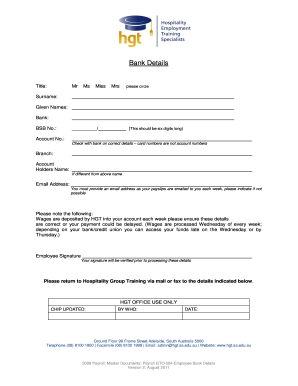
Filling out the AU HGT Bank Details form is a crucial step for accurate wage deposits. This guide provides clear, step-by-step instructions to help you complete the form online with confidence.
Follow the steps to complete the AU HGT Bank Details form accurately.
- Click the ‘Get Form’ button to obtain the form and access it for editing.
- In the title section, circle the appropriate title that applies to you: Mr, Ms, Miss, or Mrs.
- Enter your surname and given names in the designated fields. Ensure spelling is accurate to avoid any payment issues.
- Select your bank from the drop-down list or type it in if it's not listed.
- Input your BSB number, which should be six digits long. Double-check with your bank for accuracy.
- Enter your account number. Verify with your bank that you are using the correct details, as card numbers are not account numbers.
- If your bank account is with a different branch, indicate the branch name.
- Fill in the account holder's name if it differs from the name provided earlier.
- Provide your email address carefully, as it will be used to send your payslips each week. If you cannot provide an email address, indicate so.
- Review all entered information to confirm its accuracy, as wages will be deposited based on this information.
- Sign the form in the designated area. Your signature will be verified prior to processing the submitted details.
- Upon completing the form, you can save the changes, download, print, or share the form as required.
Get started by completing your AU HGT Bank Details online today.
Your AU HGT Bank Details can be viewed by logging into your online banking portal or app. Once logged in, navigate to your account overview. Additionally, if you receive paper statements, your bank information can be found there as well.