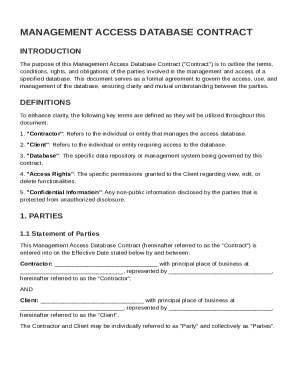
Itions, rights, and obligations of the parties involved in the management and access of a specified database. This document serves as a formal agreement to govern the access, use, and management of the database, ensuring clarity and mutual understanding between the parties. DEFINITIONS To enhance clarity, the following key terms are defined as they will be utilized throughout this document: 1. "Contractor": Refers to the individual or entity that manages the access database. 2. "Client": Refers.
Open form follow the instructions
Easily sign the form with your finger
Send filled & signed form or save
How to fill out and sign Management Access Database Contract Template online?
Get your online template and fill it in using progressive features. Enjoy smart fillable fields and interactivity.Follow the simple instructions below:
The preparation of legal paperwork can be expensive and time-ingesting. However, with our predesigned online templates, things get simpler. Now, using a Management Access Database Contract Template takes at most 5 minutes. Our state-specific web-based blanks and crystal-clear guidelines eradicate human-prone mistakes.
Follow our simple steps to have your Management Access Database Contract Template prepared quickly:
- Select the template from the catalogue.
- Complete all required information in the required fillable fields. The easy-to-use drag&drop interface makes it simple to include or relocate fields.
- Make sure everything is filled in correctly, with no typos or absent blocks.
- Place your e-signature to the page.
- Simply click Done to confirm the changes.
- Save the data file or print out your copy.
- Send instantly to the receiver.
Use the fast search and advanced cloud editor to produce a precise Management Access Database Contract Template. Eliminate the routine and create papers on the web!
Tips on how to fill out, edit and sign Management Access Database Contract Template online
How to fill and sign Management Access Database Contract Template
Get your online template and fill it in using progressive features. Enjoy smart fillable fields and interactivity.Follow the simple instructions below:
The preparation of legal paperwork can be expensive and time-ingesting. However, with our predesigned online templates, things get simpler. Now, using a Management Access Database Contract Template takes at most 5 minutes. Our state-specific web-based blanks and crystal-clear guidelines eradicate human-prone mistakes.
Follow our simple steps to have your Management Access Database Contract Template prepared quickly:
- Select the template from the catalogue.
- Complete all required information in the required fillable fields. The easy-to-use drag&drop interface makes it simple to include or relocate fields.
- Make sure everything is filled in correctly, with no typos or absent blocks.
- Place your e-signature to the page.
- Simply click Done to confirm the changes.
- Save the data file or print out your copy.
- Send instantly to the receiver.
Use the fast search and advanced cloud editor to produce a precise Management Access Database Contract Template. Eliminate the routine and create papers on the web!
How to edit Management Access Database Contract Template
Select a reliable document editing option you can rely on. Revise, execute, and sign Management Access Database Contract Template safely online.
Too often, editing documents, like Management Access Database Contract Template, can be a challenge, especially if you got them in a digital format but don’t have access to specialized software. Of course, you can use some workarounds to get around it, but you risk getting a form that won't meet the submission requirements. Using a printer and scanner isn’t a way out either because it's time- and resource-consuming.
We provide a simpler and more streamlined way of completing files. A rich catalog of document templates that are straightforward to change and certify, to make fillable for some individuals. Our platform extends way beyond a collection of templates. One of the best parts of utilizing our option is that you can edit Management Access Database Contract Template directly on our website.
Since it's an online-based service, it saves you from having to download any software. Additionally, not all company policies permit you to install it on your corporate computer. Here's how you can effortlessly and safely execute your paperwork with our solution.
- Hit the Get Form > you’ll be instantly redirected to our editor.
- As soon as opened, you can start the customization process.
- Choose checkmark or circle, line, arrow and cross and other choices to annotate your form.
- Pick the date field to add a particular date to your document.
- Add text boxes, pictures and notes and more to complement the content.
- Utilize the fillable fields option on the right to add fillable {fields.
- Choose Sign from the top toolbar to generate and add your legally-binding signature.
- Click DONE and save, print, and pass around or download the end {file.
Forget about paper and other inefficient ways of executing your Management Access Database Contract Template or other forms. Use our solution instead that includes one of the richest libraries of ready-to-customize forms and a powerful document editing option. It's easy and safe, and can save you lots of time! Don’t take our word for it, give it a try yourself!
How to fill and sign Management Access Database Contract Template
Get your online template and fill it in using progressive features. Enjoy smart fillable fields and interactivity.Follow the simple instructions below:
The preparation of legal paperwork can be expensive and time-ingesting. However, with our predesigned online templates, things get simpler. Now, using a Management Access Database Contract Template takes at most 5 minutes. Our state-specific web-based blanks and crystal-clear guidelines eradicate human-prone mistakes.
Follow our simple steps to have your Management Access Database Contract Template prepared quickly:
- Select the template from the catalogue.
- Complete all required information in the required fillable fields. The easy-to-use drag&drop interface makes it simple to include or relocate fields.
- Make sure everything is filled in correctly, with no typos or absent blocks.
- Place your e-signature to the page.
- Simply click Done to confirm the changes.
- Save the data file or print out your copy.
- Send instantly to the receiver.
Use the fast search and advanced cloud editor to produce a precise Management Access Database Contract Template. Eliminate the routine and create papers on the web!
Experience a faster way to fill out and sign forms on the web. Access the most extensive library of templates available.
Related content
These records include, but are not limited to: site forms, documents, maps, images...
Provided below is a template for a stand-alone Data Access Agreement. The template and...
These documents provide a template for the provision of aeronautical information with...
Get answers to your most pressing questions about US Legal Forms API.
What is the difference between CMS and CLM?
Content Management System (CMS) focuses on managing digital content, while Contract Lifecycle Management (CLM) specifically handles the process of managing contracts from creation to execution. Although both systems aim to streamline processes, they serve different purposes. When considering contract management, implementing a Management Access Database Contract Template can be a strategic choice to facilitate CLM efficiently.
How to create a database management system in Access?
Creating a database management system in Access involves defining your needs, designing tables, and entering data. Start by outlining the structure you want, such as including fields for contract details. Using a Management Access Database Contract Template can greatly simplify this process, as it provides a ready-made framework to build and manage your contracts effectively.
Does Microsoft Access have templates?
Yes, Microsoft Access provides a variety of templates to assist users in creating databases quickly and efficiently. You can find templates for different applications, including contract management. By choosing a Management Access Database Contract Template, users can set up a contract management system that meets their specific requirements without starting from scratch.
What is the difference between CRM and contract management?
Customer Relationship Management (CRM) focuses on managing interactions with clients and prospects, while contract management deals specifically with the lifecycle of legal agreements. CRM helps build and maintain customer relationships, whereas contract management ensures compliance and effective handling of contracts. Understanding this distinction is essential when deciding to implement a Management Access Database Contract Template in your business.
What is a contract database?
A contract database stores all signed agreements in a digital format, facilitating easier access and better management of contracts. By categorizing contracts by various parameters, businesses can optimize their retrieval processes. Using a Management Access Database Contract Template, organizations can efficiently build and maintain a structured database tailored to their specific needs.
What is a contract management database?
A contract management database serves as a repository for storing all contractual agreements and related documents. It enables businesses to monitor compliance, manage dates, and facilitate renewals. With a Management Access Database Contract Template, you can create a centralized system that simplifies contract oversight and reduces risks associated with missed deadlines.
What is contract data management?
Contract data management involves the organization, storage, and retrieval of contract information within a database. It allows users to track contract terms, deadlines, and obligations easily. By utilizing a Management Access Database Contract Template, businesses can streamline this process and enhance efficiency, ensuring that important data is accessible when needed.
Is Microsoft discontinuing Access databases?
Microsoft has not announced any plans to discontinue Access databases. In fact, Microsoft continues to support and update Access, ensuring it remains a viable option for database management. Users can take advantage of tools like the Management Access Database Contract Template to maintain and expand their Access databases efficiently.
How to create a contact list in Access database?
To create a contact list in an Access database, begin by setting up a new table with fields for names, phone numbers, emails, and any other relevant information. Input your contact information directly into the table or import it from an external source. Using a Management Access Database Contract Template can help you design your contact list more efficiently, especially if you plan to link it with contract management.
Are companies still using Access?
Yes, many companies still use Access due to its user-friendly interface and integration with other Microsoft applications. It serves as a powerful tool for small to medium-sized businesses looking to manage data effectively without a steep learning curve. Additionally, by implementing a Management Access Database Contract Template, organizations can enhance their contract management efforts while leveraging Access's capabilities.
Use professional pre-built templates to fill in and sign documents online faster. Get access to thousands of forms.
If you believe that this page should be taken down, please follow our DMCA take down process here.