Loading
Form preview
  • US Legal Forms
  • Other Templates
  • More Forms
  • More Multi-State Forms
  • Work Hours Agreement Template

Get Work Hours Agreement Template

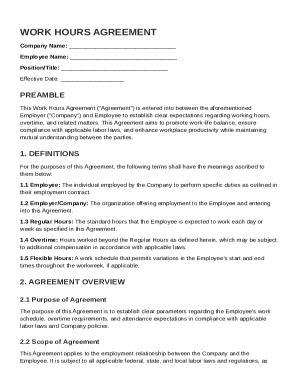
REAMBLE This Work Hours Agreement ("Agreement") is entered into between the aforementioned Employer ("Company") and Employee to establish clear expectations regarding working hours, overtime, and related matters. This Agreement aims to promote work-life balance, ensure compliance with applicable labor laws, and enhance workplace productivity while maintaining mutual understanding between the parties. 1. DEFINITIONS For the purposes of this Agreement, the following terms shall have the meanings.

How it works

  1. Open form

    Open form follow the instructions

  2. Easily sign form

    Easily sign the form with your finger

  3. Share form

    Send filled & signed form or save

How to fill out and sign Work Hours Agreement Template online?

Get your online template and fill it in using progressive features. Enjoy smart fillable fields and interactivity.Follow the simple instructions below:

The preparing of legal documents can be costly and time-consuming. However, with our preconfigured web templates, everything gets simpler. Now, using a Work Hours Agreement Template takes no more than 5 minutes. Our state-specific browser-based samples and complete instructions eliminate human-prone mistakes.

Adhere to our simple actions to get your Work Hours Agreement Template ready rapidly:

  1. Select the web sample in the library.
  2. Type all required information in the necessary fillable fields. The user-friendly drag&drop user interface makes it simple to add or move areas.
  3. Make sure everything is filled out correctly, with no typos or absent blocks.
  4. Use your e-signature to the page.
  5. Simply click Done to save the alterations.
  6. Download the document or print out your PDF version.
  7. Send instantly towards the recipient.

Use the fast search and advanced cloud editor to create a precise Work Hours Agreement Template. Get rid of the routine and make paperwork on the internet!

Tips on how to fill out, edit and sign Work Hours Agreement Template online

How to fill out and sign Work Hours Agreement Template online?

Get your online template and fill it in using progressive features. Enjoy smart fillable fields and interactivity.Follow the simple instructions below:

The preparing of legal documents can be costly and time-consuming. However, with our preconfigured web templates, everything gets simpler. Now, using a Work Hours Agreement Template takes no more than 5 minutes. Our state-specific browser-based samples and complete instructions eliminate human-prone mistakes.

Adhere to our simple actions to get your Work Hours Agreement Template ready rapidly:

  1. Select the web sample in the library.
  2. Type all required information in the necessary fillable fields. The user-friendly drag&drop user interface makes it simple to add or move areas.
  3. Make sure everything is filled out correctly, with no typos or absent blocks.
  4. Use your e-signature to the page.
  5. Simply click Done to save the alterations.
  6. Download the document or print out your PDF version.
  7. Send instantly towards the recipient.

Use the fast search and advanced cloud editor to create a precise Work Hours Agreement Template. Get rid of the routine and make paperwork on the internet!

How to edit Work Hours Agreement Template: customize forms online

Simplify your document preparation process and adjust it to your requirements within clicks. Complete and approve Work Hours Agreement Template with a robust yet user-friendly online editor.

Preparing documentation is always difficult, particularly when you deal with it from time to time. It demands you strictly adhere to all the formalities and accurately complete all areas with full and precise information. Nevertheless, it often occurs that you need to change the form or insert extra areas to fill out. If you need to improve Work Hours Agreement Template before submitting it, the best way to do it is by using our powerful yet straightforward-to-use online editing tools.

This comprehensive PDF editing tool enables you to easily and quickly fill out legal paperwork from any internet-connected device, make fundamental edits to the form, and add more fillable areas. The service enables you to opt for a specific area for each data type, like Name, Signature, Currency and SSN etc. You can make them mandatory or conditional and choose who should fill out each field by assigning them to a particular recipient.

Make the steps below to modify your Work Hours Agreement Template online:

  1. Open required sample from the catalog.
  2. Fill out the blanks with Text and drop Check and Cross tools to the tickboxes.
  3. Utilize the right-side toolbar to alter the template with new fillable areas.
  4. Choose the areas depending on the type of information you want to be collected.
  5. Make these fields mandatory, optional, and conditional and customize their order.
  6. Assign each field to a specific party with the Add Signer tool.
  7. Verify that you’ve made all the required changes and click Done.

Our editor is a universal multi-featured online solution that can help you quickly and effortlessly optimize Work Hours Agreement Template along with other templates according to your needs. Optimize document preparation and submission time and make your documentation look professional without hassle.

Get form

Experience a faster way to fill out and sign forms on the web. Access the most extensive library of templates available.
Get form

Related content

agreement to work overtime
The employee whose name and signature appears below, voluntarily agrees to work up to ten...
Learn more
Flexible Work Arrangement Agreement
This document is intended to ensure that both the supervisor and employee have a clear...
Learn more
12 Essential Elements Of A Solid Consulting...
Mar 24, 2022 — Discover the essential components of a robust consulting agreement. Learn...
Learn more

Related links form

VOLUNTARY DISSOLUTION OF - Delaware Insurance Commissioner Performance Review User's Guide - Office Of Management And ... Samples Of DFI Tiered Assignments - Christina School District 2013 Boat Colorado Guidelines And Application - Colorado Division ...

Questions & Answers

Get answers to your most pressing questions about US Legal Forms API.

Contact support

Writing up a simple agreement involves outlining the parties involved, the terms of the agreement, and any specific conditions. Aim for clarity and simplicity to avoid any confusion down the line. Consider adopting a Work Hours Agreement Template to ensure your agreement is thorough and effective.

To write a labour contract, start with a clear title followed by detailed descriptions of the work, working hours, and compensation. Additionally, include clauses about termination, confidentiality, and other relevant agreements. Using a Work Hours Agreement Template can help you draft a comprehensive labour contract that protects both parties.

Filling out a contract of employment requires accurate information about the employee and employer, job description, salary, and any benefit provisions. It’s important to ensure that all terms are understandable and agreed upon by both parties. A Work Hours Agreement Template can provide guidance on the format and necessary content.

Writing a work contract agreement involves detailing the job responsibilities, payment terms, and duration of employment. Be explicit about any benefits or conditions attached to the employment. Utilizing a Work Hours Agreement Template from US Legal Forms can simplify this process and ensure you include all crucial information.

To write a contract agreement for a work sample, include details like the project description, the owner of the work, and potential usage rights. Clearly define expectations for both parties to avoid misunderstandings. Using a Work Hours Agreement Template can streamline this process, ensuring you cover all necessary details.

When writing an hourly contract, specify the hourly rate, the estimated number of hours, and the scope of work to be completed. Clear communication about payment terms and deadlines is essential. A Work Hours Agreement Template can guide you in creating a well-structured hourly contract that protects both parties.

Examples of simple contracts include a freelance work agreement, a rental lease, or a service agreement. Each of these documents outlines the expectations and obligations of the parties involved. Using a Work Hours Agreement Template can provide a clear structure for these agreements, ensuring all critical points are addressed.

To write a simple contract agreement, start by clearly stating the purpose of the contract. Include essential elements such as the parties involved, the terms of the agreement, and any relevant deadlines. Ensure both parties understand their responsibilities. For a comprehensive guide, consider using the Work Hours Agreement Template from US Legal Forms, which simplifies the process.

Making a work agreement contract involves drafting a document that specifies the relationship between employer and employee. Clearly outline work expectations, compensation details, and any relevant legal provisions. Consider using a Work Hours Agreement Template to guide you in creating a balanced and effective contract.

Writing an agreement between an employer and an employee involves clearly stating roles, responsibilities, and compensation. Be specific about work hours, benefits, and any probationary periods. Opting for a Work Hours Agreement Template can provide a structured outline, ensuring essential elements are not overlooked.

Get This Form Now!

Use professional pre-built templates to fill in and sign documents online faster. Get access to thousands of forms.
Get form
If you believe that this page should be taken down, please follow our DMCA take down processhere.
Get Work Hours Agreement Template
Get form
  • Adoption
  • Bankruptcy
  • Contractors
  • Divorce
  • Home Sales
  • Employment
  • Identity Theft
  • Incorporation
  • Landlord Tenant
  • Living Trust
  • Name Change
  • Personal Planning
  • Small Business
  • Wills & Estates
  • Packages A-Z
  • Affidavits
  • Bankruptcy
  • Bill of Sale
  • Corporate - LLC
  • Divorce
  • Employment
  • Identity Theft
  • Internet Technology
  • Landlord Tenant
  • Living Wills
  • Name Change
  • Power of Attorney
  • Real Estate
  • Small Estates
  • Wills
  • All Forms
  • Forms A-Z
  • Other Templates
  • Legal Hub
  • About Us
  • Help Portal
  • Legal Resources
  • Blog
  • Affiliates
  • Contact Us
  • Delete My Account
  • Site Map
  • Industries
  • Forms in Spanish
  • Localized Forms
  • State-specific Forms
  • Forms Kit
  • Real Estate Handbook
  • All Guides
  • Notarize
  • Incorporation services
  • For Consumers
  • For Small Business
  • For Attorneys
  • USLegal
  • FormsPass
  • pdfFiller
  • signNow
  • altaFlow
  • DocHub
  • Instapage
Form Packages
  • Adoption
  • Bankruptcy
  • Contractors
  • Divorce
  • Home Sales
  • Employment
  • Identity Theft
  • Incorporation
  • Landlord Tenant
  • Living Trust
  • Name Change
  • Personal Planning
  • Small Business
  • Wills & Estates
  • Packages A-Z
Form Categories
  • Affidavits
  • Bankruptcy
  • Bill of Sale
  • Corporate - LLC
  • Divorce
  • Employment
  • Identity Theft
  • Internet Technology
  • Landlord Tenant
  • Living Wills
  • Name Change
  • Power of Attorney
  • Real Estate
  • Small Estates
  • Wills
  • All Forms
  • Forms A-Z
  • Other Templates
Customer Service
  • Legal Hub
  • About Us
  • Help Portal
  • Legal Resources
  • Blog
  • Affiliates
  • Contact Us
  • Delete My Account
  • Site Map
  • Industries
  • Forms in Spanish
  • Localized Forms
  • State-specific Forms
  • Forms Kit
Legal Guides
  • Real Estate Handbook
  • All Guides
Prepared for you
  • Notarize
  • Incorporation services
Our Customers
  • For Consumers
  • For Small Business
  • For Attorneys
Our Sites
  • USLegal
  • FormsPass
  • pdfFiller
  • signNow
  • altaFlow
  • DocHub
  • Instapage
Social Media
Call us now toll free:
+1 833 426 79 33
As seen in:
© Copyright 1999-2026 airSlate Legal Forms, Inc. 17 Station Street, Ste. 203, Brookline, MA 02445
  • Your Privacy Choices
  • Terms of Service
  • Privacy Notice
  • Content Takedown Policy
  • Bug Bounty Program