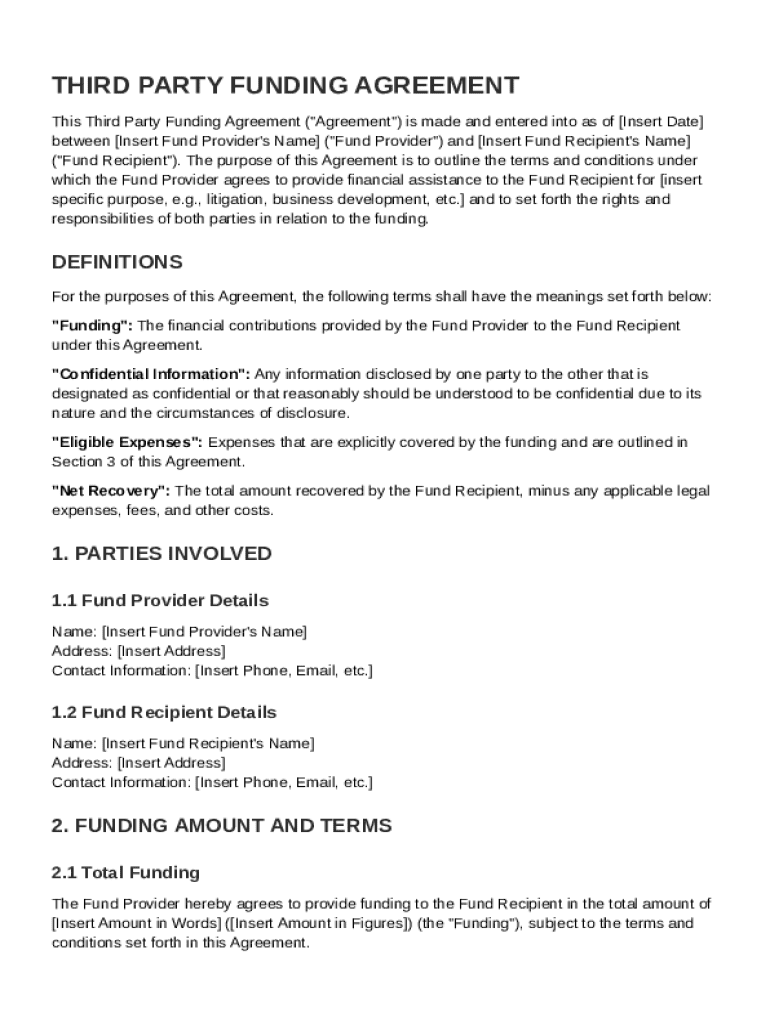
Ert Date between Insert Fund Provider's Name ("Fund Provider") and Insert Fund Recipient's Name ("Fund Recipient"). The purpose of this Agreement is to outline the terms and conditions under which the Fund Provider agrees to provide financial assistance to the Fund Recipient for insert specific purpose, e.g., litigation, business development, etc. and to set forth the rights and responsibilities of both parties in relation to the funding. DEFINITIONS For the purposes of this Agreement, t.

Open form follow the instructions

Easily sign the form with your finger

Send filled & signed form or save
How to fill out and sign Third Party Funding Agreement Template online?
Get your online template and fill it in using progressive features. Enjoy smart fillable fields and interactivity.Follow the simple instructions below:
The days of frightening complicated legal and tax forms have ended. With US Legal Forms the process of creating official documents is anxiety-free. The leading editor is directly at your fingertips supplying you with an array of useful tools for completing a Third Party Funding Agreement Template. These tips, combined with the editor will assist you with the entire procedure.
- Click on the Get Form button to start filling out.
- Switch on the Wizard mode on the top toolbar to acquire additional tips.
- Fill every fillable area.
- Make sure the data you fill in Third Party Funding Agreement Template is updated and accurate.
- Indicate the date to the sample using the Date feature.
- Click the Sign icon and make a signature. You can find 3 available alternatives; typing, drawing, or capturing one.
- Check once more each and every area has been filled in correctly.
- Click Done in the top right corne to save or send the template. There are various ways for receiving the doc. As an instant download, an attachment in an email or through the mail as a hard copy.
We make completing any Third Party Funding Agreement Template much faster. Start now!
Tips on how to fill out, edit and sign Third Party Funding Agreement Template online
How to fill and sign Third Party Funding Agreement Template
Get your online template and fill it in using progressive features. Enjoy smart fillable fields and interactivity.Follow the simple instructions below:
The days of frightening complicated legal and tax forms have ended. With US Legal Forms the process of creating official documents is anxiety-free. The leading editor is directly at your fingertips supplying you with an array of useful tools for completing a Third Party Funding Agreement Template. These tips, combined with the editor will assist you with the entire procedure.
- Click on the Get Form button to start filling out.
- Switch on the Wizard mode on the top toolbar to acquire additional tips.
- Fill every fillable area.
- Make sure the data you fill in Third Party Funding Agreement Template is updated and accurate.
- Indicate the date to the sample using the Date feature.
- Click the Sign icon and make a signature. You can find 3 available alternatives; typing, drawing, or capturing one.
- Check once more each and every area has been filled in correctly.
- Click Done in the top right corne to save or send the template. There are various ways for receiving the doc. As an instant download, an attachment in an email or through the mail as a hard copy.
We make completing any Third Party Funding Agreement Template much faster. Start now!
How to edit Third Party Funding Agreement Template
Enjoy the functionality of the multi-featured online editor while filling out your Third Party Funding Agreement Template. Use the diversity of tools to quickly fill out the blanks and provide the required data right away.
Preparing paperwork is time-consuming and pricey unless you have ready-to-use fillable forms and complete them electronically. The most effective way to deal with the Third Party Funding Agreement Template is to use our professional and multi-featured online editing solutions. We provide you with all the necessary tools for fast document fill-out and enable you to make any adjustments to your templates, adapting them to any demands. In addition to that, you can make comments on the updates and leave notes for other parties involved.
Here’s what you can do with your Third Party Funding Agreement Template in our editor:
- Fill out the blank fields using Text, Cross, Check, Initials, Date, and Sign options.
- Highlight important details with a desired color or underline them.
- Hide confidential information using the Blackout option or simply remove them.
- Add pictures to visualize your Third Party Funding Agreement Template.
- Replace the original text using the one suiting your requirements.
- Add comments or sticky notes to communicate with others about the updates.
- Create extra fillable areas and assign them to exact recipients.
- Protect the template with watermarks, place dates, and bates numbers.
- Share the paperwork in various ways and save it on your device or the cloud in different formats as soon as you finish modifying.
Dealing with Third Party Funding Agreement Template in our robust online editor is the quickest and most effective way to manage, submit, and share your documentation the way you need it from anywhere. The tool works from the cloud so that you can access it from any location on any internet-connected device. All templates you create or fill out are securely kept in the cloud, so you can always access them whenever needed and be confident of not losing them. Stop wasting time on manual document completion and get rid of papers; make it all on the web with minimum effort.
How to fill and sign Third Party Funding Agreement Template
Get your online template and fill it in using progressive features. Enjoy smart fillable fields and interactivity.Follow the simple instructions below:
The days of frightening complicated legal and tax forms have ended. With US Legal Forms the process of creating official documents is anxiety-free. The leading editor is directly at your fingertips supplying you with an array of useful tools for completing a Third Party Funding Agreement Template. These tips, combined with the editor will assist you with the entire procedure.
- Click on the Get Form button to start filling out.
- Switch on the Wizard mode on the top toolbar to acquire additional tips.
- Fill every fillable area.
- Make sure the data you fill in Third Party Funding Agreement Template is updated and accurate.
- Indicate the date to the sample using the Date feature.
- Click the Sign icon and make a signature. You can find 3 available alternatives; typing, drawing, or capturing one.
- Check once more each and every area has been filled in correctly.
- Click Done in the top right corne to save or send the template. There are various ways for receiving the doc. As an instant download, an attachment in an email or through the mail as a hard copy.
We make completing any Third Party Funding Agreement Template much faster. Start now!
Experience a faster way to fill out and sign forms on the web. Access the most extensive library of templates available.
Related content
This Litigation Funding Agreement is made as of the 9 th day of April 2020, between...
“Third-party funder” is any natural or legal person who is not a party to the...
Any ethical review must include a check of the proposed third party as well as of any...
Get answers to your most pressing questions about US Legal Forms API.
What is a third party funding agreement in arbitration?
A third party funding agreement in arbitration is a contract where a funder agrees to provide financial support for arbitration proceedings in return for a share of any compensation awarded. This type of arrangement is helpful for parties that lack the funds to pursue an arbitration claim. Adopting a Third Party Funding Agreement Template ensures clear communication of the terms and protects both the funder's and the claimant's interests.
What is an example of litigation financing?
An example of litigation financing might involve a company that funds a class action lawsuit against a large corporation, covering all legal fees upfront. In exchange, the funder receives a portion of the eventual settlement. When establishing such arrangements, using a Third Party Funding Agreement Template clarifies the terms and obligations of each party involved.
What is the third party funding mechanism?
The third-party funding mechanism operates by allowing finance providers to cover the costs related to litigation in exchange for a share of the proceeds. This arrangement helps plaintiffs access the necessary resources to file lawsuits without immediate financial burden. A well-drafted Third Party Funding Agreement Template lays out the framework for the funding relationship, ensuring clarity and protection.
What is an example of third party financing?
An example of third-party financing would be a financial firm offering funds to a plaintiff preparing for a significant legal battle, like a personal injury case. The firm, in return, receives a percentage of the settlement or award. To structure such agreements effectively, using a Third Party Funding Agreement Template is smart, as it outlines terms and protects everyone's interests.
What does a third party mean in a lawsuit?
In a lawsuit, a third party typically refers to an individual or organization that is not directly involved in the dispute but may have an interest in the case's outcome. This can include buyers, insurers, or, notably, funders providing financial support. Understanding the role of a third party is crucial, and a Third Party Funding Agreement Template can clarify the responsibilities of those involved.
What is third-party litigation financing?
Third-party litigation financing refers to the process where a third party provides the financial resources necessary to bring a lawsuit. This funding can cover various legal costs, such as attorney fees and court expenses, providing plaintiffs with the ability to pursue justice without financial strain. Utilizing a Third Party Funding Agreement Template helps ensure all parties are clear on their commitments and expectations.
What is third party litigation funding (tplf)?
Third party litigation funding, often referred to as TPLF, involves an outside entity financing a lawsuit in exchange for a portion of any monetary award. This arrangement allows plaintiffs to pursue cases they might otherwise not afford. By using a Third Party Funding Agreement Template, parties can understand the terms and conditions governing this type of funding.
What is a funding agreement?
A funding agreement is a formal contract outlining the financial support provided by one party to another for various purposes, including legal cases. This document specifies the obligations, expected outcomes, and repayment methods if applicable. Using a Third Party Funding Agreement Template helps ensure that both parties agree on all terms, minimizing potential misunderstandings.
What is the process of third party intervention?
The process of third-party intervention usually involves a separate party stepping in to assist in a legal matter, often to provide funding or support. This intervention aims to help a party that cannot afford legal costs or required resources. By engaging a Third Party Funding Agreement Template, stakeholders ensure that the terms of the intervention are transparent and legally binding.
What is the process of third party funding?
The process of third-party funding typically begins with assessing the case's viability. Once agreed, a specific funding amount is committed through a formal agreement, often documented with a Third Party Funding Agreement Template. This document outlines terms, including repayment conditions and the funder’s involvement, providing a clear path for both parties.
Use professional pre-built templates to fill in and sign documents online faster. Get access to thousands of forms.
If you believe that this page should be taken down, please follow our DMCA take down process here.