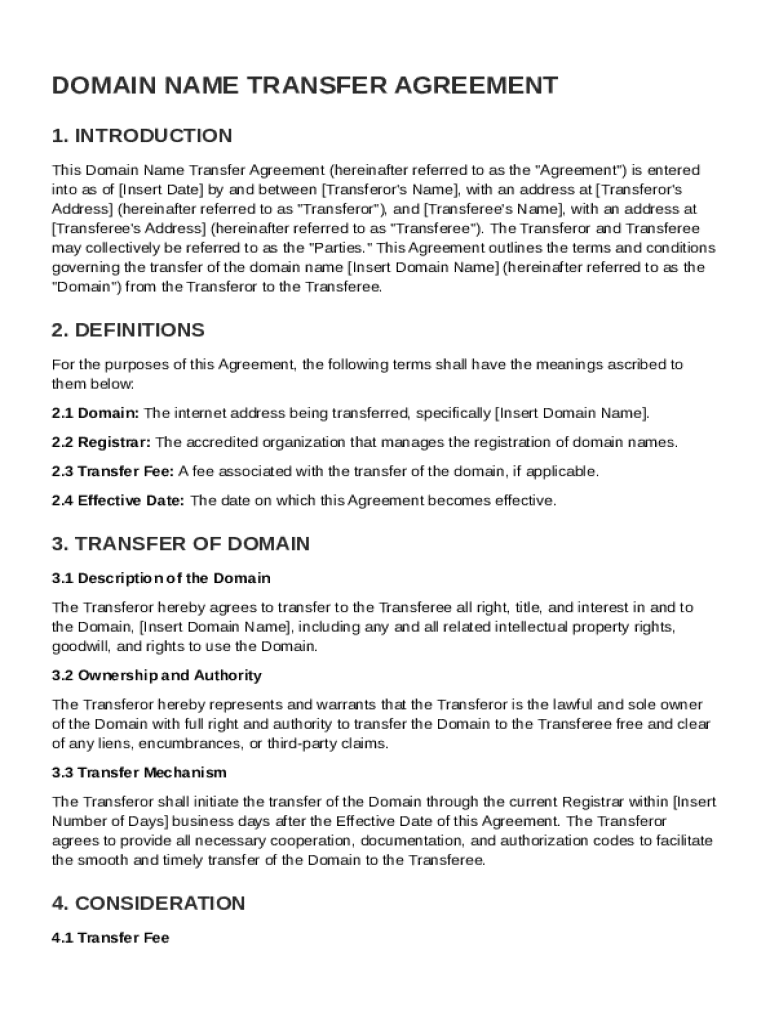
An address at Transferor's Address (hereinafter referred to as "Transferor"), and Transferee's Name , with an address at Transferee's Address (hereinafter referred to as "Transferee"). The Transferor and Transferee may collectively be referred to as the "Parties." This Agreement outlines the terms and conditions governing the transfer of the domain name Insert Domain Name (hereinafter referred to as the "Domain") from the Transferor to the Transferee. 2. DEFINITIONS For the purposes of.

Open form follow the instructions

Easily sign the form with your finger

Send filled & signed form or save
How to fill out and sign Domain Name Transfer Agreement Template online?
Get your online template and fill it in using progressive features. Enjoy smart fillable fields and interactivity.Follow the simple instructions below:
The preparing of legal papers can be high-priced and time-ingesting. However, with our preconfigured online templates, things get simpler. Now, using a Domain Name Transfer Agreement Template requires at most 5 minutes. Our state-specific online blanks and complete recommendations remove human-prone mistakes.
Adhere to our simple steps to get your Domain Name Transfer Agreement Template well prepared rapidly:
- Pick the web sample in the catalogue.
- Complete all required information in the required fillable fields. The easy-to-use drag&drop user interface makes it easy to include or relocate fields.
- Ensure everything is completed correctly, without typos or missing blocks.
- Use your electronic signature to the page.
- Click on Done to confirm the alterations.
- Save the data file or print out your PDF version.
- Send instantly towards the receiver.
Make use of the fast search and powerful cloud editor to create a correct Domain Name Transfer Agreement Template. Clear away the routine and produce paperwork online!
Tips on how to fill out, edit and sign Domain Name Transfer Agreement Template online
How to fill and sign Domain Name Transfer Agreement Template
Get your online template and fill it in using progressive features. Enjoy smart fillable fields and interactivity.Follow the simple instructions below:
The preparing of legal papers can be high-priced and time-ingesting. However, with our preconfigured online templates, things get simpler. Now, using a Domain Name Transfer Agreement Template requires at most 5 minutes. Our state-specific online blanks and complete recommendations remove human-prone mistakes.
Adhere to our simple steps to get your Domain Name Transfer Agreement Template well prepared rapidly:
- Pick the web sample in the catalogue.
- Complete all required information in the required fillable fields. The easy-to-use drag&drop user interface makes it easy to include or relocate fields.
- Ensure everything is completed correctly, without typos or missing blocks.
- Use your electronic signature to the page.
- Click on Done to confirm the alterations.
- Save the data file or print out your PDF version.
- Send instantly towards the receiver.
Make use of the fast search and powerful cloud editor to create a correct Domain Name Transfer Agreement Template. Clear away the routine and produce paperwork online!
How to edit Domain Name Transfer Agreement Template
Approve and share Domain Name Transfer Agreement Template together with any other business and personal documentation online without wasting time and resources on printing and postal delivery. Take the most out of our online form editor using a built-in compliant eSignature tool.
Signing and submitting Domain Name Transfer Agreement Template templates electronically is faster and more efficient than managing them on paper. However, it requires utilizing online solutions that ensure a high level of data safety and provide you with a certified tool for generating eSignatures. Our robust online editor is just the one you need to prepare your Domain Name Transfer Agreement Template and other individual and business or tax templates in an accurate and proper way in line with all the requirements. It features all the essential tools to easily and quickly fill out, adjust, and sign paperwork online and add Signature fields for other parties, specifying who and where should sign.
It takes just a few simple actions to fill out and sign Domain Name Transfer Agreement Template online:
- Open the chosen file for further processing.
- Make use of the upper panel to add Text, Initials, Image, Check, and Cross marks to your template.
- Underline the most significant details and blackout or remove the sensitive ones if required.
- Click on the Sign tool above and choose how you prefer to eSign your sample.
- Draw your signature, type it, upload its image, or use an alternative option that suits you.
- Switch to the Edit Fillable Fileds panel and place Signature areas for other people.
- Click on Add Signer and provide your recipient’s email to assign this field to them.
- Make sure that all data provided is complete and correct before you click Done.
- Share your form with others using one of the available options.
When signing Domain Name Transfer Agreement Template with our comprehensive online solution, you can always be certain you get it legally binding and court-admissible. Prepare and submit documents in the most beneficial way possible!
How to fill and sign Domain Name Transfer Agreement Template
Get your online template and fill it in using progressive features. Enjoy smart fillable fields and interactivity.Follow the simple instructions below:
The preparing of legal papers can be high-priced and time-ingesting. However, with our preconfigured online templates, things get simpler. Now, using a Domain Name Transfer Agreement Template requires at most 5 minutes. Our state-specific online blanks and complete recommendations remove human-prone mistakes.
Adhere to our simple steps to get your Domain Name Transfer Agreement Template well prepared rapidly:
- Pick the web sample in the catalogue.
- Complete all required information in the required fillable fields. The easy-to-use drag&drop user interface makes it easy to include or relocate fields.
- Ensure everything is completed correctly, without typos or missing blocks.
- Use your electronic signature to the page.
- Click on Done to confirm the alterations.
- Save the data file or print out your PDF version.
- Send instantly towards the receiver.
Make use of the fast search and powerful cloud editor to create a correct Domain Name Transfer Agreement Template. Clear away the routine and produce paperwork online!
Experience a faster way to fill out and sign forms on the web. Access the most extensive library of templates available.
Related content
1. Transferor agrees to transfer the Domain Names to the Transferee for consideration of...
MATERIAL TRANSFER AGREEMENT. ORSO #. I. PARTIES. This Material Transfer Agreement (MTA) is...
These documents provide a template for the provision of aeronautical information with...
Get answers to your most pressing questions about US Legal Forms API.
Can I transfer ownership of a domain name?
Yes, you can transfer ownership of a domain name. The process involves both the current owner and the new owner following procedures set by the domain registrar. Having a clear and properly structured Domain Name Transfer Agreement Template can facilitate this transition smoothly and help prevent misunderstandings regarding ownership rights.
What is the 60 day rule for domain transfer?
The 60-day rule for domain transfer states that a domain cannot be transferred within 60 days of registration or a previous transfer. This policy is in place to prevent fraud and maintain the integrity of domain ownership. It's important to plan your domain transfer accordingly, especially if you have recently registered or transferred your domain.
How do you transfer ownership of a domain name?
To transfer ownership of a domain name, you must follow the specific procedure set by your current registrar, which usually involves unlocking the domain and obtaining the Auth-Code. You will then initiate the transfer to the new owner by providing them with necessary details and authorization codes. It is advisable to use a Domain Name Transfer Agreement Template to ensure clarity and legality in the ownership transfer process.
What is a domain transfer agreement?
A domain transfer agreement is an important document that outlines the terms and conditions under which a domain name ownership is transferred from one party to another. This agreement often includes details such as the domain's current and new registrant information, payment terms, and any applicable warranties. Utilizing a Domain Name Transfer Agreement Template can simplify this process by ensuring all necessary elements are included.
How to get Auth-Code for domain name transfer?
You can obtain the Auth-Code for your domain name transfer by logging into your current registrar’s account. Look for options labeled 'Transfer,' 'Authorization Code,' or 'EPP Code,' and follow the prompts to retrieve it. If you encounter any issues, contacting customer support can provide you with guidance on acquiring your Auth-Code efficiently.
How to get domain name transfer?
To obtain a domain name transfer, you must first gather information from your current registrar, including the Auth-Code. Next, visit the new registrar's site to complete the transfer request, providing the necessary authorization information. Always check for any specific requirements or fees that may apply during the transfer process to avoid delays.
How do I transfer my domain name to another company?
To transfer your domain name to another company, begin by unlocking your domain through the current registrar's control panel. Obtain the transfer authorization code, also known as the Auth-Code, and submit it to the new registrar along with your transfer request. It is advisable to review the new registrar's process and terms before initiating the transfer to ensure a smooth transition.
How to request a domain name transfer?
To request a domain name transfer, first, ensure you have the right authorization code from your current registrar. Next, go to the new registrar's website and provide the necessary details along with the authorization code. Submitting your request initiates the transfer process, which typically takes a few days, allowing you to manage your domain seamlessly.
How do you write a short transfer letter?
When writing a short transfer letter, begin by stating your intent to transfer the domain name and identifying both parties involved. Clearly outline any specific terms or conditions related to the transfer. A Domain Name Transfer Agreement Template can assist you in crafting a concise letter that captures all necessary details while remaining straightforward.
Why does it take 5 to 7 days to transfer a domain?
The typical timeframe of 5 to 7 days to transfer a domain is due to several factors, including the need for verification and approval from both the current owner and the registrar. Additionally, domain registries implement a waiting period to prevent unauthorized transfers. To ensure the process goes smoothly, using a Domain Name Transfer Agreement Template can help you manage expectations and clarify the timeline.
Use professional pre-built templates to fill in and sign documents online faster. Get access to thousands of forms.
If you believe that this page should be taken down, please follow our DMCA take down process here.