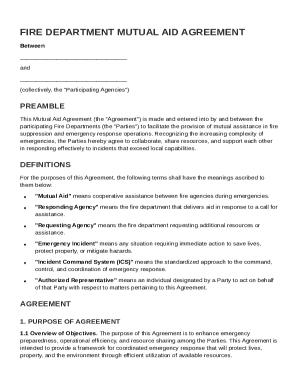
Get Fire Department Mutual Aid Agreement Template
How it works
-

Open form follow the instructions
-

Easily sign the form with your finger
-

Send filled & signed form or save
How to fill out and sign Fire Department Mutual Aid Agreement Template online?
Get your online template and fill it in using progressive features. Enjoy smart fillable fields and interactivity.Follow the simple instructions below:The days of distressing complex legal and tax forms have ended. With US Legal Forms the process of creating official documents is anxiety-free. The best editor is right at your fingertips providing you with a wide range of useful tools for completing a Fire Department Mutual Aid Agreement Template. These tips, together with the editor will help you through the whole process.
- Hit the Get Form option to start enhancing.
- Switch on the Wizard mode in the top toolbar to obtain additional suggestions.
- Fill in every fillable area.
- Ensure the information you fill in Fire Department Mutual Aid Agreement Template is updated and accurate.
- Include the date to the document using the Date feature.
- Select the Sign icon and make a signature. Feel free to use three options; typing, drawing, or capturing one.
- Re-check each and every area has been filled in correctly.
- Select Done in the top right corne to export the record. There are several choices for receiving the doc. As an instant download, an attachment in an email or through the mail as a hard copy.
We make completing any Fire Department Mutual Aid Agreement Template less difficult. Get started now!
Tips on how to fill out, edit and sign Fire Department Mutual Aid Agreement Template online
How to fill out and sign Fire Department Mutual Aid Agreement Template online?
Get your online template and fill it in using progressive features. Enjoy smart fillable fields and interactivity.Follow the simple instructions below:
The days of distressing complex legal and tax forms have ended. With US Legal Forms the process of creating official documents is anxiety-free. The best editor is right at your fingertips providing you with a wide range of useful tools for completing a Fire Department Mutual Aid Agreement Template. These tips, together with the editor will help you through the whole process.
- Hit the Get Form option to start enhancing.
- Switch on the Wizard mode in the top toolbar to obtain additional suggestions.
- Fill in every fillable area.
- Ensure the information you fill in Fire Department Mutual Aid Agreement Template is updated and accurate.
- Include the date to the document using the Date feature.
- Select the Sign icon and make a signature. Feel free to use three options; typing, drawing, or capturing one.
- Re-check each and every area has been filled in correctly.
- Select Done in the top right corne to export the record. There are several choices for receiving the doc. As an instant download, an attachment in an email or through the mail as a hard copy.
We make completing any Fire Department Mutual Aid Agreement Template less difficult. Get started now!
How to edit Fire Department Mutual Aid Agreement Template: customize forms online
Choose the right Fire Department Mutual Aid Agreement Template template and edit it on the spot. Streamline your paperwork with a smart document editing solution for online forms.
Your everyday workflow with documents and forms can be more effective when you have everything that you need in one place. For instance, you can find, get, and edit Fire Department Mutual Aid Agreement Template in a single browser tab. Should you need a specific Fire Department Mutual Aid Agreement Template, it is simple to find it with the help of the smart search engine and access it right away. You do not need to download it or search for a third-party editor to edit it and add your information. All of the tools for productive work go in a single packaged solution.
This modifying solution enables you to customize, fill, and sign your Fire Department Mutual Aid Agreement Template form right on the spot. Once you discover a suitable template, click on it to open the modifying mode. Once you open the form in the editor, you have all the needed tools at your fingertips. It is easy to fill in the dedicated fields and erase them if needed with the help of a simple yet multifunctional toolbar. Apply all the modifications right away, and sign the form without exiting the tab by simply clicking the signature field. After that, you can send or print out your file if necessary.
Make more custom edits with available tools.
- Annotate your file with the Sticky note tool by placing a note at any spot within the document.
- Add required visual elements, if required, with the Circle, Check, or Cross tools.
- Modify or add text anywhere in the document using Texts and Text box tools. Add content with the Initials or Date tool.
- Modify the template text with the Highlight and Blackout, or Erase tools.
- Add custom visual elements with the Arrow and Line, or Draw tools.
Discover new opportunities in efficient and easy paperwork. Find the Fire Department Mutual Aid Agreement Template you need in minutes and fill it in in the same tab. Clear the mess in your paperwork once and for all with the help of online forms.
Related links form
The three key elements of mutual aid are resource sharing, coordination, and communication. Resource sharing allows agencies to lend equipment and personnel when emergencies exceed local capabilities. Coordination ensures a seamless response among various departments, which is crucial for efficiency. Effective communication throughout the process is essential to maintain clarity and organization, enhancing the overall response to emergencies.