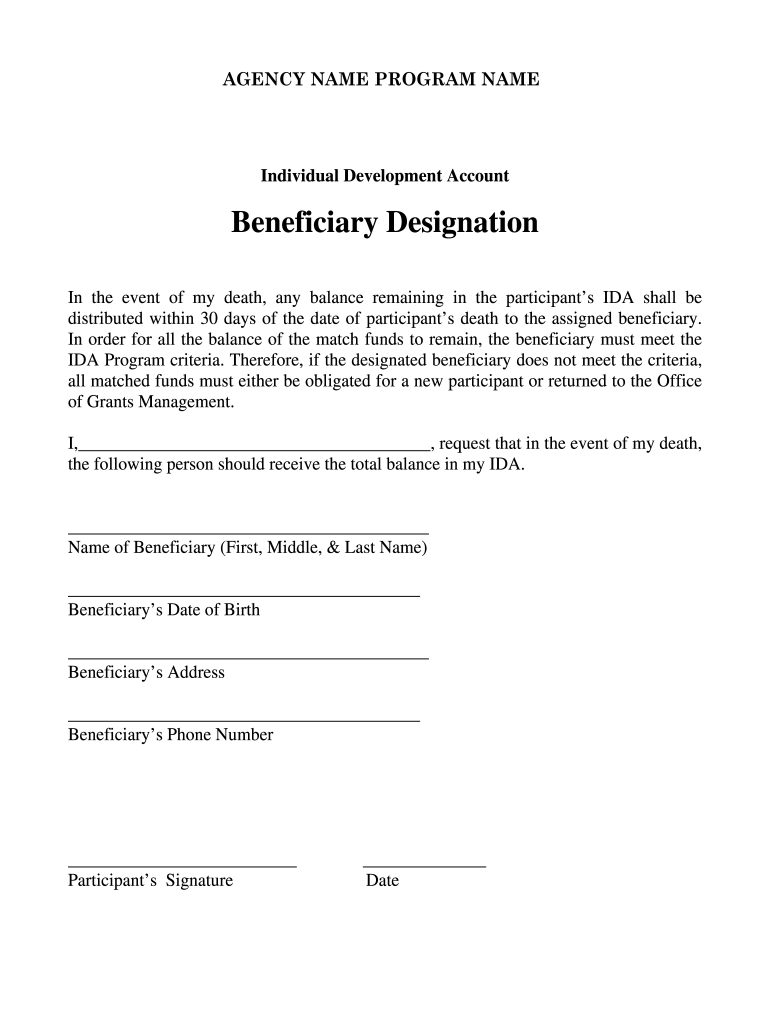
AGENCY NAME PROGRAM NAMEIndividual Development AccountBeneficiary Designation In the event of my death, any balance remaining in the participants IDA shall be distributed within 30 days of the date.
Loading

Open form follow the instructions

Easily sign the form with your finger

Send filled & signed form or save
How to fill out the HHS Individual Development Account Beneficiary Designation online
Filling out the HHS Individual Development Account Beneficiary Designation is an important step in ensuring that your assets are managed according to your wishes. This guide will provide clear, step-by-step instructions to help you complete the form accurately and effectively.
Follow the steps to complete the beneficiary designation form.
- Click the ‘Get Form’ button to obtain the form and open it in the editor.
- In the first section, clearly print your name in the designated space where it states 'I,________________________________________,' ensuring that all your name details are included.
- Next, enter the full name of your chosen beneficiary in the space provided under 'Name of Beneficiary (First, Middle, & Last Name)'. Make sure to spell it correctly to avoid any issues.
- Fill in the beneficiary’s date of birth in the format requested, ensuring that it is accurate. This information helps confirm the identity of the beneficiary.
- Provide the beneficiary’s complete address in the specified area, including street, city, state, and ZIP code.
- Enter the beneficiary’s phone number in the appropriate field, ensuring it is the correct contact number.
- Review the entire form to ensure all the information is filled in correctly and completely.
- Finally, sign the form where indicated as 'Participant’s Signature' and add the date of signing next to it. This confirms your request for the beneficiary designation.
- After completing the form, you can save changes, download, print, or share the form as required.
Get started today by filling out your beneficiary designation form online to secure your future.
Experience a faster way to fill out and sign forms on the web. Access the most extensive library of templates available.
Related content
Jun 28, 2012 — IDAs are matched savings accounts held by low-income individuals. They...
3) Beneficiary Information. Consider having IDA participants complete a form indicating...
Aug 8, 2006 — One commenter expressed concern that a requirement for ongoing...
Get answers to your most pressing questions about US Legal Forms API.
How to designate TSP beneficiary?
Designating a TSP beneficiary involves submitting a specific form that lists your chosen beneficiaries for your account. It’s essential to clearly indicate the percentage each beneficiary will receive, as outlined in your HHS Individual Development Account Beneficiary Designation. You can complete this form online, which makes it convenient and accessible. Regularly revisiting your designation ensures it aligns with your intentions and provides protection for your loved ones.
How to add beneficiary in TSP?
You can add a beneficiary to your TSP account by completing the beneficiary designation form through the TSP website or your account management portal. Including a beneficiary ensures your HHS Individual Development Account Beneficiary Designation reflects your current wishes. This process is relatively simple, and you can typically do it online for quick updates. Remember to notify your beneficiaries about their designation, so they understand their rights.
How do you assign a beneficiary?
To assign a beneficiary to your TSP account, you need to fill out the appropriate form provided by the TSP. This form allows you to specify the individuals or organizations you wish to designate as beneficiaries, thus safeguarding your HHS Individual Development Account Beneficiary Designation. Be sure to keep this information up-to-date, as life circumstances may change over time. Assigning beneficiaries is a straightforward process that can help provide peace of mind.
How to fill out a beneficiary for life insurance?
Filling out a beneficiary designation for life insurance is essential for ensuring benefits go to your intended recipients. Start by gathering necessary information about your beneficiary, including their full name and contact details. Complete the insurer's form by including this information, and remember to review requirements related to the HHS Individual Development Account Beneficiary Designation for any special instructions.
How to fill out a beneficiary designation form?
Filling out a beneficiary designation form requires careful attention. Begin by providing your personal details, followed by your beneficiary's information, including name and relationship to you. After completing the form, double-check that all necessary details are included to align with the HHS Individual Development Account Beneficiary Designation requirements.
Who should be listed as a beneficiary on a 401k?
When deciding who to list as a beneficiary on a 401k, consider financial dependence and trustworthiness. Common choices include spouses, children, or trusted family members. It's advisable to review the HHS Individual Development Account Beneficiary Designation guidelines to ensure you make informed and effective decisions.
How to fill out a 401k beneficiary form?
To fill out a 401k beneficiary form, first, gather your account details and choose your beneficiary. Include their full name, relationship to you, and any required identifying information. Ensure you indicate how assets will be split if you have multiple beneficiaries, considering the HHS Individual Development Account Beneficiary Designation options.
How do you fill out a beneficiary paperwork?
Filling out beneficiary paperwork is straightforward. Start by obtaining the correct forms specific to the HHS Individual Development Account Beneficiary Designation. Clearly write the name and contact information of your chosen beneficiary. Finally, sign and date the form to ensure it is valid.
What is IDA eligible?
The HHS Individual Development Account Beneficiary Designation allows funds for several specific objectives, including purchasing a primary residence, starting a business, or funding further education. The program encourages responsible saving for future investments, thereby enhancing financial security. It’s essential to understand the eligible uses of the IDA to make informed decisions.
What are the criteria for approving an IDA credit?
Approval for the HHS Individual Development Account Beneficiary Designation is based on multiple factors, including income verification, savings goals, and participation in required workshops. The program administrators assess whether applicants demonstrate a commitment to saving and achieving their financial goals. With proper documentation and a clear plan, you can enhance your chances of approval.
Use professional pre-built templates to fill in and sign documents online faster. Get access to thousands of forms.
If you believe that this page should be taken down, please follow our DMCA take down process here.