Loading
Form preview
  • US Legal Forms
  • Other Templates
  • Executive Forms
  • Executive Department DOT Forms
  • Faa Meda Results Form 2001

Get Faa Meda Results Form 2001-2026

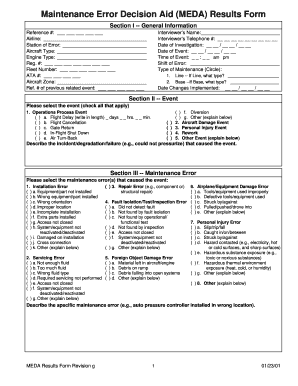
_____________________ Aircraft Type: _________________________________ Engine Type: _________________________________ Reg. #: ___ ___ ___ ___ ___ ___ ___ Fleet Number: ___ ___ ___ ___ ___ ___ ATA #: ___ ___ ___ ___ Aircraft Zone: _________________________________ Ref. # of previous related event: ___ ___ ___ ___ ___ Interviewer’s Name:_____________________________ Interviewer’s Telephone #: __ __ __ __ __ __ __ __ __ Date of Investigation: __ __ / __ __ / __ __ Date of Event: __ __ / __ __ .

How it works

  1. Open form

    Open form follow the instructions

  2. Easily sign form

    Easily sign the form with your finger

  3. Share form

    Send filled & signed form or save

How to fill out the FAA MEDA Results Form online

The FAA MEDA Results Form is essential for documenting maintenance errors and events that impact aviation safety. This guide offers a comprehensive, step-by-step approach to effectively complete the form online, ensuring accuracy and compliance.

Follow the steps to fill out the FAA MEDA Results Form online:

  1. Click ‘Get Form’ button to acquire the form and open it for editing.
  2. In Section I, provide general information. Fill in the reference number, airline, station of error, aircraft type, engine type, registration number, fleet number, ATA number, aircraft zone, and reference number of any previous related events.
  3. Enter the interviewer's name and telephone number, and input the dates for the investigation and the event. Specify the time of the event and the shift in which the error occurred.
  4. Indicate the type of maintenance performed, circling either 'Line' or 'Base', followed by specifying the type if applicable. Record the date any changes were implemented.
  5. In Section II, identify the event type by checking all that applies. Provide a detailed description of the incident or degradation that caused the event, including specifics such as flight delays or cancellations.
  6. In Section III, select the applicable maintenance errors that caused the event. Provide descriptions for any specific maintenance error observed, such as incorrect installation.
  7. Navigate to Section IV and check the contributing factors that may have played a role in the error. Provide a narrative explanation of how these factors contributed to the incident.
  8. In Section V, outline existing procedures intended to prevent the incident which may have failed. Additionally, list any recommendations for error prevention strategies.
  9. Lastly, complete Section VI by summarizing the contributing factors, error, and event. Ensure all fields are filled accurately.
  10. Upon completion of the form, save your changes and choose to download, print, or share the completed form as needed.

Get started on your FAA MEDA Results Form today and ensure thorough documentation of maintenance events.

Get form

Experience a faster way to fill out and sign forms on the web. Access the most extensive library of templates available.
Get form

Related content

Maintenance Event Decision Aid (MEDA) Results Form
Describe specifically how the selected individual factors contributed to the system...
Learn more
Printing - Human Factors in Aviation Maintenance &...
by DA Marx · 1998 · Cited by 40 — The Maintenance Error Decision Aid (MEDA) is a...
Learn more

Related links form

Aisc Erector Quality Manual Nebraska Pre Audit Questionnaire Form Online Gapghp Certification In Nc Form Michigan Deq Noi Environmental Audit Form

Questions & Answers

Get answers to your most pressing questions about US Legal Forms API.

Contact support

The parent company of Meda Pharmaceuticals Inc. is a globally recognized pharmaceutical group focused on transforming healthcare. This organization supports Meda’s mission by investing in advanced research and development initiatives. Tools like the FAA MEDA Results Form are essential components in their strategy to ensure safe and effective patient care.

Meda was established by pioneering pharmacists and medical professionals who aimed to create accessible healthcare products. Their vision remains influential in today’s pharmaceutical landscape. The incorporation of the FAA MEDA Results Form reflects their dedication to accountability and precise medical documentation in clinical settings.

Meda was developed by a team of healthcare experts dedicated to improving patient care through innovative pharmaceutical solutions. Their focus on research and development has resulted in effective treatments used worldwide. The integration of tools like the FAA MEDA Results Form exemplifies their commitment to promoting safe medical practices.

The 5 steps of Meda involve a systematic approach to ensuring efficient healthcare delivery. These steps generally include understanding patient needs, implementing strategic solutions, monitoring outcomes, adjusting plans as necessary, and maintaining thorough documentation like the FAA MEDA Results Form. This structured method supports better outcomes for patients and improves overall health service efficiency.

To file an FAA report, you first need to gather all necessary documentation, including the FAA MEDA Results Form. Complete the form accurately, providing detailed information about the incident or issue. Once completed, submit it through the FAA's designated channels, ensuring compliance with all guidelines for successful processing.

The current CEO of Meda is a notable leader in the pharmaceutical industry known for driving innovation and improving patient outcomes. Under their guidance, Meda has focused on expanding its product offerings. This effort aligns with the importance of accessibility in medical solutions, including how the FAA MEDA Results Form plays a part in ensuring accurate medical disclosures.

The five steps in Meda focus on a systematic approach: understanding needs, researching solutions, implementing actions, reviewing outcomes, and optimizing processes. This method not only aids in product development but also ensures rigorous health regulations are met. Such a framework supports initiatives like the FAA MEDA Results Form, which guides healthcare providers and patients effectively.

In aviation, 'meda' refers to a specific assessment related to a pilot's medical fitness. It can be crucial for determining eligibility and compliance with aviation standards. This medical evaluation often involves documentation, which highlights the importance of tools like the FAA MEDA Results Form to facilitate a smooth process.

Definition. The Maintenance Error Decision Aid (MEDA) is a structured process used to investigate events caused by maintenance technician and/or inspector performance.

meDa is a structured process for investigating the causes of errors made by maintenance technicians and inspectors. it is an organization's means to learn from its mistakes. errors are a result of contributing factors in the workplace, most of which are under management control.

Get This Form Now!

Use professional pre-built templates to fill in and sign documents online faster. Get access to thousands of forms.
Get form
If you believe that this page should be taken down, please follow our DMCA take down processhere.
Get FAA MEDA Results Form
Get form
  • Adoption
  • Bankruptcy
  • Contractors
  • Divorce
  • Home Sales
  • Employment
  • Identity Theft
  • Incorporation
  • Landlord Tenant
  • Living Trust
  • Name Change
  • Personal Planning
  • Small Business
  • Wills & Estates
  • Packages A-Z
  • Affidavits
  • Bankruptcy
  • Bill of Sale
  • Corporate - LLC
  • Divorce
  • Employment
  • Identity Theft
  • Internet Technology
  • Landlord Tenant
  • Living Wills
  • Name Change
  • Power of Attorney
  • Real Estate
  • Small Estates
  • Wills
  • All Forms
  • Forms A-Z
  • Other Templates
  • Legal Hub
  • About Us
  • Help Portal
  • Legal Resources
  • Blog
  • Affiliates
  • Contact Us
  • Delete My Account
  • Site Map
  • Industries
  • Forms in Spanish
  • Localized Forms
  • State-specific Forms
  • Forms Kit
  • Real Estate Handbook
  • All Guides
  • Notarize
  • Incorporation services
  • For Consumers
  • For Small Business
  • For Attorneys
  • USLegal
  • FormsPass
  • pdfFiller
  • signNow
  • altaFlow
  • DocHub
  • Instapage
Form Packages
  • Adoption
  • Bankruptcy
  • Contractors
  • Divorce
  • Home Sales
  • Employment
  • Identity Theft
  • Incorporation
  • Landlord Tenant
  • Living Trust
  • Name Change
  • Personal Planning
  • Small Business
  • Wills & Estates
  • Packages A-Z
Form Categories
  • Affidavits
  • Bankruptcy
  • Bill of Sale
  • Corporate - LLC
  • Divorce
  • Employment
  • Identity Theft
  • Internet Technology
  • Landlord Tenant
  • Living Wills
  • Name Change
  • Power of Attorney
  • Real Estate
  • Small Estates
  • Wills
  • All Forms
  • Forms A-Z
  • Other Templates
Customer Service
  • Legal Hub
  • About Us
  • Help Portal
  • Legal Resources
  • Blog
  • Affiliates
  • Contact Us
  • Delete My Account
  • Site Map
  • Industries
  • Forms in Spanish
  • Localized Forms
  • State-specific Forms
  • Forms Kit
Legal Guides
  • Real Estate Handbook
  • All Guides
Prepared for you
  • Notarize
  • Incorporation services
Our Customers
  • For Consumers
  • For Small Business
  • For Attorneys
Our Sites
  • USLegal
  • FormsPass
  • pdfFiller
  • signNow
  • altaFlow
  • DocHub
  • Instapage
Social Media
Call us now toll free:
+1 833 426 79 33
As seen in:
© Copyright 1999-2026 airSlate Legal Forms, Inc. 17 Station Street, Suite 303, Brookline, MA 02445
  • Your Privacy Choices
  • Terms of Service
  • Privacy Notice
  • Content Takedown Policy
  • Bug Bounty Program