Loading
Form preview
  • US Legal Forms
  • Other Templates
  • More Forms
  • More Multi-State Forms
  • Legal Business Agreement Template

Get Legal Business Agreement Template

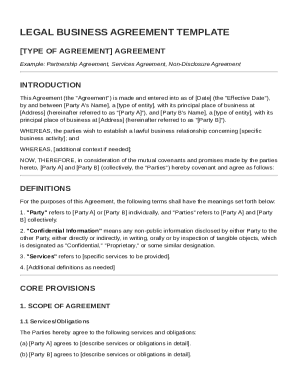
Re Agreement INTRODUCTION This Agreement (the "Agreement") is made and entered into as of Date (the "Effective Date"), by and between Party A's Name , a type of entity , with its principal place of business at Address (hereinafter referred to as " Party A "), and Party B's Name , a type of entity , with its principal place of business at Address (hereinafter referred to as " Party B "). WHEREAS, the parties wish to establish a lawful business relationship concerning specific business.

How it works

  1. Open form

    Open form follow the instructions

  2. Easily sign form

    Easily sign the form with your finger

  3. Share form

    Send filled & signed form or save

How to fill out and sign Legal Business Agreement Template online?

Get your online template and fill it in using progressive features. Enjoy smart fillable fields and interactivity.Follow the simple instructions below:

The prep of legal papers can be high-priced and time-consuming. However, with our preconfigured web templates, things get simpler. Now, using a Legal Business Agreement Template requires no more than 5 minutes. Our state browser-based blanks and clear recommendations eliminate human-prone mistakes.

Adhere to our simple actions to get your Legal Business Agreement Template ready rapidly:

  1. Pick the template from the library.
  2. Type all necessary information in the necessary fillable fields. The user-friendly drag&drop interface makes it easy to add or move fields.
  3. Make sure everything is filled out properly, with no typos or missing blocks.
  4. Use your e-signature to the PDF page.
  5. Click Done to confirm the adjustments.
  6. Save the record or print your copy.
  7. Distribute instantly to the recipient.

Take advantage of the fast search and advanced cloud editor to make a correct Legal Business Agreement Template. Get rid of the routine and create papers on the internet!

Tips on how to fill out, edit and sign Legal Business Agreement Template online

How to fill out and sign Legal Business Agreement Template online?

Get your online template and fill it in using progressive features. Enjoy smart fillable fields and interactivity.Follow the simple instructions below:

The prep of legal papers can be high-priced and time-consuming. However, with our preconfigured web templates, things get simpler. Now, using a Legal Business Agreement Template requires no more than 5 minutes. Our state browser-based blanks and clear recommendations eliminate human-prone mistakes.

Adhere to our simple actions to get your Legal Business Agreement Template ready rapidly:

  1. Pick the template from the library.
  2. Type all necessary information in the necessary fillable fields. The user-friendly drag&drop interface makes it easy to add or move fields.
  3. Make sure everything is filled out properly, with no typos or missing blocks.
  4. Use your e-signature to the PDF page.
  5. Click Done to confirm the adjustments.
  6. Save the record or print your copy.
  7. Distribute instantly to the recipient.

Take advantage of the fast search and advanced cloud editor to make a correct Legal Business Agreement Template. Get rid of the routine and create papers on the internet!

How to edit Legal Business Agreement Template: customize forms online

Find the correct Legal Business Agreement Template template and modify it on the spot. Streamline your paperwork with a smart document editing solution for online forms.

Your day-to-day workflow with paperwork and forms can be more effective when you have all you need in one place. For instance, you can find, get, and modify Legal Business Agreement Template in one browser tab. If you need a specific Legal Business Agreement Template, you can easily find it with the help of the smart search engine and access it instantly. You do not need to download it or search for a third-party editor to modify it and add your information. All of the tools for effective work go in one packaged solution.

This modifying solution enables you to personalize, fill, and sign your Legal Business Agreement Template form right on the spot. Once you see a proper template, click on it to go to the modifying mode. Once you open the form in the editor, you have all the necessary instruments at your fingertips. It is easy to fill in the dedicated fields and erase them if needed with the help of a simple yet multifunctional toolbar. Apply all the changes instantly, and sign the form without leaving the tab by merely clicking the signature field. After that, you can send or print out your file if required.

Make more custom edits with available instruments.

  • Annotate your file using the Sticky note tool by placing a note at any spot within the document.
  • Add necessary graphic components, if required, with the Circle, Check, or Cross instruments.
  • Modify or add text anywhere in the document using Texts and Text box instruments. Add content with the Initials or Date tool.
  • Modify the template text using the Highlight and Blackout, or Erase instruments.
  • Add custom graphic components using the Arrow and Line, or Draw tools.

Discover new opportunities in efficient and simple paperwork. Find the Legal Business Agreement Template you need in minutes and fill it in in the same tab. Clear the mess in your paperwork once and for all with the help of online forms.

Get form

Experience a faster way to fill out and sign forms on the web. Access the most extensive library of templates available.
Get form

Related content

Legal Services Contract Template ...
CONTRACTUAL AGREEMENT. FOR LEGAL SERVICES. THIS AGREEMENT made and entered into this the...
Learn more
Sample Partnership Agreement
This agreement is for purchasing and operating grape acreage. Partner 1 contributes 190...
Learn more
12 Essential Elements Of A Solid Consulting...
Mar 24, 2022 — A solid consulting agreement should include the nature of services, fee...
Learn more

Related links form

MD CC-DR-054 2017 Pain Control Associates Narcotic Agreement 2023 ME Township High School South Guest Permission Form 2018 NAVCRUIT 1131/5 2014

Questions & Answers

Get answers to your most pressing questions about US Legal Forms API.

Contact support

Writing a short agreement involves summarizing the essential points of the arrangement. Clearly identify the parties, state the purpose, and outline key terms. A Legal Business Agreement Template can help you focus on brevity while ensuring that all critical information is included.

To write a simple business contract, start by identifying the parties and the specific agreement details. Explain the terms and conditions clearly, ensuring both parties understand their rights and duties. Consider using a Legal Business Agreement Template to simplify the process, as it offers guidance and structure.

Writing your own agreement is entirely feasible and can be done effectively. By using a Legal Business Agreement Template, you gain a structured outline to follow, which can help in drafting a comprehensive document. Ensure to tailor the template according to your unique needs and requirements.

To create a legal contract agreement, start by clearly stating the parties and the purpose of the contract. Include terms that specify rights and obligations, and ensure there is mutual consent. Utilizing a Legal Business Agreement Template can streamline this process, making it easier to craft a legally sound document.

Writing a simple business agreement starts with defining the parties involved and the purpose of the agreement. Next, outline the terms, responsibilities, and any payment structure. A Legal Business Agreement Template can provide the necessary framework, allowing you to focus on specific details that matter to your agreement.

Absolutely; creating your own operating agreement is possible if you have the right resources. Using a Legal Business Agreement Template can guide you through the essential elements to include. This ensures that your agreement accurately reflects your business arrangement and complies with relevant laws.

Examples of simple contracts include sales agreements, service contracts, and lease agreements. Each of these documents serves a clear purpose and often follows a standard format. Utilizing a Legal Business Agreement Template can simplify the creation of these contracts, making them easier to understand and execute.

Yes, you can create your own agreement using a Legal Business Agreement Template. These templates provide a structured format that can help ensure you include all necessary components. It is important to customize them to fit your specific needs and the details of your agreement.

Yes, Microsoft Word offers various contract templates that you can customize, including those designed for a Legal Business Agreement Template. Using these templates can save time and provide a starting point for your agreements. However, it's important to review and tailor any template to meet your unique needs and legal standards.

You can create your own contract by utilizing a Legal Business Agreement Template as a guide. This approach helps ensure that you include all necessary components, which are vital for the contract's legality. However, it is crucial to understand the legal implications behind the terms you set to avoid enforceability issues.

Get This Form Now!

Use professional pre-built templates to fill in and sign documents online faster. Get access to thousands of forms.
Get form
If you believe that this page should be taken down, please follow our DMCA take down processhere.
Get Legal Business Agreement Template
Get form
  • Adoption
  • Bankruptcy
  • Contractors
  • Divorce
  • Home Sales
  • Employment
  • Identity Theft
  • Incorporation
  • Landlord Tenant
  • Living Trust
  • Name Change
  • Personal Planning
  • Small Business
  • Wills & Estates
  • Packages A-Z
  • Affidavits
  • Bankruptcy
  • Bill of Sale
  • Corporate - LLC
  • Divorce
  • Employment
  • Identity Theft
  • Internet Technology
  • Landlord Tenant
  • Living Wills
  • Name Change
  • Power of Attorney
  • Real Estate
  • Small Estates
  • Wills
  • All Forms
  • Forms A-Z
  • Other Templates
  • Legal Hub
  • About Us
  • Help Portal
  • Legal Resources
  • Blog
  • Affiliates
  • Contact Us
  • Delete My Account
  • Site Map
  • Industries
  • Forms in Spanish
  • Localized Forms
  • State-specific Forms
  • Forms Kit
  • Real Estate Handbook
  • All Guides
  • Notarize
  • Incorporation services
  • For Consumers
  • For Small Business
  • For Attorneys
  • USLegal
  • FormsPass
  • pdfFiller
  • signNow
  • altaFlow
  • DocHub
  • Instapage
Form Packages
  • Adoption
  • Bankruptcy
  • Contractors
  • Divorce
  • Home Sales
  • Employment
  • Identity Theft
  • Incorporation
  • Landlord Tenant
  • Living Trust
  • Name Change
  • Personal Planning
  • Small Business
  • Wills & Estates
  • Packages A-Z
Form Categories
  • Affidavits
  • Bankruptcy
  • Bill of Sale
  • Corporate - LLC
  • Divorce
  • Employment
  • Identity Theft
  • Internet Technology
  • Landlord Tenant
  • Living Wills
  • Name Change
  • Power of Attorney
  • Real Estate
  • Small Estates
  • Wills
  • All Forms
  • Forms A-Z
  • Other Templates
Customer Service
  • Legal Hub
  • About Us
  • Help Portal
  • Legal Resources
  • Blog
  • Affiliates
  • Contact Us
  • Delete My Account
  • Site Map
  • Industries
  • Forms in Spanish
  • Localized Forms
  • State-specific Forms
  • Forms Kit
Legal Guides
  • Real Estate Handbook
  • All Guides
Prepared for you
  • Notarize
  • Incorporation services
Our Customers
  • For Consumers
  • For Small Business
  • For Attorneys
Our Sites
  • USLegal
  • FormsPass
  • pdfFiller
  • signNow
  • altaFlow
  • DocHub
  • Instapage
Social Media
Call us now toll free:
+1 833 426 79 33
As seen in:
© Copyright 1999-2026 airSlate Legal Forms, Inc. 17 Station Street, Ste. 203, Brookline, MA 02445
  • Your Privacy Choices
  • Terms of Service
  • Privacy Notice
  • Content Takedown Policy
  • Bug Bounty Program