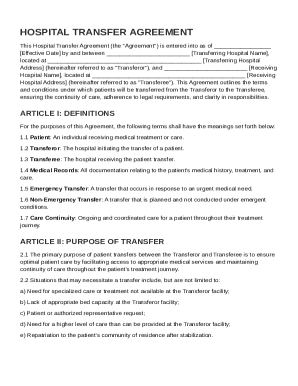
Get Hospital Transfer Agreement Template
How it works
-

Open form follow the instructions
-

Easily sign the form with your finger
-

Send filled & signed form or save
How to fill out and sign Hospital Transfer Agreement Template online?
Get your online template and fill it in using progressive features. Enjoy smart fillable fields and interactivity.Follow the simple instructions below:The times of frightening complicated legal and tax documents are over. With US Legal Forms the procedure of filling out legal documents is anxiety-free. A powerhouse editor is directly close at hand providing you with an array of advantageous tools for filling out a Hospital Transfer Agreement Template. These guidelines, along with the editor will assist you with the whole process.
- Click the orange Get Form option to begin filling out.
- Activate the Wizard mode on the top toolbar to have more tips.
- Fill each fillable area.
- Ensure the data you add to the Hospital Transfer Agreement Template is updated and correct.
- Add the date to the template with the Date tool.
- Click the Sign icon and create an e-signature. There are 3 options; typing, drawing, or uploading one.
- Make sure that each field has been filled in properly.
- Click Done in the top right corne to save or send the template. There are various alternatives for receiving the doc. As an instant download, an attachment in an email or through the mail as a hard copy.
We make completing any Hospital Transfer Agreement Template much easier. Use it now!
Tips on how to fill out, edit and sign Hospital Transfer Agreement Template online
How to fill out and sign Hospital Transfer Agreement Template online?
Get your online template and fill it in using progressive features. Enjoy smart fillable fields and interactivity.Follow the simple instructions below:
The times of frightening complicated legal and tax documents are over. With US Legal Forms the procedure of filling out legal documents is anxiety-free. A powerhouse editor is directly close at hand providing you with an array of advantageous tools for filling out a Hospital Transfer Agreement Template. These guidelines, along with the editor will assist you with the whole process.
- Click the orange Get Form option to begin filling out.
- Activate the Wizard mode on the top toolbar to have more tips.
- Fill each fillable area.
- Ensure the data you add to the Hospital Transfer Agreement Template is updated and correct.
- Add the date to the template with the Date tool.
- Click the Sign icon and create an e-signature. There are 3 options; typing, drawing, or uploading one.
- Make sure that each field has been filled in properly.
- Click Done in the top right corne to save or send the template. There are various alternatives for receiving the doc. As an instant download, an attachment in an email or through the mail as a hard copy.
We make completing any Hospital Transfer Agreement Template much easier. Use it now!
How to edit Hospital Transfer Agreement Template: customize forms online
Sign and share Hospital Transfer Agreement Template together with any other business and personal paperwork online without wasting time and resources on printing and postal delivery. Get the most out of our online document editor using a built-in compliant eSignature option.
Signing and submitting Hospital Transfer Agreement Template documents electronically is quicker and more productive than managing them on paper. However, it requires making use of online solutions that guarantee a high level of data safety and provide you with a certified tool for generating electronic signatures. Our robust online editor is just the one you need to complete your Hospital Transfer Agreement Template and other personal and business or tax templates in a precise and proper way in accordance with all the requirements. It offers all the necessary tools to quickly and easily fill out, modify, and sign paperwork online and add Signature fields for other people, specifying who and where should sign.
It takes just a few simple steps to complete and sign Hospital Transfer Agreement Template online:
- Open the chosen file for further processing.
- Use the upper toolkit to add Text, Initials, Image, Check, and Cross marks to your template.
- Underline the important details and blackout or remove the sensitive ones if necessary.
- Click on the Sign option above and select how you prefer to eSign your document.
- Draw your signature, type it, upload its image, or use another option that suits you.
- Move to the Edit Fillable Fileds panel and drop Signature areas for other parties.
- Click on Add Signer and provide your recipient’s email to assign this field to them.
- Check that all information provided is complete and accurate before you click Done.
- Share your document with others using one of the available options.
When signing Hospital Transfer Agreement Template with our comprehensive online solution, you can always be certain you get it legally binding and court-admissible. Prepare and submit documentation in the most efficient way possible!
The purpose of a transfer agreement is to establish clear protocols for transferring patients safely between healthcare facilities. This agreement outlines the roles and responsibilities of each party, ensuring compliance with legal requirements and continuity of care. A Hospital Transfer Agreement Template helps in drafting these essential documents efficiently, protecting both hospitals and patients.