Loading
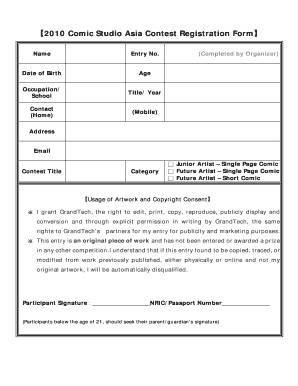
Get 2010 Comic Studio Asia Contest Registration Form
How it works
-

Open form follow the instructions
-

Easily sign the form with your finger
-

Send filled & signed form or save
How to fill out the 2010 Comic Studio Asia Contest Registration Form online
Filling out the 2010 Comic Studio Asia Contest Registration Form is an essential step for participants who wish to showcase their talent. This guide will walk you through the various components of the form, ensuring that you complete it accurately and efficiently.
Follow the steps to complete your registration form seamlessly.
- Click the ‘Get Form’ button to obtain the form, then open it in your preferred editing tool.
- Begin by entering your name in the appropriate field. This is crucial for identifying your entry.
- Next, assign an entry number, which will be provided by the organizers upon submission or registration.
- Provide your date of birth. This information is necessary to verify eligibility for certain age categories.
- Indicate your age, as this may apply to specific contest categories.
- In the occupation or school field, state your current status. This is aside from being a participant.
- Fill in the title of your work and the year it was created.
- Enter your contact information, including both home and mobile phone numbers. This ensures the organizers can reach you if needed.
- Provide your email address for digital communication regarding the contest.
- In the contest title section, write the title of your comic or artwork submission.
- Select the appropriate category from the options provided, which include Junior Artist – Single Page Comic, Future Artist – Single Page Comic, or Future Artist – Short Comic.
- Review the usage of artwork and copyright consent section, ensuring you understand the rights granted to GrandTech and its partners concerning your work.
- Affix your signature in the designated area, verifying your agreement to the above terms, and include your NRIC or passport number.
- If you are under the age of 21, ensure that a parent or guardian also signs the form.
- Finally, save your changes to the completed form. You can choose to download, print, or share it as needed for submission.
Complete your registration form online today and showcase your creativity in the contest!
Industry-leading security and compliance
US Legal Forms protects your data by complying with industry-specific security standards.
-
In businnes since 199725+ years providing professional legal documents.
-
Accredited businessGuarantees that a business meets BBB accreditation standards in the US and Canada.
-
Secured by BraintreeValidated Level 1 PCI DSS compliant payment gateway that accepts most major credit and debit card brands from across the globe.