Loading
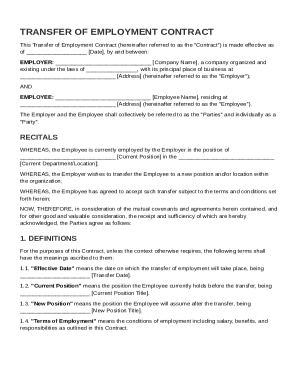
Form preview
  • US Legal Forms
  • Other Templates
  • More Forms
  • More Multi-State Forms
  • Transfer Of Employment Contract Template

Get Transfer Of Employment Contract Template

Date , by and between: EMPLOYER: Company Name , a company organized and existing under the laws of , with its principal place of business at Address (hereinafter referred to as the "Employer"); AND EMPLOYEE: Employee Name , residing at Address (hereinafter referred to as the "Employee"). The Employer and the Employee shall collecti.

How it works

  1. Open form

    Open form follow the instructions

  2. Easily sign form

    Easily sign the form with your finger

  3. Share form

    Send filled & signed form or save

How to fill out and sign Transfer Of Employment Contract Template online?

Get your online template and fill it in using progressive features. Enjoy smart fillable fields and interactivity.Follow the simple instructions below:

The prep of lawful papers can be costly and time-consuming. However, with our predesigned online templates, everything gets simpler. Now, creating a Transfer Of Employment Contract Template requires not more than 5 minutes. Our state web-based blanks and clear instructions eradicate human-prone faults.

Adhere to our simple actions to get your Transfer Of Employment Contract Template ready quickly:

  1. Select the template in the catalogue.
  2. Type all necessary information in the necessary fillable areas. The easy-to-use drag&drop user interface makes it easy to add or move areas.
  3. Check if everything is filled out correctly, without any typos or absent blocks.
  4. Apply your e-signature to the PDF page.
  5. Click Done to confirm the alterations.
  6. Download the record or print your copy.
  7. Submit immediately to the recipient.

Take advantage of the fast search and advanced cloud editor to generate an accurate Transfer Of Employment Contract Template. Eliminate the routine and produce documents online!

Tips on how to fill out, edit and sign Transfer Of Employment Contract Template online

How to fill out and sign Transfer Of Employment Contract Template online?

Get your online template and fill it in using progressive features. Enjoy smart fillable fields and interactivity.Follow the simple instructions below:

The prep of lawful papers can be costly and time-consuming. However, with our predesigned online templates, everything gets simpler. Now, creating a Transfer Of Employment Contract Template requires not more than 5 minutes. Our state web-based blanks and clear instructions eradicate human-prone faults.

Adhere to our simple actions to get your Transfer Of Employment Contract Template ready quickly:

  1. Select the template in the catalogue.
  2. Type all necessary information in the necessary fillable areas. The easy-to-use drag&drop user interface makes it easy to add or move areas.
  3. Check if everything is filled out correctly, without any typos or absent blocks.
  4. Apply your e-signature to the PDF page.
  5. Click Done to confirm the alterations.
  6. Download the record or print your copy.
  7. Submit immediately to the recipient.

Take advantage of the fast search and advanced cloud editor to generate an accurate Transfer Of Employment Contract Template. Eliminate the routine and produce documents online!

How to edit Transfer Of Employment Contract Template: customize forms online

Find the correct Transfer Of Employment Contract Template template and edit it on the spot. Simplify your paperwork with a smart document editing solution for online forms.

Your daily workflow with paperwork and forms can be more effective when you have everything that you need in one place. For instance, you can find, get, and edit Transfer Of Employment Contract Template in just one browser tab. Should you need a specific Transfer Of Employment Contract Template, you can easily find it with the help of the smart search engine and access it immediately. You do not need to download it or look for a third-party editor to edit it and add your data. All of the tools for efficient work go in just one packaged solution.

This editing solution allows you to personalize, fill, and sign your Transfer Of Employment Contract Template form right on the spot. Once you discover a suitable template, click on it to go to the editing mode. Once you open the form in the editor, you have all the necessary tools at your fingertips. It is easy to fill in the dedicated fields and remove them if needed with the help of a simple yet multifunctional toolbar. Apply all the changes immediately, and sign the form without leaving the tab by merely clicking the signature field. After that, you can send or print out your document if required.

Make more custom edits with available tools.

  • Annotate your document with the Sticky note tool by putting a note at any spot within the document.
  • Add necessary visual elements, if needed, with the Circle, Check, or Cross tools.
  • Modify or add text anywhere in the document using Texts and Text box tools. Add content with the Initials or Date tool.
  • Modify the template text with the Highlight and Blackout, or Erase tools.
  • Add custom visual elements with the Arrow and Line, or Draw tools.

Discover new options in streamlined and effortless paperwork. Find the Transfer Of Employment Contract Template you need in minutes and fill it out in in the same tab. Clear the mess in your paperwork once and for all with the help of online forms.

Get form

Experience a faster way to fill out and sign forms on the web. Access the most extensive library of templates available.
Get form

Related content

employee transfer agreement
Chesapeake Management agreed to transfer to the Company certain employees necessary to...
Learn more
Letter to Employees Notifying them of Transfer...
This letter is to confirm the transfer of the function of (name of function) to the (name...
Learn more
Business sold 'as a going concern' – legal...
May 26, 2016 — This agreement can take various forms. For example, it can be agreed that...
Learn more

Related links form

Application Form Harry J. Horne Scholarship - Middle Tennessee ... Over The Years, FOUNDATION NAME H - Michigan State University Author-Publisher Agreement - Michigan State University - Msu SUPERVISOR'S INTERNSHIP EVALUATION

Questions & Answers

Get answers to your most pressing questions about US Legal Forms API.

Contact support

To transfer a contract, you must first obtain agreement from all parties involved. Utilize the Transfer Of Employment Contract Template to draft a new agreement that outlines the transfer specifics. It's essential to follow any legal stipulations, so reviewing the document thoroughly with all parties is vital to ensure a smooth transition.

Yes, you can transfer a contract to another company, but this process typically requires consent from all parties involved. Using a Transfer Of Employment Contract Template can facilitate this process by providing a clear structure for the terms of the transfer. Check any legal requirements and ensure all parties understand and agree to the new arrangements before proceeding.

Filling out a contract of employment template involves several straightforward steps. First, provide the employee's and employer's details, including names and addresses. Next, specify job duties, salary, and benefits, utilizing the Transfer Of Employment Contract Template to guide you through the process. Finally, review the completed document with all parties to ensure accuracy before signing.

To write a transfer agreement, start by clearly defining the parties involved and the specific contract being transferred. Use the Transfer Of Employment Contract Template to outline the terms and conditions, ensuring all essential details are included, such as start dates and obligations. Make sure to have both parties review the document to confirm mutual understanding before signing.

To request an office transfer, formally communicate your request via email or letter to your manager or HR. Include details about the location or department you wish to transfer to and your reasons for this move. A Transfer Of Employment Contract Template can assist in drafting your message professionally.

Requesting a transfer starts with clearly outlining the position you are interested in and your reasons for the request. Submit this in writing, ideally as an official transfer request form or letter. A Transfer Of Employment Contract Template can guide you in structuring your request effectively.

To download your employment contract, log into the company’s HR portal and navigate to the section for employment documents. Locate your contract and select the download option. If you don’t have access, consider requesting a copy while referencing a Transfer Of Employment Contract Template for clarity.

To professionally ask for a transfer, schedule a meeting with your supervisor to discuss your request. Prepare to explain your reasons thoughtfully and how the transfer can benefit the company as well. A Transfer Of Employment Contract Template can serve as a useful tool in this situation.

To ask for a transfer at work, you can use a template that highlights your desire to grow within the company. Clearly state your reasons for requesting the transfer and express enthusiasm for the new role. Utilizing a Transfer Of Employment Contract Template can enhance your request.

To request a copy of your employment contract, send a polite written request to your HR department. Specify your name, position, and any details pertaining to your original contract. This is essential for referencing details in your Transfer Of Employment Contract Template.

Get This Form Now!

Use professional pre-built templates to fill in and sign documents online faster. Get access to thousands of forms.
Get form
If you believe that this page should be taken down, please follow our DMCA take down processhere.
Get Transfer Of Employment Contract Template
Get form
  • Adoption
  • Bankruptcy
  • Contractors
  • Divorce
  • Home Sales
  • Employment
  • Identity Theft
  • Incorporation
  • Landlord Tenant
  • Living Trust
  • Name Change
  • Personal Planning
  • Small Business
  • Wills & Estates
  • Packages A-Z
  • Affidavits
  • Bankruptcy
  • Bill of Sale
  • Corporate - LLC
  • Divorce
  • Employment
  • Identity Theft
  • Internet Technology
  • Landlord Tenant
  • Living Wills
  • Name Change
  • Power of Attorney
  • Real Estate
  • Small Estates
  • Wills
  • All Forms
  • Forms A-Z
  • Other Templates
  • Legal Hub
  • About Us
  • Help Portal
  • Legal Resources
  • Blog
  • Affiliates
  • Contact Us
  • Delete My Account
  • Site Map
  • Industries
  • Forms in Spanish
  • Localized Forms
  • State-specific Forms
  • Forms Kit
  • Real Estate Handbook
  • All Guides
  • Notarize
  • Incorporation services
  • For Consumers
  • For Small Business
  • For Attorneys
  • USLegal
  • FormsPass
  • pdfFiller
  • signNow
  • altaFlow
  • DocHub
  • Instapage
Form Packages
  • Adoption
  • Bankruptcy
  • Contractors
  • Divorce
  • Home Sales
  • Employment
  • Identity Theft
  • Incorporation
  • Landlord Tenant
  • Living Trust
  • Name Change
  • Personal Planning
  • Small Business
  • Wills & Estates
  • Packages A-Z
Form Categories
  • Affidavits
  • Bankruptcy
  • Bill of Sale
  • Corporate - LLC
  • Divorce
  • Employment
  • Identity Theft
  • Internet Technology
  • Landlord Tenant
  • Living Wills
  • Name Change
  • Power of Attorney
  • Real Estate
  • Small Estates
  • Wills
  • All Forms
  • Forms A-Z
  • Other Templates
Customer Service
  • Legal Hub
  • About Us
  • Help Portal
  • Legal Resources
  • Blog
  • Affiliates
  • Contact Us
  • Delete My Account
  • Site Map
  • Industries
  • Forms in Spanish
  • Localized Forms
  • State-specific Forms
  • Forms Kit
Legal Guides
  • Real Estate Handbook
  • All Guides
Prepared for you
  • Notarize
  • Incorporation services
Our Customers
  • For Consumers
  • For Small Business
  • For Attorneys
Our Sites
  • USLegal
  • FormsPass
  • pdfFiller
  • signNow
  • altaFlow
  • DocHub
  • Instapage
Social Media
Call us now toll free:
+1 833 426 79 33
As seen in:
© Copyright 1999-2026 airSlate Legal Forms, Inc. 17 Station Street, Ste. 203, Brookline, MA 02445
  • Your Privacy Choices
  • Terms of Service
  • Privacy Notice
  • Content Takedown Policy
  • Bug Bounty Program