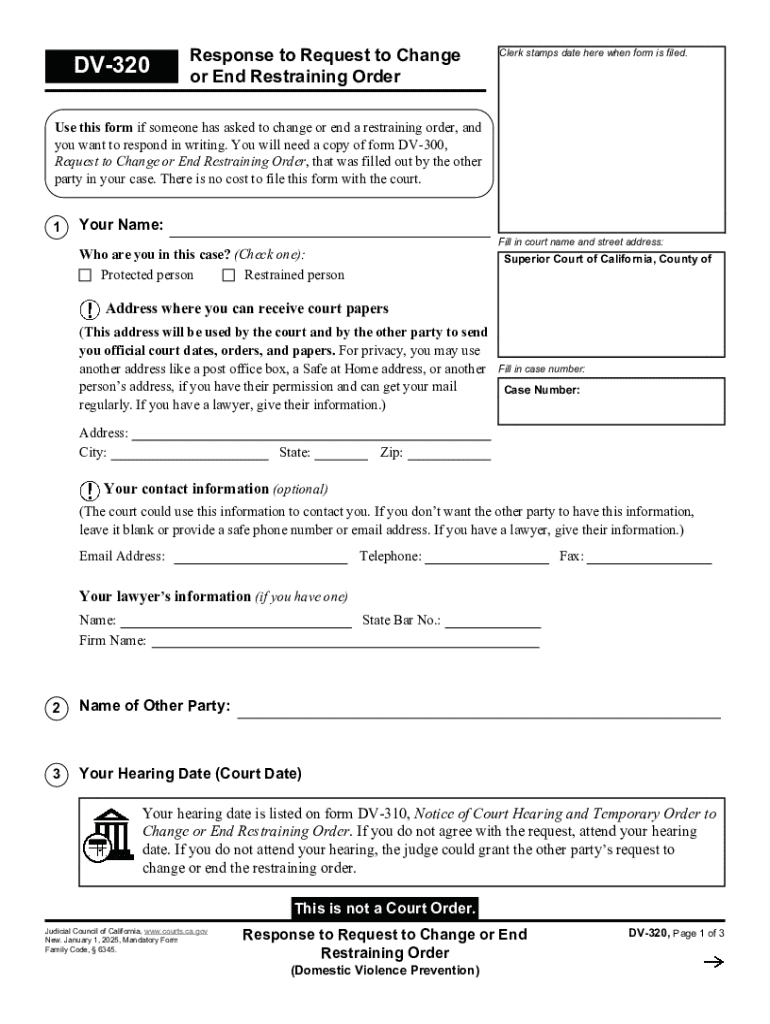
Respond in writing. You will need a copy of form DV-300, Request to Change or End Restraining Order, that was filled out by the other party in your case. There is no cost to file this form with the court. 1 Your Name: Fill in court name and street address: Who are you in this case? (Check one): Protected person Restrained person Superior Court of California, County of Address where you can receive court papers (This address will be used by the court and by the other party to send you offici.
Loading

Open form follow the instructions

Easily sign the form with your finger

Send filled & signed form or save
How to fill out and sign CA DV-320 online?
Get your online template and fill it in using progressive features. Enjoy smart fillable fields and interactivity.Follow the simple instructions below:
Getting a legal expert, creating a scheduled visit and coming to the business office for a personal conference makes doing a CA DV-320 from beginning to end stressful. US Legal Forms enables you to quickly produce legally-compliant papers based on pre-created web-based samples.
Prepare your docs within a few minutes using our easy step-by-step guideline:
- Find the CA DV-320 you require.
- Open it with cloud-based editor and begin adjusting.
- Fill out the blank fields; involved parties names, places of residence and numbers etc.
- Change the template with exclusive fillable areas.
- Add the date and place your e-signature.
- Simply click Done following double-examining everything.
- Save the ready-created papers to your gadget or print it as a hard copy.
Easily generate a CA DV-320 without needing to involve experts. We already have over 3 million people taking advantage of our rich catalogue of legal forms. Join us today and gain access to the #1 collection of web blanks. Try it out yourself!
Tips on how to fill out, edit and sign CA DV-320 online
How to fill and sign CA DV-320
Get your online template and fill it in using progressive features. Enjoy smart fillable fields and interactivity.Follow the simple instructions below:
Getting a legal expert, creating a scheduled visit and coming to the business office for a personal conference makes doing a CA DV-320 from beginning to end stressful. US Legal Forms enables you to quickly produce legally-compliant papers based on pre-created web-based samples.
Prepare your docs within a few minutes using our easy step-by-step guideline:
- Find the CA DV-320 you require.
- Open it with cloud-based editor and begin adjusting.
- Fill out the blank fields; involved parties names, places of residence and numbers etc.
- Change the template with exclusive fillable areas.
- Add the date and place your e-signature.
- Simply click Done following double-examining everything.
- Save the ready-created papers to your gadget or print it as a hard copy.
Easily generate a CA DV-320 without needing to involve experts. We already have over 3 million people taking advantage of our rich catalogue of legal forms. Join us today and gain access to the #1 collection of web blanks. Try it out yourself!
How to edit CA DV-320
Say goodbye to an old-fashioned paper-based way of completing CA DV-320. Have the form completed and certified in minutes with our top-notch online editor.
Are you forced to revise and fill out CA DV-320? With a professional editor like ours, you can perform this in only minutes without the need to print and scan papers back and forth. We offer fully editable and straightforward form templates that will serve as a start and help you fill out the necessary document template online.
All forms, by default, include fillable fields you can execute once you open the document. However, if you need to improve the existing content of the form or insert a new one, you can select from a variety of customization and annotation options. Highlight, blackout, and comment on the text; add checkmarks, lines, text boxes, graphics and notes, and comments. Additionally, you can quickly certify the document with a legally-binding signature. The completed form can be shared with others, stored, sent to external apps, or transformed into any popular format.
You’ll never go wrong by choosing our web-based tool to execute CA DV-320 because it's:
- Easy to set up and use, even for those who haven’t completed the documents online in the past.
- Powerful enough to allow for various modifying needs and form types.
- Safe and secure, making your editing experience protected every time.
- Available for different operating systems, making it effortless to complete the form from anywhere.
- Capable of creating forms based on ready-drafted templates.
- Friendly to numerous file formats: PDF, DOC, DOCX, PPT and JPEG etc.
Don't spend time editing your CA DV-320 the old-fashioned way - with pen and paper. Use our feature-rich option instead. It gives you a versatile suite of editing options, built-in eSignature capabilities, and ease of use. What makes it differ from similar alternatives is the team collaboration capabilities - you can collaborate on documents with anyone, create a well-structured document approval flow from A to Z, and a lot more. Try our online tool and get the best bang for your buck!
How to fill and sign CA DV-320
Get your online template and fill it in using progressive features. Enjoy smart fillable fields and interactivity.Follow the simple instructions below:
Getting a legal expert, creating a scheduled visit and coming to the business office for a personal conference makes doing a CA DV-320 from beginning to end stressful. US Legal Forms enables you to quickly produce legally-compliant papers based on pre-created web-based samples.
Prepare your docs within a few minutes using our easy step-by-step guideline:
- Find the CA DV-320 you require.
- Open it with cloud-based editor and begin adjusting.
- Fill out the blank fields; involved parties names, places of residence and numbers etc.
- Change the template with exclusive fillable areas.
- Add the date and place your e-signature.
- Simply click Done following double-examining everything.
- Save the ready-created papers to your gadget or print it as a hard copy.
Easily generate a CA DV-320 without needing to involve experts. We already have over 3 million people taking advantage of our rich catalogue of legal forms. Join us today and gain access to the #1 collection of web blanks. Try it out yourself!
Experience a faster way to fill out and sign forms on the web. Access the most extensive library of templates available.
Related content
Jan 1, 2025 — Use this form if someone has asked to change or end a restraining order...
This course examines how perspectives on racism and other types of oppression influence...
Antes de utilizá-la, leia atentamente todas as instruções e precauções de segurança...
Get answers to your most pressing questions about US Legal Forms API.
What is the burden of proof for a restraining order in California?
In California, the burden of proof for obtaining a restraining order typically requires the petitioner to demonstrate a preponderance of evidence. This means you must show that it is more likely than not that you have experienced abuse or threats. A clear presentation of your situation is vital, and consulting resources like US Legal Forms can aid you in effectively meeting this requirement.
How to file proof of service in California court?
To file proof of service in California court, you must complete the appropriate proof of service form, which states how and when documents were delivered. This form can be filed alongside your other court documents. Properly filing this proof helps demonstrate that all parties involved in your case have received the necessary information regarding the CA DV-320.
What is the difference between a no contact order and a restraining order in California?
A no contact order prohibits communication with an individual, while a restraining order involves legal restrictions designed to protect a person from harassment or harm. In California, a restraining order can include various conditions beyond just communication prohibitions. Understanding these distinctions is crucial for your case, especially when dealing with situations involving CA DV-320.
How long does it take to get a restraining order in California?
The process to obtain a restraining order in California can vary in duration. Typically, it takes about one to three weeks, depending on the court's schedule and the specifics of your case. If you seek an emergency order, you may receive a temporary restraining order the same day, providing you immediate protection under CA DV-320.
How to beat a DV case in California?
To effectively address a DV case in California, it is essential to gather evidence demonstrating your side of the story. You should document interactions and seek witness statements when possible. Additionally, working with a legal professional experienced in CA DV-320 can provide you with the necessary strategies to navigate the case successfully.
What looks bad in a custody case?
Several factors can negatively impact a custody case. Inconsistencies in statements, lack of documentation, and showing unfit parenting practices all raise concerns. Additionally, any sign of neglect or failure to meet a child's needs can severely affect outcomes. Utilize resources available through US Legal Forms to prepare thoroughly and ensure your presentation in court, including documents like the CA DV-320, reflects your commitment to your child’s best interests.
What is an example of a good declaration?
An example of a good declaration clearly outlines the facts without ambiguity. Using the CA DV-320 as a foundation, it includes an introduction, main body with factual statements, and a supportive conclusion. It should focus on relevant issues, present information in chronological order, and use simple language for clarity. You can explore US Legal Forms for samples that illustrate effective declarations.
How do you write a declaration statement for court?
To write a declaration statement for court, start with an introduction that includes your name and relationship to the case. Make sure to reference the CA DV-320 as needed and present your statements factually. Organize your information logically, and keep your language clear and straightforward. Resources from US Legal Forms can provide you with templates that ensure your declaration meets court requirements.
How do you write a proper declaration?
A proper declaration should be precise and to the point. Begin with a clear heading that identifies the document and your purpose. The CA DV-320 format helps you lay out your statement correctly; focus on relevant facts while avoiding unnecessary details. Check out US Legal Forms for well-crafted templates that can guide you in creating a professional, effective declaration.
How do you write a good declaration in court?
Writing a good declaration for court involves being factual and organized. Start with a clear introduction, followed by a logical structure that presents your points supported by evidence. Refer to the CA DV-320 guidelines when listing your facts, and maintain an objective tone throughout your statement. Utilizing templates from US Legal Forms can greatly enhance your declaration's effectiveness and formality.
Use professional pre-built templates to fill in and sign documents online faster. Get access to thousands of forms.
If you believe that this page should be taken down, please follow our DMCA take down process here.