Loading
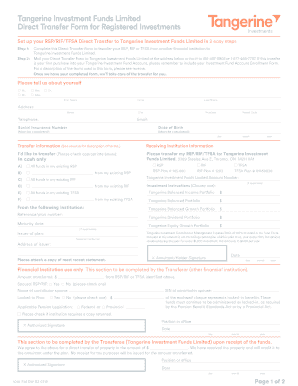
Get Canada Tangerine 1001 Fm Ew 2019-2026
How it works
-

Open form follow the instructions
-

Easily sign the form with your finger
-

Send filled & signed form or save
How to fill out the Canada Tangerine 1001 FM EW online
Filling out the Canada Tangerine 1001 FM EW form is a straightforward process that enables users to transfer their registered investments to Tangerine Investment Funds Limited. This guide provides a clear, step-by-step approach to ensure your form is completed accurately and efficiently.
Follow the steps to successfully complete your direct transfer form.
- Click 'Get Form' button to obtain the Canada Tangerine 1001 FM EW form and open it in your preferred online editing tool.
- Provide your personal information in the 'Please tell us about yourself' section. This includes your title, first name, initial, last name, street address, city, province, postal code, telephone number, email, social insurance number, and date of birth. Ensure that all required fields are completed, particularly your date of birth.
- In the 'Transfer information' section, identify the receiving institution by confirming that you want to transfer your funds to Tangerine Investment Funds Limited, located at 3389 Steeles Ave E, Toronto, ON M2H 0A1. Check the appropriate boxes for the type of account you are transferring (RSP, RIF, TFSA) and specify if you wish to transfer all or a portion of the funds.
- Indicate whether this transfer involves a locked-in plan or a spousal RSP/RIF. If applicable, provide the reference/plan number and mention any maturity dates for your investments. This information helps in the correct processing of your transfer.
- Choose your investment instructions from the available good options provided, specifying how you would like the transfer proceeds to be allocated once received by Tangerine Investment Funds Limited.
- In the 'Issuer of plan' section, include the name of the financial institution you are transferring from, along with its address. Remember to attach a copy of your most recent account statement from this institution.
- Finally, sign and date the form at the bottom to certify the transfer request. Ensure your signature and the date are accurately noted to avoid any processing delays. Review the entire form for completeness before submitting.
- Once you have completed the form, save your changes, then print it or download it for your records. Mail it to the provided address or fax it to the indicated numbers to initiate the transfer process.
Take action now and get your Canada Tangerine 1001 FM EW form filled out online today!
Related links form
Yes, Tangerine does have a transit number associated with each banking branch. This number is essential for conducting various transactions, including direct deposits and electronic payments. Be sure to check which transit number corresponds to your account for accurate processing. This is particularly relevant when using the Canada Tangerine 1001 FM EW service.