Loading
Form preview
  • US Legal Forms
  • Form Library
  • RMV Forms
  • Texas RMV Forms
  • Tx Cr-2 2017

Get Tx Cr-2 2017-2026

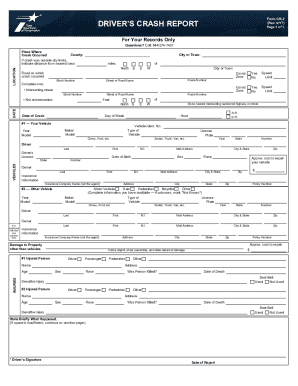
R vehicle is involved in a crash not investigated by a law enforcement officer that results in injury to or death of any person, or damage to the property of any one person, including the driver, to the apparent extent of at least one thousand dollars ($1,000). Who Should Complete a Driver's Crash Report (form CR-2)? The Driver's Crash Report is completed and signed by the driver of the vehicle involved in the crash. If the driver is unable to complete the report, another person may complete the.

How it works

  1. Open form

    Open form follow the instructions

  2. Easily sign form

    Easily sign the form with your finger

  3. Share form

    Send filled & signed form or save

How to fill out the TX CR-2 online

Filling out the TX CR-2 form online is an important step for drivers involved in a crash not investigated by law enforcement. This guide will provide you with comprehensive, step-by-step instructions to help you complete the form accurately and efficiently.

Follow the steps to fill out the TX CR-2 form with ease

  1. Click ‘Get Form’ button to obtain the form and open it in the editor.
  2. In the LOCATION section, fill in the details about the crash site, including the county, city or town, and specifics if the crash occurred outside city limits, such as distance from the nearest town and the name of that town.
  3. Provide the DATE of the crash by entering the date in MMDDYYY format, selecting the day of the week, and indicating the hour of the crash.
  4. In the VEHICLES section, start with #1 - Your Vehicle. Enter your vehicle's identification number (VIN), year, make/model, and type. Then fill in your driver information including your name, mailing address, license state and number, date of birth, sex, race, and vehicle owner information.
  5. For #2 - Other Vehicle, provide details about the other vehicle involved, which may be another motor vehicle, train, pedestrian, or other conveyances. Fill out the required fields as applicable.
  6. In the DAMAGE TO PROPERTY section, describe any property damage that occurred other than vehicle damage, including a description of the object, the state of the object, and the estimated repair cost.
  7. In the INJURIES section, identify any injured persons from your vehicle and the other vehicle, stating their positions and completing all the relevant data fields.
  8. Complete the DRIVER'S STATEMENT section with factual information regarding the crash circumstances.
  9. Finally, in the SIGNATURE section, sign and date the report to validate it.
  10. After completing all sections, you can save changes, download the completed form, print it for your records, or share it as needed.

Complete your TX CR-2 form online today to ensure all necessary information is accurately documented.

Get form

Experience a faster way to fill out and sign forms on the web. Access the most extensive library of templates available.
Get form

Related content

Crash Records Forms - Texas Department of...
TxDOT also offers the CR-3 Alternate Texas Peace Officer's Crash Report form ... the...
Learn more
Blue Form
Form CR-2 (Rev. 04/01/08) ... AUSTIN TX 78714. NOTE: If you are ... The CR-2 must be...
Learn more
U.S. Route 277 - Wikipedia
U.S. Route 277 (US 277, US-277) is a north–south United States Highway that is a spur...
Learn more

Related links form

CT 18-32224-CON 2019 TXCH Medical Board (TMB) Sub-Specialty Fellowship Program Applicant Information 2016 TX HCAD Supplemental Abatement Application Questionnaire For Tax Year 2019 CT Petition To Add A Medical Condition Medical Treatment Or Disease To The List Of Debilitating 2019

Questions & Answers

Get answers to your most pressing questions about US Legal Forms API.

Contact support

You may obtain a Texas Peace Officer's Crash Report (CR-3) (regular or certified) from the Texas Department of Transportation's Crash Report Online Purchase System. To request a driving record, you must submit the required information and pay the applicable fee. You may obtain your own driving record online.

Related Articles. Police records in Texas are public records. That means it is your right by law to retrieve or view your's or anyone's police records. They are generally provided for your viewing free of charge, but if you want a copy of the record, an nominal administrative fee is charged.

For instance, accident victims are required to complete and submit a Driver's Crash Report within 10 days of their crash if a police report was not filed and: The accident resulted in physical injury or death; or. The accident resulted in property damage of at least $1,000 or more to at least one person's property.

To obtain a paid copy of the police report, you need to request a copy from the local law enforcement office that drafted the report. Before leaving the scene of the incident, the investigating officer typically will hand you a receipt with the identification number for the police report.

The Driver's Crash Report or the so-called Texas blue form , is a paper filed by the driver of a motor vehicle who has been involved in a traffic accident. ... If the driver has been hurt in the crash and now is physically unable to complete the blue form, it may be completed by another individual.

Are Accident Reports Public Record? ... In order to protect the privacy of those involved, it is illegal for anyone to order an accident report without a reason. Violators can be prosecuted criminally, as the reports contain sensitive personal information.

Contact the newspaper offices or locate the newspapers online. For relatively recent accident reports, you should be able to search the newspaper online by finding the "archives" section of the website. For older accident reports, you may need to search the newspapers' archives or microfilm.

Can I Look Up a Police Report Online? You can obtain some police incident reports online. ... Your best bet is to call or visit the law enforcement agency that made the police report you want to look up. Have the identification number or the relevant time, place, date and names.

Are Car Accident Reports Public Record? If you have been involved in an accident, the car accident report will be the record that collects all the information from the crash. ... The bad effect from wrong information may not show up until a year later when your insurance is canceled or something else happens.

Due to their confidential nature, crash reports are not available for online viewing by the general public. The Texas Department of Transportation (TxDOT) is the custodian of crash records for the State of Texas.

Get This Form Now!

Use professional pre-built templates to fill in and sign documents online faster. Get access to thousands of forms.
Get form
If you believe that this page should be taken down, please follow our DMCA take down processhere.

Industry-leading security and compliance

US Legal Forms protects your data by complying with industry-specific security standards.
  • In businnes since 1997
    25+ years providing professional legal documents.
  • Accredited business
    Guarantees that a business meets BBB accreditation standards in the US and Canada.
  • Secured by Braintree
    Validated Level 1 PCI DSS compliant payment gateway that accepts most major credit and debit card brands from across the globe.
Get TX CR-2
Get form
  • Adoption
  • Bankruptcy
  • Contractors
  • Divorce
  • Home Sales
  • Employment
  • Identity Theft
  • Incorporation
  • Landlord Tenant
  • Living Trust
  • Name Change
  • Personal Planning
  • Small Business
  • Wills & Estates
  • Packages A-Z
  • Affidavits
  • Bankruptcy
  • Bill of Sale
  • Corporate - LLC
  • Divorce
  • Employment
  • Identity Theft
  • Internet Technology
  • Landlord Tenant
  • Living Wills
  • Name Change
  • Power of Attorney
  • Real Estate
  • Small Estates
  • Wills
  • All Forms
  • Forms A-Z
  • Form Library
  • Legal Hub
  • About Us
  • Help Portal
  • Legal Resources
  • Blog
  • Affiliates
  • Contact Us
  • Delete My Account
  • Site Map
  • Industries
  • Forms in Spanish
  • Localized Forms
  • State-specific Forms
  • Forms Kit
  • Real Estate Handbook
  • All Guides
  • Notarize
  • Incorporation services
  • For Consumers
  • For Small Business
  • For Attorneys
  • USLegal
  • FormsPass
  • pdfFiller
  • signNow
  • altaFlow
  • DocHub
  • Instapage
Form Packages
  • Adoption
  • Bankruptcy
  • Contractors
  • Divorce
  • Home Sales
  • Employment
  • Identity Theft
  • Incorporation
  • Landlord Tenant
  • Living Trust
  • Name Change
  • Personal Planning
  • Small Business
  • Wills & Estates
  • Packages A-Z
Form Categories
  • Affidavits
  • Bankruptcy
  • Bill of Sale
  • Corporate - LLC
  • Divorce
  • Employment
  • Identity Theft
  • Internet Technology
  • Landlord Tenant
  • Living Wills
  • Name Change
  • Power of Attorney
  • Real Estate
  • Small Estates
  • Wills
  • All Forms
  • Forms A-Z
  • Form Library
Customer Service
  • Legal Hub
  • About Us
  • Help Portal
  • Legal Resources
  • Blog
  • Affiliates
  • Contact Us
  • Delete My Account
  • Site Map
  • Industries
  • Forms in Spanish
  • Localized Forms
  • State-specific Forms
  • Forms Kit
Legal Guides
  • Real Estate Handbook
  • All Guides
Prepared for you
  • Notarize
  • Incorporation services
Our Customers
  • For Consumers
  • For Small Business
  • For Attorneys
Our Sites
  • USLegal
  • FormsPass
  • pdfFiller
  • signNow
  • altaFlow
  • DocHub
  • Instapage
Social Media
Call us now toll free:
+1 833 426 79 33
As seen in:
© Copyright 1999-2026 airSlate Legal Forms, Inc. 3720 Flowood Dr, Flowood, Mississippi 39232
  • Your Privacy Choices
  • Terms of Service
  • Privacy Notice
  • Content Takedown Policy
  • Bug Bounty Program