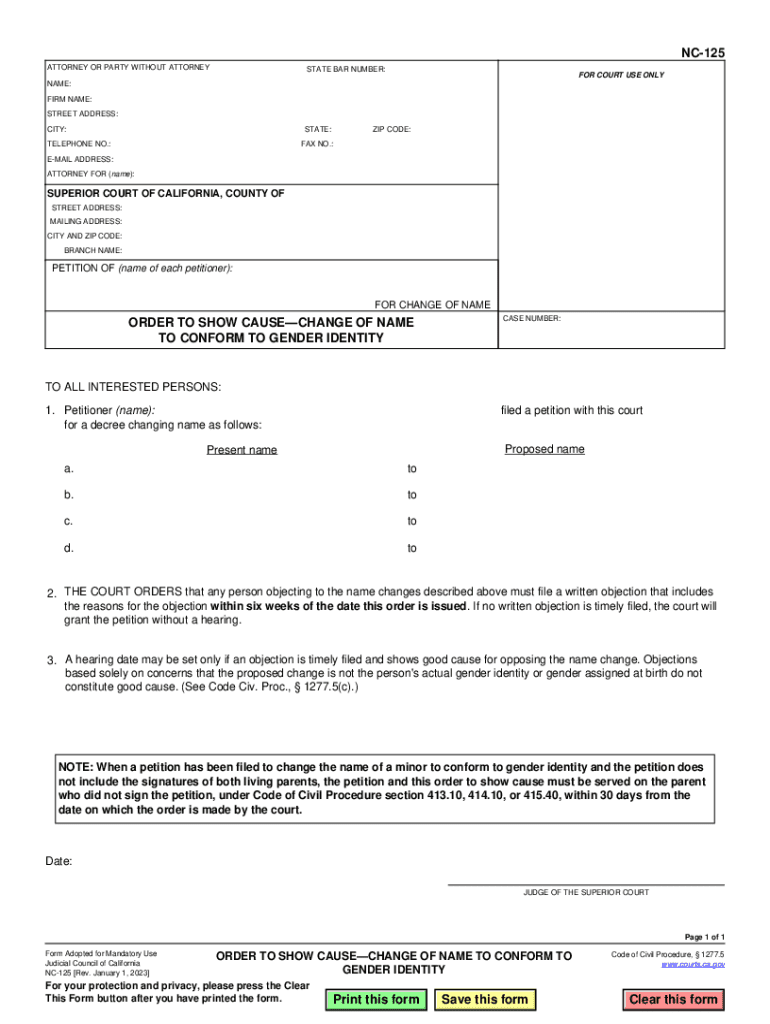
Me): SUPERIOR COURT OF CALIFORNIA, COUNTY OF STREET ADDRESS: MAILING ADDRESS: CITY AND ZIP CODE: BRANCH NAME: PETITION OF (name of each petitioner): FOR CHANGE OF NAME ORDER TO SHOW CAUSE CHANGE OF NAME TO CONFORM TO GENDER IDENTITY CASE NUMBER: TO ALL INTERESTED PERSONS: 1. Petitioner (name): for a decree changing name as follows: filed a petition with this court Proposed name Present name a. to b. to c. to d. to 2. THE COURT ORDERS that any person objecting to the name change.
Loading

Open form follow the instructions

Easily sign the form with your finger

Send filled & signed form or save
How to fill out and sign CA NC-125 online?
Get your online template and fill it in using progressive features. Enjoy smart fillable fields and interactivity.Follow the simple instructions below:
Tax, legal, business along with other electronic documents need a top level of protection and compliance with the law. Our templates are regularly updated in accordance with the latest legislative changes. In addition, with us, all of the data you provide in your CA NC-125 is protected against loss or damage with the help of cutting-edge file encryption.
The tips below will help you complete CA NC-125 quickly and easily:
- Open the template in the feature-rich online editing tool by hitting Get form.
- Fill out the necessary fields that are colored in yellow.
- Press the arrow with the inscription Next to jump from box to box.
- Use the e-autograph tool to add an electronic signature to the template.
- Put the date.
- Look through the whole template to ensure that you haven?t skipped anything.
- Press Done and save the new form.
Our service enables you to take the whole process of completing legal documents online. For that reason, you save hours (if not days or weeks) and eliminate additional expenses. From now on, fill out CA NC-125 from home, office, or even while on the go.
Tips on how to fill out, edit and sign CA NC-125 online
How to fill and sign CA NC-125
Get your online template and fill it in using progressive features. Enjoy smart fillable fields and interactivity.Follow the simple instructions below:
Tax, legal, business along with other electronic documents need a top level of protection and compliance with the law. Our templates are regularly updated in accordance with the latest legislative changes. In addition, with us, all of the data you provide in your CA NC-125 is protected against loss or damage with the help of cutting-edge file encryption.
The tips below will help you complete CA NC-125 quickly and easily:
- Open the template in the feature-rich online editing tool by hitting Get form.
- Fill out the necessary fields that are colored in yellow.
- Press the arrow with the inscription Next to jump from box to box.
- Use the e-autograph tool to add an electronic signature to the template.
- Put the date.
- Look through the whole template to ensure that you haven?t skipped anything.
- Press Done and save the new form.
Our service enables you to take the whole process of completing legal documents online. For that reason, you save hours (if not days or weeks) and eliminate additional expenses. From now on, fill out CA NC-125 from home, office, or even while on the go.
How to edit CA NC-125
Fill out and sign your CA NC-125 quickly and error-free. Find and edit, and sign customizable form templates in a comfort of a single tab.
Your document workflow can be much more efficient if everything required for editing and handling the flow is arranged in one place. If you are searching for a CA NC-125 form sample, this is a place to get it and fill it out without looking for third-party solutions. With this intelligent search engine and editing tool, you won’t need to look any further.
Just type the name of the CA NC-125 or any other form and find the right sample. If the sample seems relevant, you can start editing it right on the spot by clicking Get form. No need to print or even download it. Hover and click on the interactive fillable fields to place your details and sign the form in a single editor.
Use more editing instruments to customize your template:
- Check interactive checkboxes in forms by clicking on them. Check other areas of the CA NC-125 form text with the help of the Cross, Check, and Circle instruments
- If you need to insert more textual content into the file, utilize the Text tool or add fillable fields with the respective button. You can also specify the content of each fillable field.
- Add pictures to forms with the Image button. Upload pictures from your device or capture them with your computer camera.
- Add custom visual components to the document. Use Draw, Line, and Arrow instruments to draw on the form.
- Draw over the text in the document if you want to conceal it or stress it. Cover text fragments using theErase and Highlight, or Blackout tool.
- Add custom components such as Initials or Date using the respective instruments. They will be generated automatically.
- Save the form on your device or convert its format to the one you want.
When equipped with a smart forms catalog and a powerful document editing solution, working with documentation is easier. Find the form you need, fill it out instantly, and sign it on the spot without downloading it. Get your paperwork routine simplified with a solution tailored for editing forms.
How to fill and sign CA NC-125
Get your online template and fill it in using progressive features. Enjoy smart fillable fields and interactivity.Follow the simple instructions below:
Tax, legal, business along with other electronic documents need a top level of protection and compliance with the law. Our templates are regularly updated in accordance with the latest legislative changes. In addition, with us, all of the data you provide in your CA NC-125 is protected against loss or damage with the help of cutting-edge file encryption.
The tips below will help you complete CA NC-125 quickly and easily:
- Open the template in the feature-rich online editing tool by hitting Get form.
- Fill out the necessary fields that are colored in yellow.
- Press the arrow with the inscription Next to jump from box to box.
- Use the e-autograph tool to add an electronic signature to the template.
- Put the date.
- Look through the whole template to ensure that you haven?t skipped anything.
- Press Done and save the new form.
Our service enables you to take the whole process of completing legal documents online. For that reason, you save hours (if not days or weeks) and eliminate additional expenses. From now on, fill out CA NC-125 from home, office, or even while on the go.
Experience a faster way to fill out and sign forms on the web. Access the most extensive library of templates available.
Related content
This NC-125 form is an order to show cause for a name change to conform to gender...
by JK Chan · 2024 · Cited by 2 — Conclusions: Preoperative CA-125 was elevated in...
Get answers to your most pressing questions about US Legal Forms API.
Can you legally change your gender without surgery in California?
Yes, you can legally change your gender in California without undergoing surgery. The CA NC-125 form allows individuals to update their gender marker without requiring surgical procedures. You only need to indicate your desired gender on the form. This policy reflects California's commitment to respecting personal identity.
What disqualifies you from changing your name in California?
In California, certain circumstances can disqualify you from changing your name, such as having a felony conviction or attempting to evade legal obligations. The CA NC-125 form will require you to provide accurate information about your history. If you face potential disqualifications, it's wise to seek legal counsel to understand your options. Transparency is crucial in the process.
How to legally change your name and gender in California?
To legally change your name and gender in California, complete the CA NC-125 form and include any required supporting documents. File your application with the local court, and attend a hearing if necessary. Once your application is approved, you will receive documentation confirming your changes. This process is designed to be straightforward, allowing for both changes together.
How long does it take to legally change your gender in California?
Legally changing your gender in California can take several weeks to a few months, depending on the court's schedule and your compliance with the CA NC-125 process. After submitting your necessary forms, including CA NC-125, the court will review your application. You may also have to wait for a hearing date. The timeline can vary, so it's essential to remain patient.
How do you change your name in San Jose, California?
To change your name in San Jose, California, you need to file a petition in the local court using the CA NC-125 form. After completing the form, submit it to the court and attend a hearing if required. Once the court approves your petition, you will receive a name change decree. This decree allows you to update your name on official documents.
Can I change my name and gender at the same time?
Yes, you can change your name and gender simultaneously in California by completing the CA NC-125 form. This streamlined process allows you to update both identifiers in one application. It simplifies the paperwork and reduces the time needed for legal approval. Always consult official resources for the most accurate guidance.
Can I still change my name and gender in California?
Yes, you can still change your name and gender in California. The CA NC-125 offers a clear path for those looking to make these changes. Whether you are initiating this process for the first time or have questions, this form provides the necessary framework to manage your requests efficiently.
Do I need a lawyer to change my name in CA?
While it is not mandatory to have a lawyer to change your name in California, having legal assistance can simplify the process. The CA NC-125 form provides a clear guideline for those who choose to file without an attorney. However, if you have any complications or unique situations, consulting a lawyer might be beneficial.
How to file a joinder in California?
To file a joinder in California, you will need to complete the appropriate paperwork and submit it to the court. The CA NC-125 can also be used in this context to support your petition if related to name and gender changes. Be sure to follow the court's specific instructions to avoid delays.
What is an order to show cause for change of name NC 120?
An order to show cause for a change of name, NC 120, is a court document that allows individuals to present reasons for their name change to a judge. This document is part of the legal process where you justify your request for a name change. Understanding this step can help you prepare better when pursuing a name change, especially in conjunction with CA NC-125.
Use professional pre-built templates to fill in and sign documents online faster. Get access to thousands of forms.
If you believe that this page should be taken down, please follow our DMCA take down process here.