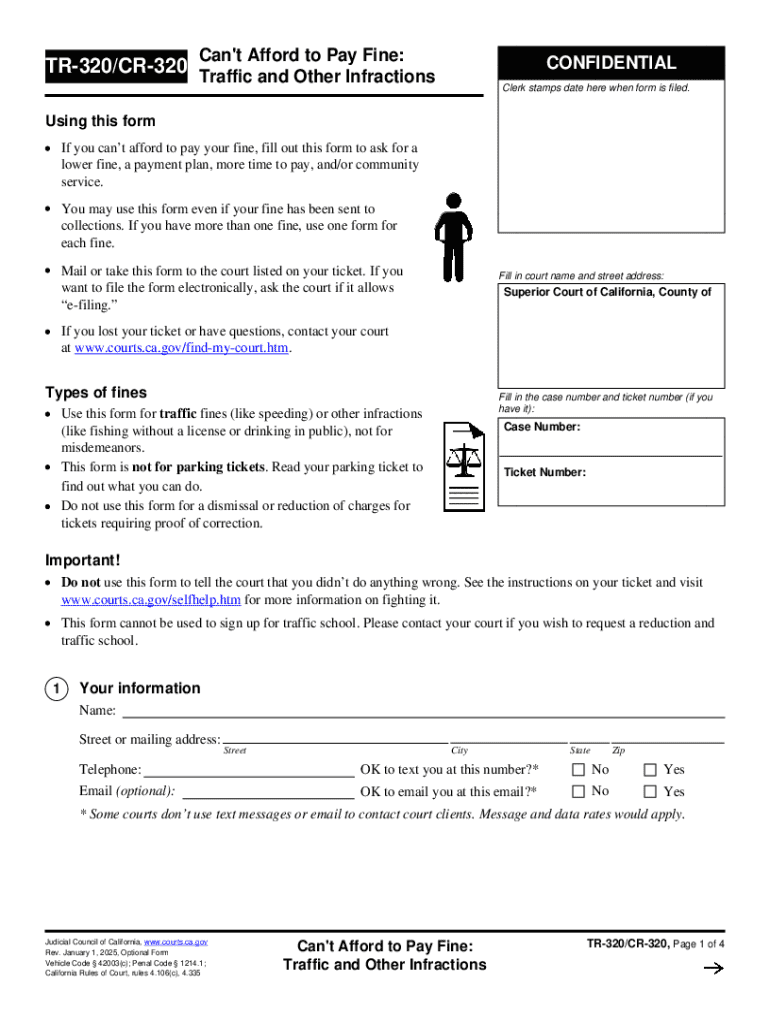
Is form to ask for a lower fine, a payment plan, more time to pay, and/or community service. You may use this form even if your fine has been sent to collections. If you have more than one fine, use one form for each fine. Mail or take this form to the court listed on your ticket. If you want to file the form electronically, ask the court if it allows e-filing. Fill in court name and street address: Superior Court of California, County of If you lost your ticket or have questions, conta.
Loading

Open form follow the instructions

Easily sign the form with your finger

Send filled & signed form or save
How to fill out and sign Tr-320/cr-320 online?
Get your online template and fill it in using progressive features. Enjoy smart fillable fields and interactivity.Follow the simple instructions below:
Business, legal, tax as well as other documents need a high level of compliance with the law and protection. Our documents are updated on a regular basis according to the latest legislative changes. In addition, with our service, all the info you provide in the Tr-320/cr-320 is protected against loss or damage with the help of industry-leading file encryption.
The following tips will help you fill in Tr-320/cr-320 quickly and easily:
- Open the document in our full-fledged online editor by clicking Get form.
- Complete the necessary fields that are yellow-colored.
- Press the green arrow with the inscription Next to move from box to box.
- Use the e-autograph solution to e-sign the document.
- Insert the relevant date.
- Check the whole e-document to be sure that you have not skipped anything.
- Press Done and save your new document.
Our solution allows you to take the entire process of completing legal papers online. As a result, you save hours (if not days or even weeks) and eliminate extra payments. From now on, fill out Tr-320/cr-320 from your home, place of work, or even on the move.
Tips on how to fill out, edit and sign Tr-320/cr-320 online
How to fill and sign Tr-320/cr-320
Get your online template and fill it in using progressive features. Enjoy smart fillable fields and interactivity.Follow the simple instructions below:
Business, legal, tax as well as other documents need a high level of compliance with the law and protection. Our documents are updated on a regular basis according to the latest legislative changes. In addition, with our service, all the info you provide in the Tr-320/cr-320 is protected against loss or damage with the help of industry-leading file encryption.
The following tips will help you fill in Tr-320/cr-320 quickly and easily:
- Open the document in our full-fledged online editor by clicking Get form.
- Complete the necessary fields that are yellow-colored.
- Press the green arrow with the inscription Next to move from box to box.
- Use the e-autograph solution to e-sign the document.
- Insert the relevant date.
- Check the whole e-document to be sure that you have not skipped anything.
- Press Done and save your new document.
Our solution allows you to take the entire process of completing legal papers online. As a result, you save hours (if not days or even weeks) and eliminate extra payments. From now on, fill out Tr-320/cr-320 from your home, place of work, or even on the move.
How to edit Tr-320/cr-320
Make the most of our comprehensive online document editor while completing your forms. Fill out the Tr-320/cr-320, emphasize on the most significant details, and easily make any other essential changes to its content.
Preparing documents electronically is not only time-saving but also comes with an opportunity to modify the sample according to your needs. If you’re about to manage the Tr-320/cr-320, consider completing it with our comprehensive online editing solutions. Whether you make a typo or enter the requested data into the wrong field, you can rapidly make adjustments to the document without the need to restart it from the beginning as during manual fill-out. Aside from that, you can stress on the essential information in your paperwork by highlighting specific pieces of content with colors, underlining them, or circling them.
Adhere to these simple and quick actions to complete and edit your Tr-320/cr-320 online:
- Open the file in the editor.
- Provide the necessary information in the empty fields using Text, Check, and Cross tools.
- Adhere to the form navigation not to miss any mandatory fields in the sample.
- Circle some of the significant details and add a URL to it if necessary.
- Use the Highlight or Line tools to stress on the most significant pieces of content.
- Select colors and thickness for these lines to make your form look professional.
- Erase or blackout the facts you don’t want to be visible to other people.
- Replace pieces of content containing errors and type in text that you need.
- Finish modifcations with the Done button once you make sure everything is correct in the form.
Our robust online solutions are the most effective way to fill out and customize Tr-320/cr-320 according to your demands. Use it to prepare personal or professional documents from anywhere. Open it in a browser, make any alterations in your forms, and get back to them anytime in the future - they all will be securely kept in the cloud.
How to fill and sign Tr-320/cr-320
Get your online template and fill it in using progressive features. Enjoy smart fillable fields and interactivity.Follow the simple instructions below:
Business, legal, tax as well as other documents need a high level of compliance with the law and protection. Our documents are updated on a regular basis according to the latest legislative changes. In addition, with our service, all the info you provide in the Tr-320/cr-320 is protected against loss or damage with the help of industry-leading file encryption.
The following tips will help you fill in Tr-320/cr-320 quickly and easily:
- Open the document in our full-fledged online editor by clicking Get form.
- Complete the necessary fields that are yellow-colored.
- Press the green arrow with the inscription Next to move from box to box.
- Use the e-autograph solution to e-sign the document.
- Insert the relevant date.
- Check the whole e-document to be sure that you have not skipped anything.
- Press Done and save your new document.
Our solution allows you to take the entire process of completing legal papers online. As a result, you save hours (if not days or even weeks) and eliminate extra payments. From now on, fill out Tr-320/cr-320 from your home, place of work, or even on the move.
Experience a faster way to fill out and sign forms on the web. Access the most extensive library of templates available.
Related content
Using this form. If you can't afford to pay your fine, fill out this form to ask for a...
Chapter 15: Judicial Council Ability to Pay Form, TR-320/CR-320. Reentry in California –...
The wireless remote keypad is powered by a CR-2032 Button Lithium Cell Battery. To access...
Get answers to your most pressing questions about US Legal Forms API.
What to bring to court for a traffic ticket?
When attending court for a traffic ticket, it's essential to bring the completed Tr-320/cr-320 form, any supporting documents related to your case, and your identification. Being well-prepared will help you present your situation effectively. US Legal Forms can guide you in gathering important materials and filing them properly, ensuring you are ready for your court appearance.
How to get a traffic ticket dismissed in California?
To seek a dismissal of your traffic ticket in California, you can use the Tr-320/cr-320 form and present a valid defense at your court hearing. Common strategies include demonstrating a lack of evidence or showing that you met legal requirements to avoid penalties. Platforms like US Legal Forms can assist you by providing you with the necessary documents and helpful tips to strengthen your case.
How can I reduce my traffic ticket fine in California?
To reduce your traffic ticket fine in California, consider requesting a reduction through the Tr-320/cr-320 process. This may involve showing proof of good driving habits or completing a traffic safety course. By utilizing US Legal Forms, you can find the right templates to effectively present your case and save on fines.
How can I get ticket forgiveness in California?
You can achieve ticket forgiveness in California by submitting the Tr-320/cr-320 form along with any required documentation to the court. Ensure that you check the court's specific requirements, as they may vary. Utilizing resources such as US Legal Forms can simplify this process by offering easy access to essential forms and instructions tailored to your needs.
How to apply for ticket forgiveness in California?
To apply for ticket forgiveness in California using the Tr-320/cr-320 form, you need to gather relevant documentation and submit the form to the appropriate court. It is important to demonstrate eligibility by meeting specific criteria, such as completing traffic school or attending a court hearing. The process can be streamlined by using platforms like US Legal Forms, which provide necessary templates and guidance for your application.
How to get a speeding ticket dismissed in CA?
Getting a speeding ticket dismissed in California usually involves contesting the ticket in court or seeking a reduction through a traffic school program. You might also need to provide evidence that counters the officer's claim, such as traffic patterns or nearby signage. Understanding the proceedings outlined under Tr-320/cr-320 can strengthen your case. Engaging with legal services can help bolster your chances of dismissal.
What is the best plea for a traffic ticket?
Choosing the right plea for a traffic ticket depends on your driving history and the specifics of the infraction. Often, pleading guilty or no contest may result in a lesser penalty or no points on your record, protecting your driving privileges. Familiarity with the Tr-320/cr-320 guidelines can play an essential role in your decision. It is advisable to consult a professional for tailored advice.
What is the best defense against a ticket?
A strong defense typically involves highlighting any inconsistencies in the officer's report or the ticket itself. Another successful strategy may include demonstrating that the speed limit was not clearly posted in the area where you were cited. Learning about applicable defenses under the Tr-320/cr-320 regulations is crucial. Consulting with a legal expert can enlighten you on the best approaches to take.
What is the best plea for a speeding ticket?
The best plea often depends on your specific circumstances and the details of your case. A common approach is to plead no contest, which avoids an admission of guilt but allows you to address the ticket without further complications. Understanding the intricacies of the Tr-320/cr-320 framework can aid in formulating the best plea. Seeking help from legal resources can clarify your options.
Why is it better to plead guilty?
Pleading guilty can sometimes lead to a simpler resolution of your speeding ticket. By doing so, you might be eligible for a plea agreement, which could reduce your penalties or points. However, it is essential to weigh this decision against the implications for your driving record and insurance. Consulting a professional familiar with the Tr-320/cr-320 process can guide you through your options.
Use professional pre-built templates to fill in and sign documents online faster. Get access to thousands of forms.
If you believe that this page should be taken down, please follow our DMCA take down process here.