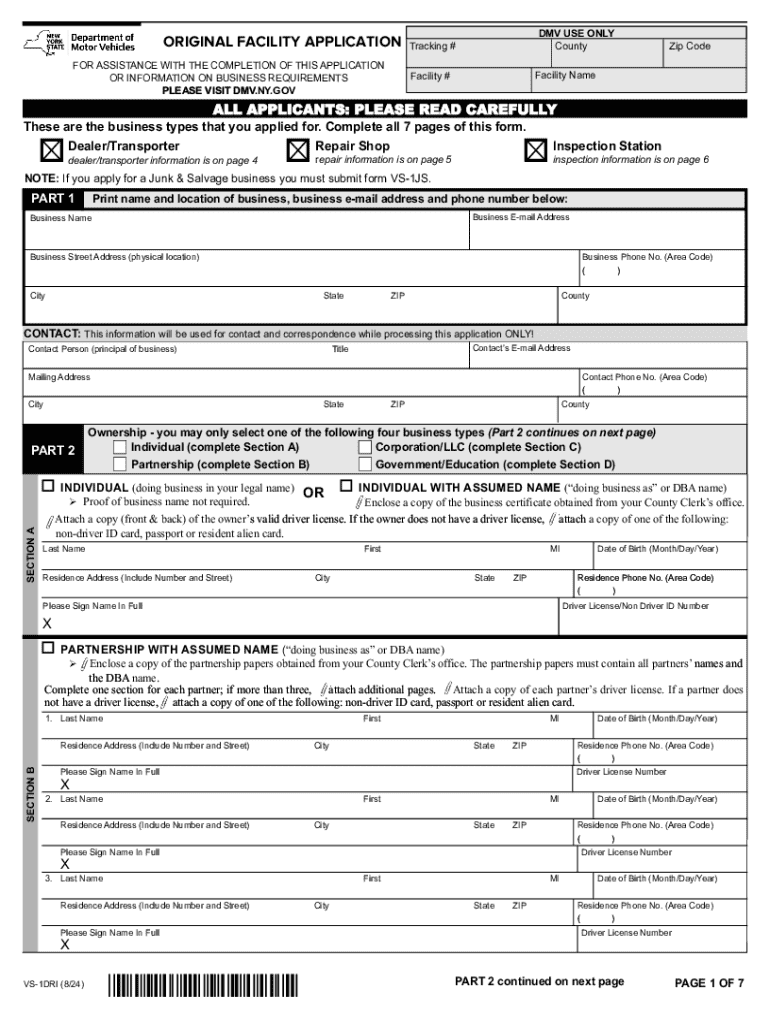
NY.GOV DMV USE ONLY County Tracking # Zip Code Facility Name Facility # ALL APPLICANTS: PLEASE READ CAREFULLY These are the business types that you applied for. Complete all 7 pages of this form. o Dealer/Transporter dealer/transporter information is on page 4 o o Repair Shop repair information is on page 5 NOTE: If you apply for a Junk & Salvage business you must submit form VS-1JS. PART 1 Inspection Station inspection information is on page 6 Print name and location of busines.
Loading

Open form follow the instructions

Easily sign the form with your finger

Send filled & signed form or save
How to fill out and sign NY VS-1DRI online?
Get your online template and fill it in using progressive features. Enjoy smart fillable fields and interactivity.Follow the simple instructions below:
The days of frightening complex tax and legal forms are over. With US Legal Forms the whole process of completing official documents is anxiety-free. The best editor is right close at hand supplying you with a wide variety of useful instruments for submitting a NY VS-1DRI. These guidelines, with the editor will help you with the entire procedure.
- Hit the Get Form button to start filling out.
- Switch on the Wizard mode on the top toolbar to get extra pieces of advice.
- Complete every fillable field.
- Ensure that the details you add to the NY VS-1DRI is up-to-date and correct.
- Include the date to the sample using the Date function.
- Select the Sign button and create a signature. You will find 3 available alternatives; typing, drawing, or capturing one.
- Check once more each and every field has been filled in correctly.
- Click Done in the top right corne to save or send the sample. There are several ways for getting the doc. An attachment in an email or through the mail as a hard copy, as an instant download.
We make completing any NY VS-1DRI more straightforward. Start now!
Tips on how to fill out, edit and sign NY VS-1DRI online
How to fill and sign NY VS-1DRI
Get your online template and fill it in using progressive features. Enjoy smart fillable fields and interactivity.Follow the simple instructions below:
The days of frightening complex tax and legal forms are over. With US Legal Forms the whole process of completing official documents is anxiety-free. The best editor is right close at hand supplying you with a wide variety of useful instruments for submitting a NY VS-1DRI. These guidelines, with the editor will help you with the entire procedure.
- Hit the Get Form button to start filling out.
- Switch on the Wizard mode on the top toolbar to get extra pieces of advice.
- Complete every fillable field.
- Ensure that the details you add to the NY VS-1DRI is up-to-date and correct.
- Include the date to the sample using the Date function.
- Select the Sign button and create a signature. You will find 3 available alternatives; typing, drawing, or capturing one.
- Check once more each and every field has been filled in correctly.
- Click Done in the top right corne to save or send the sample. There are several ways for getting the doc. An attachment in an email or through the mail as a hard copy, as an instant download.
We make completing any NY VS-1DRI more straightforward. Start now!
How to edit NY VS-1DRI
Benefit from the functionality of the multi-featured online editor while filling out your NY VS-1DRI. Use the diversity of tools to quickly fill out the blanks and provide the requested data right away.
Preparing documents is time-taking and costly unless you have ready-to-use fillable forms and complete them electronically. The most effective way to cope with the NY VS-1DRI is to use our professional and multi-featured online editing solutions. We provide you with all the essential tools for quick document fill-out and allow you to make any edits to your templates, adapting them to any needs. Apart from that, you can make comments on the updates and leave notes for other parties involved.
Here’s what you can do with your NY VS-1DRI in our editor:
- Fill out the blanks using Text, Cross, Check, Initials, Date, and Sign options.
- Highlight important details with a favorite color or underline them.
- Hide confidential information with the Blackout option or simply remove them.
- Insert images to visualize your NY VS-1DRI.
- Substitute the original text with the one corresponding with your requirements.
- Leave comments or sticky notes to inform others about the updates.
- Place extra fillable areas and assign them to specific recipients.
- Protect the template with watermarks, add dates, and bates numbers.
- Share the document in various ways and save it on your device or the cloud in different formats as soon as you finish editing.
Working with NY VS-1DRI in our powerful online editor is the fastest and most effective way to manage, submit, and share your documentation the way you need it from anywhere. The tool operates from the cloud so that you can use it from any location on any internet-connected device. All templates you generate or fill out are safely kept in the cloud, so you can always access them whenever needed and be assured of not losing them. Stop wasting time on manual document completion and get rid of papers; make it all on the web with minimum effort.
How to fill and sign NY VS-1DRI
Get your online template and fill it in using progressive features. Enjoy smart fillable fields and interactivity.Follow the simple instructions below:
The days of frightening complex tax and legal forms are over. With US Legal Forms the whole process of completing official documents is anxiety-free. The best editor is right close at hand supplying you with a wide variety of useful instruments for submitting a NY VS-1DRI. These guidelines, with the editor will help you with the entire procedure.
- Hit the Get Form button to start filling out.
- Switch on the Wizard mode on the top toolbar to get extra pieces of advice.
- Complete every fillable field.
- Ensure that the details you add to the NY VS-1DRI is up-to-date and correct.
- Include the date to the sample using the Date function.
- Select the Sign button and create a signature. You will find 3 available alternatives; typing, drawing, or capturing one.
- Check once more each and every field has been filled in correctly.
- Click Done in the top right corne to save or send the sample. There are several ways for getting the doc. An attachment in an email or through the mail as a hard copy, as an instant download.
We make completing any NY VS-1DRI more straightforward. Start now!
Experience a faster way to fill out and sign forms on the web. Access the most extensive library of templates available.
Related content
All applicants, except Inspection Stations and Transporters, must provide a copy of NYS...
by L Quer i Sardanyons · 2005 · Cited by 1 — We are interested in the existence and...
Digital's new Spiralog rile system, a featured topic in the issue, supports rid! 64-bit...
Get answers to your most pressing questions about US Legal Forms API.
How to apply for a dealer license in New York?
To apply for a dealer license in New York, you need to complete the required application forms and submit them along with the appropriate fees. This process also includes an inspection of your business location. For additional support, consider using UsLegalForms to navigate the specifics of the application process efficiently, ensuring compliance with regulations tied to the NY VS-1DRI.
Can I get my REAL ID online in NY?
Unfortunately, you cannot obtain a REAL ID online in New York. You must visit a DMV office for the application process. To ensure you have the correct information, utilize online resources like UsLegalForms to gather documents and information needed for your application, especially related to the NY VS-1DRI.
How to apply for REAL ID NY?
To apply for a REAL ID in New York, you must visit a DMV office and provide the required documentation, including proof of identity, residence, and citizenship. Preparing these documents beforehand can help streamline the application process. Once you start your application, you’ll find it aligns well with other identification needs, including those related to NY VS-1DRI.
Can I renew my registration without an inspection in NY?
In New York, you typically cannot renew your vehicle registration without a current inspection. The Department of Motor Vehicles requires you to have a valid inspection. Staying compliant with these rules helps you manage your vehicle’s documentation under the NY VS-1DRI.
Can I fly without a REAL ID in NYS?
If you plan to fly in New York State, it’s essential to know that you cannot use just any identification. Without a REAL ID, you will need to carry a valid passport or another accepted form of identification for air travel. To ensure smooth travels, consider obtaining a REAL ID as this aligns with the requirements of the NY VS-1DRI.
How do I find my NYS DMV document number?
To find your NYS DMV document number, you can check your vehicle registration documents or your driver’s license. If you cannot locate these, visit the nearest DMV office, or log in to your NY DMV account online. Remember, having your document number handy can simplify processes related to the NY VS-1DRI.
What's needed for a NYS inspection?
For your NY VS-1DRI inspection, you will need to provide a few key items. Bring your vehicle's registration and proof of insurance documents. It’s also helpful to have any repair receipts or past inspection reports available, as they can assist the technician in evaluating your vehicle's history.
How often do vehicles need to be inspected in New York State?
New York State requires all vehicles to undergo a NY VS-1DRI inspection annually. This rule applies to passenger cars, trucks, and motorcycles to ensure ongoing safety and compliance with emissions standards. Failing to get an inspection on time can result in fines, so it is essential to stay on schedule.
What year is a vehicle exempt from emissions in NY?
In New York, vehicles manufactured in 1995 or earlier are typically exempt from emissions testing as part of the NY VS-1DRI regulations. However, even exempt vehicles must still pass safety inspections. Always confirm with the latest state guidelines or your inspection facility to ensure compliance.
What are the 7 steps of the inspection process?
The NY VS-1DRI inspection process involves several essential steps. First, a technician reviews the vehicle's documentation, including registration and insurance. Next, the technician conducts a safety check, examining brakes, lights, and tires. An emissions test follows, then a visual inspection for any damage. After that, the technician performs a road test, checks for onboard diagnostics, and finally, issues an inspection sticker if the vehicle passes all stages.
Use professional pre-built templates to fill in and sign documents online faster. Get access to thousands of forms.
If you believe that this page should be taken down, please follow our DMCA take down process here.
This form is available in several versions. Select the version you need from the drop-down list below.