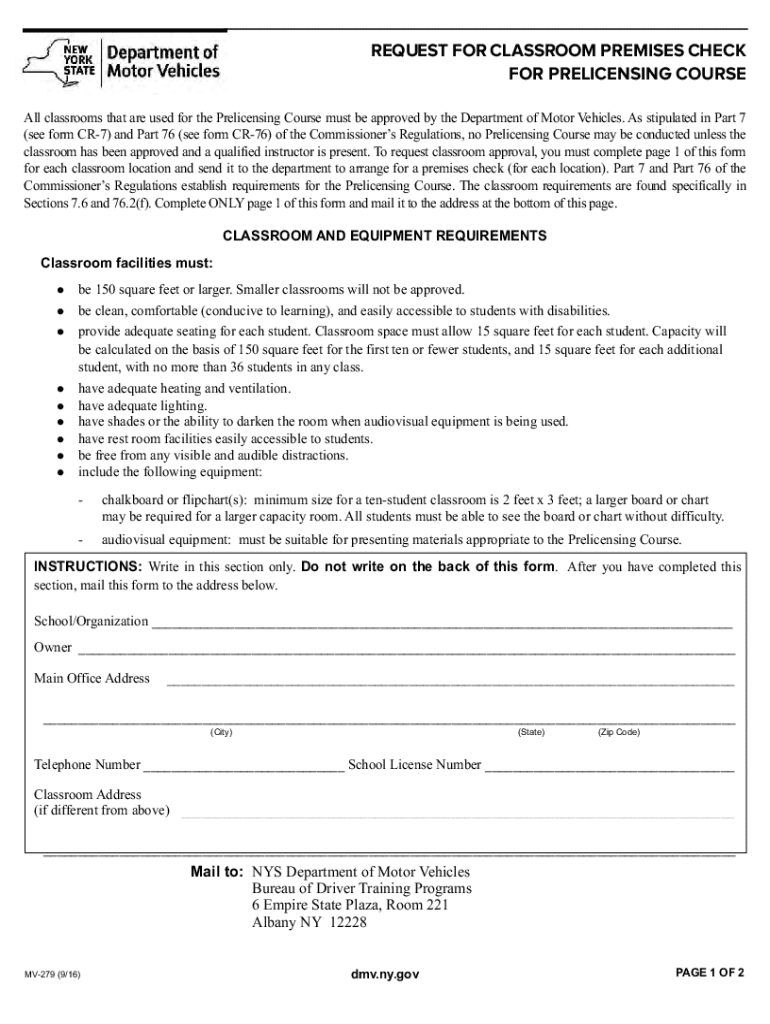
(see form CR-7) and Part 76 (see form CR-76) of the Commissioner s Regulations, no Prelicensing Course may be conducted unless the classroom has been approved and a qualified instructor is present. To request classroom approval, you must complete page 1 of this form for each classroom location and send it to the department to arrange for a premises check (for each location). Part 7 and Part 76 of the Commissioner s Regulations establish requirements for the Prelicensing Course. The classroo.
Loading

Open form follow the instructions

Easily sign the form with your finger

Send filled & signed form or save
How to fill out and sign NY MV-279 online?
Get your online template and fill it in using progressive features. Enjoy smart fillable fields and interactivity.Follow the simple instructions below:
The prep of legal papers can be high-priced and time-consuming. However, with our pre-built online templates, things get simpler. Now, creating a NY MV-279 takes no more than 5 minutes. Our state-specific web-based blanks and clear guidelines eradicate human-prone errors.
Comply with our easy steps to get your NY MV-279 well prepared quickly:
- Choose the web sample from the library.
- Enter all required information in the required fillable fields. The user-friendly drag&drop user interface makes it easy to add or relocate areas.
- Make sure everything is filled in appropriately, without any typos or lacking blocks.
- Use your electronic signature to the PDF page.
- Click on Done to save the alterations.
- Save the document or print your copy.
- Submit immediately towards the recipient.
Make use of the quick search and powerful cloud editor to make a correct NY MV-279. Clear away the routine and make paperwork on the web!
Tips on how to fill out, edit and sign NY MV-279 online
How to fill and sign NY MV-279
Get your online template and fill it in using progressive features. Enjoy smart fillable fields and interactivity.Follow the simple instructions below:
The prep of legal papers can be high-priced and time-consuming. However, with our pre-built online templates, things get simpler. Now, creating a NY MV-279 takes no more than 5 minutes. Our state-specific web-based blanks and clear guidelines eradicate human-prone errors.
Comply with our easy steps to get your NY MV-279 well prepared quickly:
- Choose the web sample from the library.
- Enter all required information in the required fillable fields. The user-friendly drag&drop user interface makes it easy to add or relocate areas.
- Make sure everything is filled in appropriately, without any typos or lacking blocks.
- Use your electronic signature to the PDF page.
- Click on Done to save the alterations.
- Save the document or print your copy.
- Submit immediately towards the recipient.
Make use of the quick search and powerful cloud editor to make a correct NY MV-279. Clear away the routine and make paperwork on the web!
How to edit NY MV-279
Make the best use of our extensive online document editor while completing your forms. Fill out the NY MV-279, point out the most significant details, and easily make any other necessary changes to its content.
Preparing paperwork electronically is not only time-saving but also gives a possibility to modify the sample according to your requirements. If you’re about to manage the NY MV-279, consider completing it with our extensive online editing tools. Whether you make an error or enter the requested data into the wrong field, you can quickly make adjustments to the document without the need to restart it from the beginning as during manual fill-out. Apart from that, you can point out the critical data in your paperwork by highlighting particular pieces of content with colors, underlining them, or circling them.
Adhere to these simple and quick actions to complete and edit your NY MV-279 online:
- Open the form in the editor.
- Enter the required information in the blank fields using Text, Check, and Cross tools.
- Follow the document navigation to avoid missing any required fields in the sample.
- Circle some of the critical details and add a URL to it if needed.
- Use the Highlight or Line options to emphasize the most significant pieces of content.
- Choose colors and thickness for these lines to make your form look professional.
- Erase or blackout the facts you don’t want to be visible to other people.
- Substitute pieces of content that contain mistakes and type in text that you need.
- Finish modifcations with the Done key when you make sure everything is correct in the document.
Our robust online solutions are the best way to fill out and customize NY MV-279 in accordance with your demands. Use it to prepare personal or professional paperwork from anywhere. Open it in a browser, make any adjustments to your forms, and get back to them anytime in the future - they all will be safely stored in the cloud.
How to fill and sign NY MV-279
Get your online template and fill it in using progressive features. Enjoy smart fillable fields and interactivity.Follow the simple instructions below:
The prep of legal papers can be high-priced and time-consuming. However, with our pre-built online templates, things get simpler. Now, creating a NY MV-279 takes no more than 5 minutes. Our state-specific web-based blanks and clear guidelines eradicate human-prone errors.
Comply with our easy steps to get your NY MV-279 well prepared quickly:
- Choose the web sample from the library.
- Enter all required information in the required fillable fields. The user-friendly drag&drop user interface makes it easy to add or relocate areas.
- Make sure everything is filled in appropriately, without any typos or lacking blocks.
- Use your electronic signature to the PDF page.
- Click on Done to save the alterations.
- Save the document or print your copy.
- Submit immediately towards the recipient.
Make use of the quick search and powerful cloud editor to make a correct NY MV-279. Clear away the routine and make paperwork on the web!
Experience a faster way to fill out and sign forms on the web. Access the most extensive library of templates available.
Related content
MV-279 (3/18). PAGE 1 OF 2. Mail to: NYS Department of Motor Vehicles. Bureau of Driver...
by VA Freeman · 2004 · Cited by 3 — This law replaces an older one that required that...
Aug 1, 2017 — THE SHIPPERS LISTED HAVE BEEN CERTIFIED BY REGULATORY AUTHORITIES IN THE...
Get answers to your most pressing questions about US Legal Forms API.
What is the form for vehicle transfer in NY?
In New York, the primary form for vehicle transfer is the NY MV-279. This form is crucial for completing ownership transfer and ensures all necessary details are documented. When completing this form, be precise and include all requested information. You can find user-friendly templates for the NY MV-279 on platforms like uslegalforms to assist you.
How do I fill out the back of a car title?
Filling out the back of a car title typically involves signing off ownership, completing the odometer disclosure if applicable, and providing the purchaser's information. Make sure to date your signature and check for any specific requirements that may apply. For added clarity, take advantage of the NY MV-279 form, which assists in this process.
What form do I need to fill out to register a car in NY?
To register a car in New York, you need to fill out the Application for Title and Registration, also known as the NY MV-282. Along with this form, you will need to provide proof of identity, insurance information, and sales tax payment. Use uslegalforms to get a clear and accurate version of the NY MV-282 for your convenience.
Do both parties need to be present for a title transfer in NY?
In New York, both the seller and buyer should ideally be present for a title transfer. This ensures that all necessary signatures are obtained on the title document. If one party cannot attend, they may need to provide a signed power of attorney. It’s advisable to have the completed NY MV-279 form on hand for a smooth transaction.
How to fill out a New York state title?
Filling out a New York state title involves several steps. You need to enter the current owner's information, the vehicle's details, and the buyer's information if transferring ownership. Ensure that you sign the title in the appropriate area and check for any liens on the vehicle before submitting. The NY MV-279 form is essential for making these changes official.
How to clear a salvage title in NY?
To clear a salvage title in New York, you must first complete the necessary repairs on the vehicle. After that, you will need to fill out the NY MV-279 form to obtain a rebuilt title. This process involves providing proof of repairs and possibly undergoing a state inspection. Utilizing online resources, such as uslegalforms, can simplify filling out the NY MV-279 efficiently.
How do I get mv 285 in NY?
To obtain the MV 285 in NY, you must contact the Department of Motor Vehicles directly or access their online forms. The MV 285 is critical for certain vehicle-related transactions and must be completed accurately. Utilizing platforms like US Legal Forms can streamline this process, ensuring you have all necessary documents ready, including the NY MV-279.
How can I check my NY driving record?
You can check your NY driving record by accessing the New York State DMV's online platform. By entering your personal information, you can obtain a detailed report of your driving history. Keeping your record updated is vital, especially if you need to complete the NY MV-279 for a vehicle transfer.
How to check NY license record?
To check your NY license record, you can visit the New York State Department of Motor Vehicles website. They offer an online service that allows you to view your driving history and any points associated with your record. This information is crucial, especially if you are preparing documents like the NY MV-279 for a vehicle transaction.
What is a NY MV 907A?
The NY MV 907A is a form used for reporting the sale of a motor vehicle in New York State. This document provides proof of sale and is essential for both the seller and the buyer during the transaction. When filling out this form, it is important to ensure that your NY MV-279 documentation is correctly completed and filed to avoid any potential issues with ownership transfer.
Use professional pre-built templates to fill in and sign documents online faster. Get access to thousands of forms.
If you believe that this page should be taken down, please follow our DMCA take down process here.