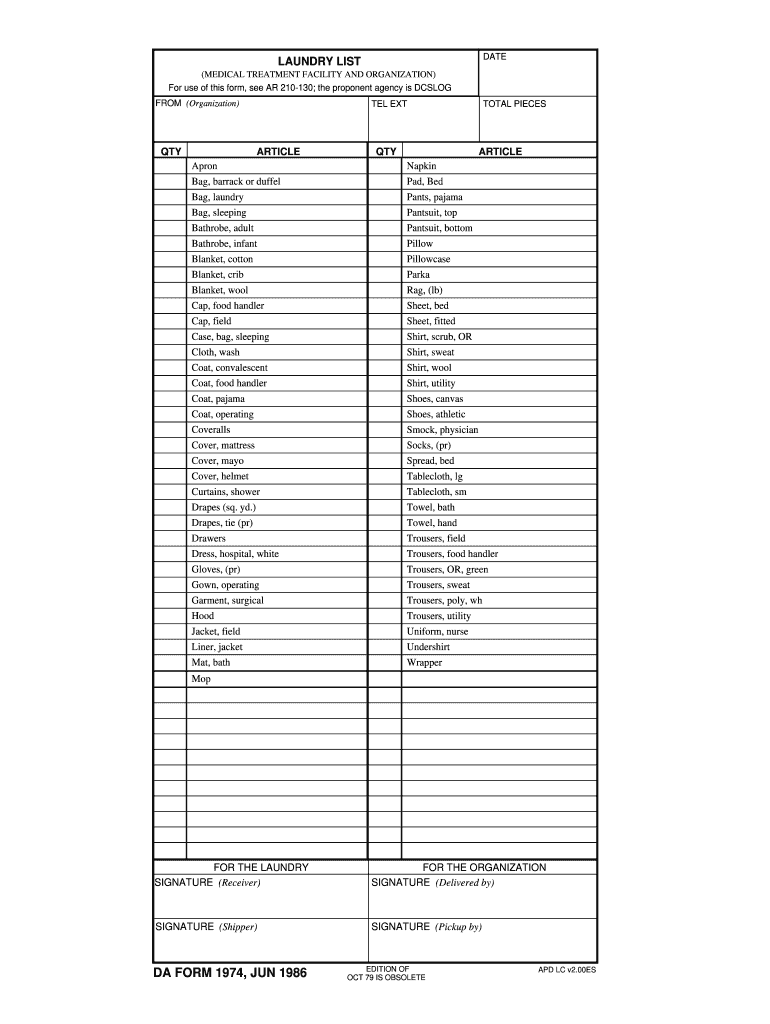
Ceiver) FOR THE ORGANIZATION SIGNATURE (Delivered by) SIGNATURE (Shipper) SIGNATURE (Pickup by) DA FORM 1974, JUN 1986 EDITION OF OCT 79 IS OBSOLETE APD LC v2.00ES .
Loading

Open form follow the instructions

Easily sign the form with your finger

Send filled & signed form or save
How to fill out the DA 1974 online
The DA 1974 form is essential for documenting items received and delivered within a medical treatment facility and organization. This guide aims to walk you through the process of filling out the DA 1974 online, ensuring accuracy and compliance with all necessary details.
Follow the steps to complete the DA 1974 online.
- Click ‘Get Form’ button to obtain the form and open it in the editor.
- Begin by identifying your organization in the 'FROM (Organization)' field. Input the appropriate name of the organization that is submitting the request.
- In the quantity ('QTY') fields, accurately enter the number of each article you are documenting. Use the provided article list to ensure each item is listed correctly.
- For each article listed, ensure to note the total pieces in the designated 'TOTAL PIECES' column. Cross-check your entries for any discrepancies.
- Complete the signature fields appropriately. The 'SIGNATURE (Receiver)' field requires the individual who received the items to sign. Ensure this is done after verifying all items are accounted for.
- In the 'FOR THE ORGANIZATION' section, the individual who delivered the items must provide their signature under 'SIGNATURE (Delivered by)'. This adds a layer of verification to the document.
- The 'SIGNATURE (Shipper)' section is for the person responsible for the shipment. They should sign here to validate the transaction.
- Finally, the 'SIGNATURE (Pickup by)' is for the individual who handled the pickup of the items. All sections must be correctly signed to enforce accountability.
- Once you've filled out all relevant sections, save your changes. You can then download, print, or share the form as necessary.
Complete your DA 1974 form online today to streamline your document management process.
Experience a faster way to fill out and sign forms on the web. Access the most extensive library of templates available.
Related content
astronomy picture of the day dated archive listing.
It then discusses the particular ecological problematic in the Brazilian situation, before...
Sessão da Tarde is a Brazilian television programming block on TV Globo that shows movies...
Get answers to your most pressing questions about US Legal Forms API.
Who signs a 4187?
The DA form 4187 must be signed by the initiating soldier and their immediate supervisor. In some cases, another authority within the unit may also need to sign to validate the request. Understanding these signature requirements is crucial, particularly as they relate to the comprehensive process outlined by the DA 1974.
How to get a DA form 4187?
You can download the DA form 4187 from the Army Publishing Directorate website, where you will find various official forms. If you require further assistance, uslegalforms serves as a reliable resource to obtain similar forms along with additional guidance that'll help simplify your paperwork, including anything related to the DA 1974.
What is a DA form 3947?
The DA form 3947 is used for Military Medical Board proceedings. This form addresses physical evaluations and duties associated with medical reviews. While this may seem unrelated, having insightful documents such as the DA 1974 can facilitate smoother procedures and ensure all necessary information is documented correctly.
How to get a DA 31 form?
To obtain a DA 31 form, you can download it from the Army Publishing Directorate website. Your unit's administrative office may also provide copies. Remember, understanding the relationship between the DA 31 and establishing proper leave is crucial, much like the process outlined with the DA 1974.
How to properly fill out DA form 4187?
Filling out the DA form 4187 requires careful attention to detail. Start by entering relevant data such as your rank, unit information, and the specifics of the request. For guidance on the process, resources such as the uslegalforms platform offer useful tools and templates that can simplify the task, especially when coupled with understanding the DA 1974.
Where can I get Army forms?
You can find Army forms, including the DA 1974, on official military websites like the Army Publishing Directorate. These platforms provide easy access to various forms needed for official purposes. Additionally, consider visiting uslegalforms where you can discover a comprehensive selection of legal forms tailored to your needs.
How to fill out a family care plan?
Filling out a family care plan requires listing all family members and their roles clearly. You'll want to outline responsibilities and include contact information for each person involved. As you compile this plan, consider referencing the DA 1974 to understand any specific mandates related to care. Always review the plan to make sure it is comprehensive and ready for any necessary approvals.
How do I write a parental consent form?
Writing a parental consent form requires clarity and straightforward language. Start by stating the purpose of the consent and include vital details such as the child’s name and activity involved. It's helpful to ensure your language aligns with any regulatory requirements such as those referenced in the DA 1974. Lastly, have the form signed by the parent or guardian to make it legally binding.
How to fill out DA form 7666?
To fill out DA form 7666, gather all necessary background information relevant to the military appointment being documented. Clearly articulate the purpose of the form, and include all signatures as required. It’s crucial to incorporate relevant context from the DA 1974 when detailing the assignment. Always finalize the form with a thorough review to confirm all sections are accurately completed.
How to properly fill out a DA form 1687?
Start by identifying the specific details related to the property being forfeited in a DA form 1687. Clearly input all relevant information, including the names and signatures of both the requestor and the approving authority. Always refer back to the DA 1974 guidelines if you need clarification on the documentation procedures involved. After completing the form, ensure it passes a final review for completeness.
Use professional pre-built templates to fill in and sign documents online faster. Get access to thousands of forms.
If you believe that this page should be taken down, please follow our DMCA take down process here.