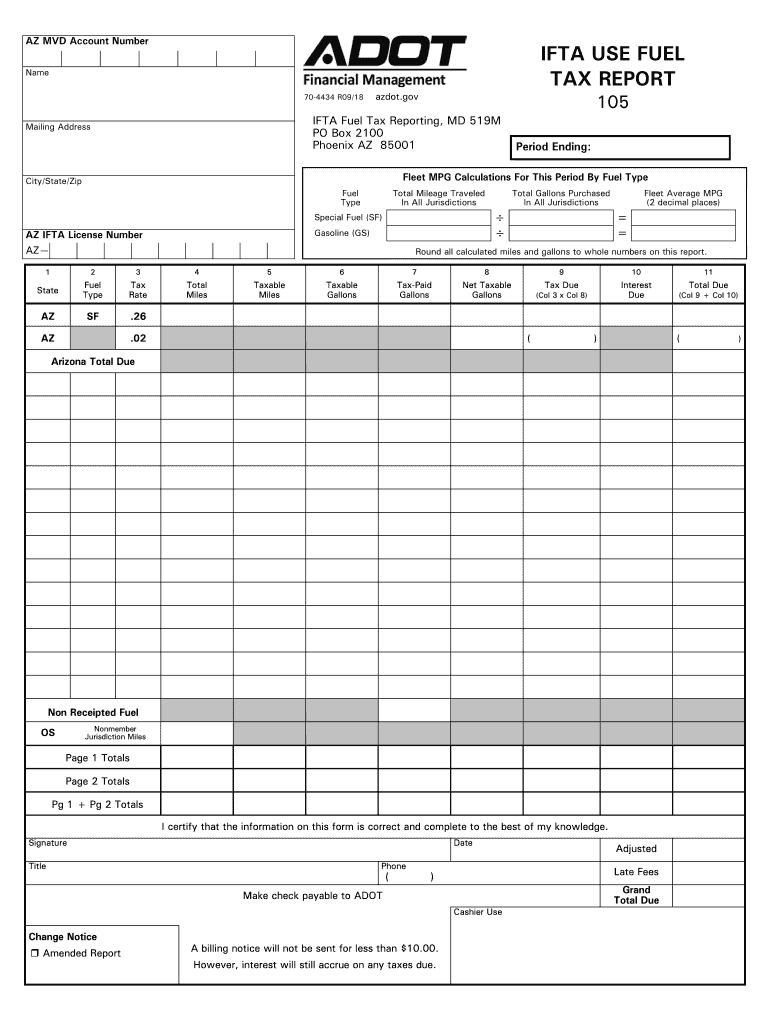
Leet MPG Calculations For This Period By Fuel Type City/State/Zip Fuel Type Total Mileage Traveled In All Jurisdictions Special Fuel (SF) Gasoline (GS) AZ IFTA License Number AZ Total Gallons Purchased In All Jurisdictions Fleet Average MPG (2 decimal places) Round all calculated miles and gallons to whole numbers on this report. 1 2 3 4 5 6 7 8 9 10 11 State Fuel Type Tax Rate Total Miles Taxable Miles Taxable Gallons Tax-Paid Gallons Net Taxable Gallons.
Loading

Open form follow the instructions

Easily sign the form with your finger

Send filled & signed form or save
How to fill out the AZ 70-4434 online
The AZ 70-4434 form is essential for reporting fuel tax for users in Arizona. This guide provides clear, step-by-step instructions to help you navigate the online completion of the form effectively.
Follow the steps to fill out the AZ 70-4434 form correctly.
- Click the ‘Get Form’ button to receive the form and open it in the editor.
- Enter your IFTA account information. Provide your AZ IFTA License Number in the designated field to ensure proper identification of your account.
- Record the period ending date for the report to clarify the reporting timeframe. This ensures accuracy for the tax period you are accounting for.
- For each fuel type used, input the total gallons purchased in all jurisdictions. This will support the calculation of your tax obligations.
- Complete the table for each state with the relevant details: fuel type, tax rate, total miles, taxable miles, taxable gallons, tax-paid gallons, net taxable gallons, tax due, and interest due.
- Verify the certification section at the end of the form. Sign, date, and provide a contact number as required. This step affirms the accuracy of your submission.
- Review all entered data to confirm that all information is complete and accurate. Make any necessary corrections before submitting.
Complete your Arizona fuel tax reporting online today for a seamless process.
Experience a faster way to fill out and sign forms on the web. Access the most extensive library of templates available.
Related content
AZ IFTA License Number. AZ—. Mail Drop 519M. IFTA Fuel Tax Reporting. PO Box 2100...
THE COMPLEX STRUCTURE OF THE ABSOLUTE PROHIBITION OF TORTURE. COMMENTS IN THE LIGHT OF THE...
Get answers to your most pressing questions about US Legal Forms API.
Do I need IFTA for local trucking?
IFTA is generally required for interstate travel, meaning if your trucks operate across state lines, you will need to register and file IFTA. However, if you only operate locally within your state, you may not have to worry about IFTA at all. It is beneficial to review your trucking operations under the AZ 70-4434 to determine if you meet the criteria for IFTA registration.
What is the easiest way to track IFTA?
The easiest way to track IFTA is to use a dedicated logbook or tracking software designed for this purpose. Maintain detailed records of your fuel purchases, miles driven, and jurisdictions traveled. Many trucking companies find that utilizing forms like the AZ 70-4434 simplifies their record-keeping, making it easier to gather this information during tax season.
How to manually calculate IFTA?
Manually calculating IFTA involves several steps. First, track the miles traveled and gallons of fuel purchased for each jurisdiction throughout the reporting period. Then, calculate your fuel efficiency by dividing total gallons by total miles. Finally, utilize this data to calculate the tax due for each jurisdiction, ensuring you follow the guidelines laid out in the AZ 70-4434 for precise reporting.
How do I manually calculate IFTA?
To manually calculate IFTA, begin by adding up the total miles traveled in all jurisdictions during the reporting period. Next, divide the total gallons of fuel purchased by the number of miles driven to determine fuel efficiency. Then, multiply this efficiency by the distances in each state to compute the tax owed. Using tools like the AZ 70-4434 can streamline the calculations and provide you with accurate reporting.
How to file a 10IEA filing?
Filing a 10IEA involves documenting your income expenses accurately on the appropriate form. You should gather all relevant financial records ahead of time. The AZ 70-4434 can be useful in ensuring you meet all filing requirements and deadlines. If you encounter challenges, consider leveraging the resources on US Legal Forms, which offer detailed guidance.
How to file computation?
Filing computation for your taxes involves calculating your income, deductions, and any credits applicable to you. You can use the AZ 70-4434 to ensure you accurately compute the taxes owed or the refund due. Accurate calculations can prevent issues and help you understand your tax responsibilities. Consider using online resources for assistance or tools provided by US Legal Forms.
How to file an amended AZ tax return?
To file an amended AZ tax return, you will need to use Form 140X. This form helps you make corrections to your original return. Once you complete the necessary adjustments, you can submit it via mail. Utilizing the AZ 70-4434 may also be necessary if your amendments involve an extension.
What is the deadline to file taxes in Arizona?
In Arizona, the deadline to file taxes typically falls on April 15. However, if it lands on a weekend or holiday, the deadline extends to the next business day. For those using the AZ 70-4434 form for extensions, this deadline remains the same, so plan accordingly. Always check for updates as deadlines may occasionally change.
Use professional pre-built templates to fill in and sign documents online faster. Get access to thousands of forms.
If you believe that this page should be taken down, please follow our DMCA take down process here.
This form is available in several versions. Select the version you need from the drop-down list below.